Solved Ring Group feature not working

Status
Not open for further replies.

hezkyy

Forum User
Joined
Mar 15, 2019
Messages
6
Reaction score
0
Hello Everyone,

I'm new with 3cx and we are trying to figure out on how to make the calls route to all of our extensions.
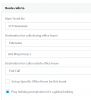
I have 5 extensions part of my Ring Group. But once we receive an inbound call the call only rings one extension which is the extension that is in the SIP Trunks > General > Route calls to > Destination for calls during office hours > Extension #
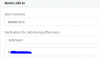
9838

I've tried deleting our inbound rules and just leave the Ring groups but it seems that it still does not ring all of our extensions.
Thank you so much in advance.
 
So the problem isn't that the ring group isn't working. The problem is that you are likely using a unsupported provider or formatted your DID incorrectly so the DID is not being recognized and it is following the catch-all trunk route instead of the inbound rule. If you want it to ring the ring group why don't you change the trunk route to go to the ring group?
 
Thank you so much for your quick response.
Can you tell me how to change the trunk route to the ring group.
 
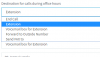
Where you have it crossed out in your image. The ring group will be an extension option in the drop down.
 
  • Like
Reactions: JohnS_3CX
9839
there's no option to put ring group here
 
That's not the field you had crossed out in your image... You select Extension in the top box and the the ring group extension in the bottom.
 
As above change the extension number to the ring group number
 
1. Pick "Extension" as the "Destination during office hours"

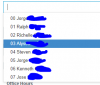
2. Pick the ring group from your list of extensions.

9843

If you had a specific user's extension before, you were never sending the calls to the Ring Group in the first place, you were just sending them to the specific user
 
I don't see the option Ring Group, the options available are only the list of my extensions nothing says Ring Group
9846
You think there's a problem on the other settings?
 
Okay I'm seeing this one now. Hope it work will give you an update. Thank you so much!
 
I just went through something similar.

What provider are you using? How many trunks do you have configured? Is it IP or registration based?
 
Everything works fine! Thank you so much! I believe we are using google cloud as our provider
 
Glad to hear it was resolved
 
Status
Not open for further replies.

Forum statistics

Threads
111,916
Messages
589,722
Members
164,787
Latest member
IWalter