- Joined
- Dec 17, 2018
- Messages
- 26
- Reaction score
- 0
Thanks again for your answers
I made a mistake I just realised it... When I pinged the FQDN from the LAN I did it from the same PC that PBX is installed (sorry...). When I ping the FQDN from another PC in the LAN the requests time out and I have 100% loss. On the PC that 3CX is installed I am using as a DNS the local ip of my router.
My mistake again because I wasn't specific...The machine that I had for the PBX was starting to cause some hardware problems so I replaced it with a new one. I installed Windows 10 on it, some other programs(browsers, etc) and of course 3CX. The FQDN has changed (xxx.3cx.gr) and the port too. But I have tried installing the PBX with default settings (for ports) and no luck
Yes I do have my public ip returned

on your lan you said ping on FQDN was working fine so local DNS should be the same
I've no DNS server on my Lan and FQDN resolve, what are your network settings related to DNS, do you use 8.8.8.8 ?
I made a mistake I just realised it... When I pinged the FQDN from the LAN I did it from the same PC that PBX is installed (sorry...). When I ping the FQDN from another PC in the LAN the requests time out and I have 100% loss. On the PC that 3CX is installed I am using as a DNS the local ip of my router.
Maybe I'm saying something stupid, but let's try it anyway:
since you said in the past it worked (I'm assuming you're referring the same xxx.3cx.gr:5101) and now not, it's not possible to be just a problem of a DNS cache? Resolving to a no-longer-valid local IP instead the actual one?
My mistake again because I wasn't specific...The machine that I had for the PBX was starting to cause some hardware problems so I replaced it with a new one. I installed Windows 10 on it, some other programs(browsers, etc) and of course 3CX. The FQDN has changed (xxx.3cx.gr) and the port too. But I have tried installing the PBX with default settings (for ports) and no luck
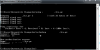
From LAN if you type in a cmd windows : nslookup your fqdn
do you have your public ip returned, and first answer returned is DNS IP resolving query, in my case 80.80.80.80
View attachment 10614
Yes I do have my public ip returned