Setup Database to make a direct call to extension

JorgeWillianSantos

Bronze Partner
Advanced Certified
Joined
Dec 19, 2023
Messages
38
Reaction score
7
I want to set up the following configuration: When one of the extensions calls a client, at the moment the call is made, I need that number that the extension called to be saved in a database, so that when the number calls the landline it is directed straight to the extension that made the earlier call. Example: extension 9094 called the number 5561912345678. When the number 5561912345678 calls the company's landline, it should not go through the IVR, but be directed straight to 9094. I am just having trouble creating the logic for this configuration in CFD.

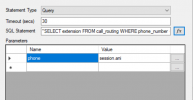
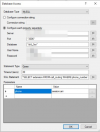
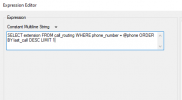
Can anyone tell me if the database and query configuration is correct here? And if it’s possible to set up this configuration, what would the logic be? 1766505095872.png1766505085763.png
 
And if it’s possible to set up this configuration
no, not this way - unless you can arrange it so that the user/extension doesn't dial directly number but instead passes the task of calling a number to a CFD app

Basically it’s like this: currently no call script starts for regular outgoing calls. However, every call is logged in the CDR journal after the call ends (if this option is enabled) and the call also appears in the call lists. The first is a file on the 3CX and the second is a database entry in the 3CX - which can be queried for example with the 3CX Config API.

Everything else - especially in real-time during the call / right after it starts - can only be done with the 3CX Call Control API, the right 3CX license and a bit more effort.
 
I've read the task more thoroughly again: it is requested that future incoming calls be forwarded to the extension that called there previously.

Yes, this is generally possible and we have already built this here and there. It can work if all incoming calls first go to a call script that queries the CDR file, a CRM database integration or 3CX itself to check which outgoing calls were directed there within the last xx hours.
Overall, it's not entirely simple.

The first question is which source should be queried for outgoing calls. That will need to be built.
 
Logging the call in a database is already being done by 3CX. If what you need is to have the information in case that numbers call you back, then you don't need this. You just need to query the appropriate data source to get the details of calls made in the past. 3CX supports exporting the call details to an external database, I would go that way, so you can run a simple query in that database and know if the call needs a special treatment in case some internal agent called that number in the last N minutes. You can also check CDR files, which are in the local 3CX server.
 
aside from the implementation I would also add some logic to "delete" the incoming call directly to the extension, being it by time passed, received call for that record or some other logic
Let's say you're calling a client that has multiple contacts with you (commercial, support, etc..). I call a customer to talk to person A about something regardin customer support and he doesn't answer. Two hours later person B of the same customer calls my external number and is connected to my extension directly and maybe he's trying to reach the sales department
 
... being it by time passed ...
Yes, that's always a problem. You have to set limits to the automation, especially when it comes to time. We've already experienced that. It doesn't work well otherwise.

It's also good if you have a CRM attached where you can manually mark such calls as completed, so it's not only based on time rules or a successful callback.

In general, temporarily assigning incoming calls is always tricky until you find a suitable algorithm for yourself. It's always very individual.
 
Yes, this is generally possible and we have already built this here and there. It can work if all incoming calls first go to a call script that queries the CDR file, a CRM database integration or 3CX itself to check which outgoing calls were directed there within the last xx hours.
Overall, it's not entirely simple.
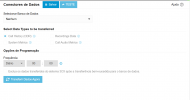
Good morning! Could you give me an example of which CFD components I would use to set up this configuration? And also, when you say CDR configurations, are you talking about this part here with the data connectors?

1767012296151.png
Logging the call in a database is already being done by 3CX. If what you need is to have the information in case that numbers call you back, then you don't need this. You just need to query the appropriate data source to get the details of calls made in the past. 3CX supports exporting the call details to an external database, I would go that way, so you can run a simple query in that database and know if the call needs a special treatment in case some internal agent called that number in the last N minutes. You can also check CDR files, which are in the local 3CX server.
 
Good morning! Could you give me an example of which CFD components I would use to set up this configuration?
Maybe you can check the following articles that explain how to run a validation against different data sources (database, text files, web services):
https://www.3cx.com/docs/cfd-creating-phone-support-portal-1/
https://www.3cx.com/docs/cfd-creating-phone-support-portal-2/
https://www.3cx.com/docs/cfd-creating-phone-support-portal-3/
https://www.3cx.com/docs/cfd-creating-phone-support-portal-4/

This is not exactly what you need, but it shows how to use CFD components to check data in different places.

And also, when you say CDR configurations, are you talking about this part here with the data connectors?
CDRs are text files written in the 3CX server. These text files can be read by a CFD app to make decisions based on what's inside. You will need a C# script to parse the contents and create your decision logic....

In that screenshot you have the configuration of the database connector. With that you can take the data of your calls to an external database, so you can run queries on that external database, as connecting directly to the 3CX database is not supported.
 
Maybe you can check the following articles that explain how to run a validation against different data sources (database, text files, web services):
https://www.3cx.com/docs/cfd-creating-phone-support-portal-1/
https://www.3cx.com/docs/cfd-creating-phone-support-portal-2/
https://www.3cx.com/docs/cfd-creating-phone-support-portal-3/
https://www.3cx.com/docs/cfd-creating-phone-support-portal-4/

This is not exactly what you need, but it shows how to use CFD components to check data in different places.
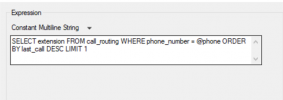
I'll take a look, thanks! Another question I wanted to ask is whether the text I set up in the database query is correct, or if there's something that needs to be adjusted.

1767014103429.png
1767014140596.png
 
That depends on the database structure.... Do you have data in that table already? The query looks syntactically correct, and the CFD component looks properly configured, that's all I can say.
 
@JorgeWillianSantos
If you use the 3CX database
https://www.3cx.com/docs/call-detail-record-guide/

SQL:
select destination_dn_number, cdr_started_at from cdroutput where source_entity_type='external_line' and source_participant_phone_number = '@phone' order by cdr_started_at desc limit 1;

It's funny that exactly one year ago today I wrote a CFD example for someone that queries the 3CX own database. The snippet also reads the access data from the 3CXPhoneSystem(.)ini file. The example should be somewhere in the forum.
 
Last edited:

Latest Posts

Forum statistics

Threads
111,969
Messages
590,046
Members
164,881
Latest member
mdavis@housingresourcesin