- Joined
- Nov 26, 2020
- Messages
- 4
- Reaction score
- 0
Hello
I need some guidance on setting up the W52P with 3CX. I've followed the manual provisioning steps outlined on this link:
https://www.3cx.com/sip-phones/manually-provision-yealink-dect/
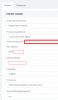
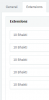
Apart from the above steps, I've also entered extension values for all the extensions under DECT phone setup (though I'm only using one), I understand there is/was an issue that the cfg file would not get generated if any of the extension values are left blank.
I'm hosting on Azure. I've been able to configure Web apps to receive and make calls, however am stuck in configuring the W52P device. I've added the Provisioning link in the Yealink Auto Provision setup under the Server URL. I'm not sure what values do I put under the User Name and Password fields on the W52P setup page though.
I need some guidance on setting up the W52P with 3CX. I've followed the manual provisioning steps outlined on this link:
https://www.3cx.com/sip-phones/manually-provision-yealink-dect/
Apart from the above steps, I've also entered extension values for all the extensions under DECT phone setup (though I'm only using one), I understand there is/was an issue that the cfg file would not get generated if any of the extension values are left blank.
I'm hosting on Azure. I've been able to configure Web apps to receive and make calls, however am stuck in configuring the W52P device. I've added the Provisioning link in the Yealink Auto Provision setup under the Server URL. I'm not sure what values do I put under the User Name and Password fields on the W52P setup page though.