Snom D735 BFLs turn off when calling and talking

Status
Not open for further replies.

alexvo

Free User
Joined
Dec 14, 2018
Messages
6
Reaction score
0
Hello!

When calling to a ring group or one of it's members corresponding BLF leds just turn off instead of showing status. During the talk the contact's BLF is still off. Then the call has ended the lamp turns back green.

The phone is Snom D735 with multicolor leds. Previous Yealink phone works correctly in this scenario.

Running the latest 3CX version 16.0.493 with standard license. Have already clicked on refresh license button. Have tried recomended and recent phone firmware with no result. Have tried to configure these smart keys as "extention" and "BLF" via phone's UI.

Does anyone have any ideas on how to fix it?
 
...Have tried to configure these smart keys as "extention" and "BLF" via phone's UI.

Hi @alexvo

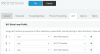
Avoid doing it directly via the phone's UI. The correct method is to do it via the management console, under your extension to ensure that this gets provisioned as tested and confirmed by us

1581945321026.png

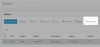
Then go to Phones and reprovision the Snom

1581945380673.png
 
Avoid doing it directly via the phone's UI. The correct method is to do it via the management console, under your extension to ensure that this gets provisioned as tested and confirmed by us

Then go to Phones and reprovision the Snom
Hi JohnS_3CX!

Thanks for these screenshots. Sure using phone's UI was just another attept to make it working. My phone currently provisioned via the 3CX console acts the same.

The phone, 3CX server and callee are located at different subnets all accessible to each other. However previous phone (Yealink) worked flawlessly in this setup. Maybe there is some redirecting error which can be mitigated with proper 3CX or phone settings?

With regards,
alexvo
 
The BLF should work using the SUBSCRIBE method which is basically speaking a SIP message.

So if any SIP messages can pass through (which I imagine they do since the phone can make/receive calls) then this should also work.

What can be problematic is if there are modified templates, or misconfigured phones, or even possibly a problematic firmware edition.

In my test I used FW 10.1.46.16 as you see in the screenshot, and when extension 000 was in a call the BLF on the Snom was red to indicate the state of the 000 extension.

Kindly read the below article and share your setup details so we can better understand your system
https://www.3cx.com/community/threads/information-to-provide-when-requesting-help.67558/
 
Kindly read the below article and share your setup details so we can better understand your system
The setup is pretty basic with nothing custom nor advanced.
  • 3CX Version Standard Annual 16.0.493
  • Server OS Debian Linux
  • 3CX Server 3CX dedicated server is located inside LAN
  • IP Phone Snom D735 firmware 10.1.46.16
  • Provisioning Method: Local, remote users sit on different subnet as connected via VPN tunnel
  • Has the Firewall Checker passed: YES
  • Are custom Phone Templates being used: NO
In my test I used FW 10.1.46.16 as you see in the screenshot, and when extension 000 was in a call the BLF on the Snom was red to indicate the state of the 000 extension.
It's the same and OK here when calling to single users. The issue appers when calling to a ring group or one of it's members.
 
I think even if you deleted the ring group, you would still see the same behavior if one of the extensions in the BLF.

Lets try something else to eliminate some possibilities

  1. Check that your PBX does not have any pending template updates (Especially for snom).
  2. Delete the D735 phone from your extension
  3. Reset phone to factory defaults (hold down # while the Snom is rebooting)
  4. Wait until the phone is ready to be provisioned (will appear in the phones section in bold)
  5. Create a fresh extension, and assign the phone to it, along with two BLFs (as in my screenshots above)
  6. Once the phone is ready, try to make a call to the other phones again
 
Lets try something else to eliminate some possibilities
I took steps 1 to 6, at step 5 assigned the phone to a newly created extension. Unfortunately BLFs still turn off when ringing to a group or individually. BLF remains blank while talking to remote party, then goes green after the call end. On the other hand when these extensions are called from other source I can see red leds on my phone's BLFs.
 
Unfortunately BLFs still turn off when ringing to a group or individually.
To correct I've said earlier, all ring group members BLFs still turn off when calling to its virtual extention. That's the issue. Calling to an individual ring group member behaves normally - BLF turns red. When someone else is calling to a ring group, all group members BLFs blink red which is normal too. My extension is outside of that ring group.
 
You should run a capture on your PBX then, and start the Snom and replicate the test.

We expect to see it SUBSCRIBE to the extension numbers in question.
We would then expect it to get NOTIFY messages from the PBX when those extensions receive the call
 
Hi @alexvo

Please do not post all those logs directly on the forum, they are not much help in this case anyway.

What I suggested in my last post was to run a Capture (from the Activity Log page again).

The pcap file generated will show the relevant information. The Snom will have to be powered on AFTER the capture begins in order to capture the SUBSCRIBE (to BLF) and the subsequent NOTIFY (of line state changes).

Then you have to make a call to the ring group from some other extension without touching the Snom phone. The lights will go off like you noticed and then when the short call is over the lights should come on.

At this point you need to stop the capture and download it off the machine. Do not post it here directly in the forum as it will contain sensitive information that you should not be sharing online.
 
Please do not post all those logs directly on the forum
Oh I see. That wasn't easy anyway :)
Then you have to make a call to the ring group from some other extension without touching the Snom phone. The lights will go off like you noticed and then when the short call is over the lights should come on.
Not exactly, the lights go down when I'm calling a ring group from the Snom. When the ring group is dialed from other extention, the Snom's BLFs are OK showing proper status.
Do not post it here directly in the forum as it will contain sensitive information that you should not be sharing online.
@JohnS_3CX, what should I do with the capture file next?
 
No problem, just replicate your scenario and run the capture as i described, including the device startup.

You can send me a link to download it as a PM and I can take a look.

Make sure to include the following:
  1. Snom extension number and IP
  2. Phone A extension number and IP
  3. Phone B extension number and IP
  4. PBX IP
  5. RG extension number
 
Status
Not open for further replies.

Latest Posts

Forum statistics

Threads
111,939
Messages
589,843
Members
164,821
Latest member
M_R