Solved System owner right changed to user

Status
Not open for further replies.

STI-David

Gold Partner
Joined
Mar 1, 2023
Messages
63
Reaction score
7
Not sure how, but my System Owner status has changed to User.
Coincidentally, this happened after I upgraded to Dedicated Pro 4SC Version 18.0 update 6 (build 908)

Any suggestions what to do now?

Thank you
 
Login to the Management console and reset the permissions on the user to system owner as needed.
 
i tried that, but greyed out, as I'm now a "user" and not "admin".
 
Are you sure you are logging into the management console as the root use (not as an extension that has delegated rights but the actual root user)

Note: Not the underlying OS Root user
 
I logged out and gained access to MC via the link in the Partner - My Systems page, with respective system link.
 
I logged out and gained access to MC via the link in the Partner - My Systems page, with respective system link.
And to log in... is that a username or an extension number?
 
Is any other user set to system owner?
 
There are two system administrators, I was the only system owner.
Incidentally, the 2 system administrators disappeared from my management portal in the Users list. They do appear as extensions in the web client.
 
Coincidentally, this happened after I upgraded to Dedicated Pro 4SC Version 18.0 update 6
There was no System Owner role before update 6.

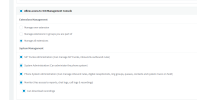
If there is no system owner at all you get a banner:
1677758813691.png

Click on the Groups button and check how many groups you have. Also check whether you belong to any of them since you cannot assign any rights if you don't belong to any groups.
 
There was no System Owner role before update 6.
I was assigned as a system owner.
The client had a free version and I upgraded them to a paid version. Immediately after the upgrade, I lost my admin rights (although still have limited access to M.C.) and lost the ability to view the previously assigned 2 system admins.

I'm sort of in limbo!
 
Click on the Groups button and check how many groups you have. Also check whether you belong to any of them since you cannot assign any rights if you don't belong to any groups.
There is only one group named - Default.
I am in the default group.
 
I was assigned as a system owner.
The client had a free version and I upgraded them to a paid version. Immediately after the upgrade, I lost my admin rights (although still have limited access to M.C.) and lost the ability to view the previously assigned 2 system admins.

I'm sort of in limbo!
All this smells like logging into the MC as a user with delegated rights (they can't see other admins, etc).

If this were the case, the extension number you use to login would look like this on the rights tab
1677768477297.png

Navigate to :5001/#/app/settings/security/2/credentials and note the username there. Then confirm that's the name you are using to login to the MC with.

Although an upgrade shouldn't cause any issues like this and being able to see other system admins should work if you mean system admin with the new U6 rights and not the above extension rights.

To be clear, not being able to see other admins in previous versions was if you were logging into MC as an extension that had rights to "manage all extensions" and another extension had the same box checked - nothing to do with the new U6 groups.
 
  • Like
Reactions: JohnS_3CX
Ok if you are in the default group you should have the ability to have rights, but are we definitely certain you are not logging in as an extension?The root admin does not have an extension. I mean, the username is not an extension or an email.
It's whatever you defined during the installation of the system during the setup wizard.

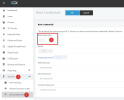
You can see the Root Username here if you are logged in with the correct account. Can you kindly confirm?

1677771578795.png
 
@JohnS_3CX You are correct, when I go to MC, I do not see the Root Credentials tab.
Navigate to :5001/#/app/settings/security/2/credentials and note the username there.
@SweetAction Not sure how to navigate to above URL 5001...?
Both of you are suggesting that I'm logging in with the wrong alias. Strange, as I'm getting the link from the partner portal My Systems.

David
 
That URL brings you to the root credentials page

Basically https://your.domain.com:5001/#/app/settings/security/2/credentials would be the full URL if your server was on port 5001. It might be on port 443, in which case you would use https://your.domain.com/#/app/settings/security/2/credentials. Change as needed.

But your issue isn't the URL, it's the username/password that's not the root user. Take a backup (unencrypted), download it, edit the xml file and look for the username/password you need.
 
To recap, I'm using Dedicated Pro Hosted by 3CX.
I tried the latter option above, which got me to my usual MC login screen.
I agree that credentials are likely the wrong ones.
If that's the case, how do I get them and why didn't I get them in the first place?

David
 
@STI-David I understand what happened. We will contact you shortly to help.
 
Also, the Audit Log will contain the information as to who and when the rights were changed from System Owner to User in case you want to go back and learn when this change was made and by whom.
 
  • Like
Reactions: IrinaP_3CX
Status
Not open for further replies.

Forum statistics

Threads
111,974
Messages
590,081
Members
164,899
Latest member
mazet