• We do not provide troubleshooting help for unsupported phones. Please try with a supported phone.
  • V20 Update 10 Alpha 2 Learn more

Unsupported Temporary FXO for PSTN

Status
Not open for further replies.

nbl1268

Free User
Advanced Certified
Joined
Aug 17, 2021
Messages
19
Reaction score
2
Hi All, I'm new to 3CX and looking for some advice, have recently set up 3CX v18 on a Raspberry Pi, working well with 2 IP handsets.
Have worked through the training academy videos for the basic certification (haven't bother with actual certification... well as yet) so covered perhaps the minimum knowledge for 3CX,

As a temporary measure (perhaps for 2 or 3 months), I am looking to connect an ATA, that has a single FXO port, to my 3CX setup so that i can make use my current PSTN line as a trunk.
I see that there is a list of 'certified/supported' ATA devices, some of which have FXO port/s (and range in price from AU$300 up to nearly AU$700), also that throughout the 3CX forum discussions there are indications and part examples of where other 3CX users have been able to successfully set up other ATA units, those not (or simply no longer) on the 'certified list'.

So i am rather keen to avoid the unnecessary costs of purchasing a new ATA, and would like to make use of either the LinkSys SPA3102 I have on hand, or a GrandStream HT813 that i can borrow. The HT813 appears to me to be a newer device than the SPA3012, thus potentially the better choice for my circumstance. Thoughts??

However, what i haven't yet found is a clear (and ideally complete) guide to setting up the HT813 as I'm assuming a 'generic' PSTN gateway. Perhaps i simply haven't searched enough yet...
Anyhow if you have a HT813 set up on your system and happy to share advise to help me set up mine, that'd be appreciated.

Thanks
Neil
 
If you do happen to come across a cheap, used, SPA3102, it's easy enough to get it manually provisioned, and working, even though they are no longer "officially" supported.. Post back on the forum if you end up going that route, and I can help you with it.
 
Thanks @SweetAction, I'll certainly have a look at those forum posts.

Hi @leejor, actually i do already have a working SPA3102, it was the HT813 that i could borrow. I'm using the SPA3102 for another purpose, but can certainly back up the config and have a go at getting it going with my 3CX set up with your support.
 
If you do decide to go with the 3102...after doing a backup of your current settings, do a factory reset so you are starting fresh.

Since you are already familiar with the device, most of this will be old hat.

Use a computer on the Ethernet port to give the device a static IP, DNS server, etc. (WAN Setup), also set Enable WAN Web Server to Yes, to you can acces from the Internet port. You can set the LAN set up to Bridge, if you want.
After applying, you should be able to now connect the Internet port to your local LAN and gain access using the IP you just assigned.

Set up your passwords, if you want, put in an NTP server, then disable Line1, unless you plan on using that.

Under Regional/Miscellaneous ...set up your time zone and caller ID as you had it working in the previous settings, whatever was working for you.
While in there change any ring patterns or call progress tone to suit you.

Under SIP, change RTP Packet Size: to 0.020

At this point, create your Generic PSTN gateway in 3CX. Use the Gateway IP you assigned the 3102. The Gateway port will be the local port. On the 3102 that is under PSTN Line/Sip Settings/SIP Port. I think it is 5061 as the default. You can set the destination to an extension, until you've finished testing.

Let me know when you are up to this point, and all looks good.
 
Last edited:
  • Like
Reactions: nbl1268
Thanks @leejor, have worked through those steps for the 3102 and the generic gateway in 3CX.
The gateway is showing green, so hopeful thats a positive step.
Questions,
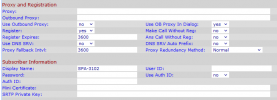
1/ Am i right to assume the settings for Proxy and Subscriber fields can be left blank?
SPA3102 PSTN-proxy-Subscriber Settings.png

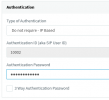
2/ likewise the authentication settings for the gateway in 3CX?
3CX Gateway.png


Re Line 1, yes not required, but maybe once the FXO/PSTN is working, might be a nice step for learning value.
 
You can try IP based authentication, but if you put in the setttings as follows, you can set to require authentication.

The Proxy will the the IP of the 3CX server. As long as the 3CX server is using the default port of 5060, then you don't have to add anything behind that. You will also require the User ID= the 3CX trunk number. The Password, which is the trunk SIP password. Put in the Authentication password. You may have to set Use Auth ID to Yes

The Display Name is what will show, on an incoming call.

If all of this is correct, the gateway will show as registered in 3CX and in the Voice/Info tab of the 3102

At this point you should be able to place outbound calls. If that is not working, check the 3CX Activity log to be certain that the call is being sent to the correct IP and port of the PSTN line, on the 3102. Don't forget to plug in the PSTN line.

Once you have that working, post back, and I'll go over the settings for inbound calls.
 
  • Like
Reactions: nbl1268
Thanks @leejor, added 3CX ip details in the proxy field, along with port number 15060 (long story but i had other network equipment using the 5000-5099 range, that i've since moved ports...) and password. Success in terms of registration both on the 3CX trunk/gateway and in the voice/info tab on 3102, once i updated the 3CX trunk details to show that it had 1 PSTN port (oversight my behalf).

Will try out going call later today, and let you know how that goes.
 
If 3CX uses the default port 5060 (it's incoming port), then you don't have to add the port number to the Proxy IP in the 3102. It won't hurt, but it's not necessary. It's only if you originally assigned 3CX something like 5066, then the Proxy field would be something like 192.168.123.123:5066

Once you get the outbound calls working, we can move on to incoming.
 
Thanks all good re the proxy setting used 192.168.42.93:15060 and it works.
Outgoing calling works too.
Thanks @leejor, really appreciate you help with this.
Ready to do set up for inbound calls.
 
OK...for inbound calls, you are getting the 3102 to forward the calls to the trunk number, in 3CX.

All of these settings are in the PSTN tab

Go down to Dial Plans, in the past, when 3CX actually had a guide on setting up the 3102, these settings had gone into dial plan 8, you don't have to use that number, but I'm going to stick with tradition.

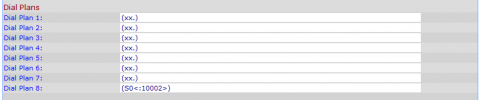
In dial plan 8 put (S0<:10002>)

That is a zero after the S. The 10002 is your 3CX trunk number.

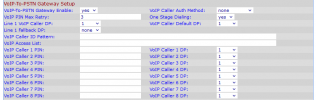
In the next section VoIP-To-PSTN Gateway Setup

VoIP-To-PSTN Gateway Enable: to YES
One Stage Dialing: to YES

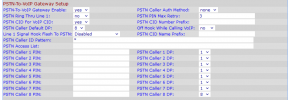
Then go down to PSTN-To-VoIP Gateway Setup

PSTN-To-VoIP Gateway Enable: YES
PSTN Ring Thru Line 1: NO
PSTN CID For VoIP CID: YES
PSTN Caller Default DP: 8 (this refers to the dialplan number you datafilled earlier)

Go down to FXO Timer Values (sec)

PSTN Answer Delay: 3 (I've found this to be the minimum for Bellcore type caller ID as it waits long enough to collect caller ID between the first and second ring, before sending the call onto 3CX)

The remaining settings, such as those in the PSTN Disconnect Detection section are up to you, and how your provider handles call disconnects to prevent the 3102 holding the phone line when an incoming caller hangs up and 3CX dies not disconnect the call.

There are a lot of other settings, things such as such as Codecs, but this should get incoming calls to work. If it doesn't, check that the call is reaching 3CX, in the Activity Log.

Of course, in the 3X trunk settings, you've chosen the destination for incoming calls.

If you choose to enable Line 1 on the 3102 just be sure that the SIP port is not the same as the one you used in the PSTN line.

Let me know if you have any problems.
 
  • Like
Reactions: nbl1268
Okay, have made those changes to the 3102.
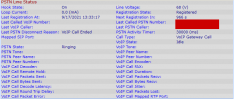
And can see it indicating when a PSTN call is incoming...however, the VoIP state remains as 'Idle'.
20210917 SPA3102 PSTN-VoIP Inbound Call.png

I'm working through the 3CX Activity Log to see what i can learn about this, eg if the 3102 is trying to connect, 3CX is ignoring or some other problem...
 
Be sure that the dialplan is correct, it must include the brackets.
 
thanks, double checked that, also that had a zero following the S as well.
SPA3102 Dial Plans.png
and just rechecking the other settings
SPA3102 VoIP-To-PSTN Gateway Setup.png
SPA3102 PSTN-To-VoIP Gateway Setup.png
SPA3102 FXO Timer Values (sec).png
Still working my way through the activity log, not thats it particularly lengthy, just getting time to focus on it.
What i am seeing, is that appears to be sending an INVITE to another trunk 10000, which is a SIP service i have on my the 3CX, instead of 10002....
 
You're certain that the Invite originates from the IP, that you assigned to the 3102?

The dialplan is, and in particular, the trunk number , in the dialplan, what determines the destination in 3CX, in the same manner as sending a call to a particular extension.

Do you have trunk 10002, in 3CX, set to ring an extension?
 
Ah...one thing I did notice...delete the * in the PSTN Caller ID Pattern: . I didn't realize that was in there as the default, but recall it causing issues, with some, in the past.

Also, change PSTN Caller 8 DP: back to the default of 1, it is not necessary, and I don't know if it will cause issues.
 
Hi @leejor, sorry, those two PSTN CALLER config items were me playing/testing, have set them as you've recommeded.

Yes I do have trunk 10002 in my 3CX and it is directed to ring group 803, rather than a specific extension. Tested as internal call and works.

Actually it looks like the invite is coming from my SIP provider back to trunk 10000, rather than from 3102. That might be due to my setup.

So some more details of what i do have setup.
I have two SIP services from my provider, being xxx365 and xxx506. Where xxx506 is configured as trunk 10000, its registered and works for inbound calls through to ring group 801. It also works for outbound calls.

Cant access the actual PSTN line at present (COVID Lockdown), so i borrowed the HT813, set it up to connect to my SIP provider service xxx365, tested that works with an analogue handset and it too works for in and out bound calls.

Have connected the HT813 FXS to the 3102 FXO to simulate that PSTN line.
Outbound calls using rule 04xxx go from the 3CX via the 3102 over the analogue link to the HT813 via my SIP provider and present on my mobile. That works.

On-network calls (as i dont have an active DID setup with my SIP provider) to service xxx365 present on the HT813, and are presented on the 3102 as an incoming call. If i enable 3102 Line 1, set PSTN-To-VoIP Gateway Enable: NO, and PSTN Ring Thru Line 1: YES, i can call xxx365 service from a 3CX ext 111 using outbound trunk 10000 connected to xxx506 service, and the analogue handset rings.

Right now i have disabled 3102 Line 1, set PSTN-To-VoIP Gateway Enable: YES, and PSTN Ring Thru Line 1: NO.

If i call xxx365 service from ext 111 in the activity log i can see an outgoing call
Call(C:262): Calling T:Line:10000>>xxx365@[Dev:sip:[email protected]:5060] for L:262.1[Extn:111]

and i see an incoming call from mySIPprovider to trunk 10000...
Call(C:262): Alerting Line:10000>>xxx365 by contact <sip:[email protected]:5060/UDP>

and that is followed by
Line limit check: Current # of calls for line Lc:10000(@mySIPprovider- xxx506[<sip:[email protected]:5060/UDP>]) is 2; limit is 1

Trunk 10000 is set to only 1 simultaneous call. If i change it to 2, then the call presents on ring group 803, but obviously not via the 3102...

So, am thinking that i need to make the call to xxx365 from a separate system (not my 3cx) and see if that resolves the problem i'm seeing.

Conscious that i've no doubt made this slightly more complicated, but hopefully i'm on the right track.
 
All I can advise, is to connect the 3102 to an actual PSTN line. Arrange an incoming call. You hopefully see an incoming 3CX Activity Log. If you don't, post the upper part of the PSTN tab.

Keep in mind that the 3102 also has a Syslog, which can be accessed, to see what the device is sending, and to where.
 
Last edited:
  • Like
Reactions: nbl1268
Yes, that'll be the ultimate test, and hopefully i can do that soon.

Anyhow set up sip xxx506 to use a separate sip desktop client, and got a new message in the activity log.
Code:
Line limit check: inbound calls are disabled for line Lc:10002(@SPA3102 FXO [<sip:[email protected]:5062/UDP>])

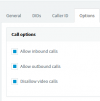
Found the problem, i had completely over looked checking the call options for the trunk, both 'Allow inbound' and 'Allow outbound' where unchecked... checked them and success for both incoming and ourgoing via the 3102...
PSTN Trunk Call Options.png

Many thanks for your help with this. Appreciated.
With that sorted, wouldn't mind having a go at setting up line 1 as an extension.
Also to understand if the 3102 could be configured so that if it got disconnected from 3CX, the incoming PSTN calls would go directly to line 1, (and line 1 could make outgoing calls too)
 
Line 1 can be set to place call to both a VoIP line and the PSTN line, This is done by creating a Line 1 dialplan to determine which dialed digits route where. If you do a search, you will find a number of sites with instructions on creating an SPA3102 dialplan.

https://voicent.com/predictive-dialer/blog/index.php/predictive-dialer/380/spa3102-dial-plan

There is nothing that will "detect" when the 3CX trunk is not connected and then route incoming calls to Line 1. This will always occur when PSTN Ring Thru Line 1: is set to YES and after the delay set in PSTN Ring Thru Delay:

So you'd have to set the PSTN Ring Thru Delay: to at least 4 seconds (call routes to 3CX after 3) or the phone will give a ring on all incoming calls.

Using Line 1 is simply a mater of putting the extension information in SIP Settings and Proxy and Registration, and As I said earlier, making sure that the SIP Port: is not the same in both the PSTN tab and the Line 1 tab. You will probably want to modify the Line 1 dialplan, from the default, to avoid the wait time, after dialing.

If you want to do some reading.....

https://downloads.linksys.com/downloads/userguide/Linksys_ATA_AG_v2_080716NC-LB_rev20080815.pdf
 
Last edited:
Status
Not open for further replies.

Forum statistics

Threads
112,147
Messages
590,961
Members
165,167
Latest member
Finatra.us