• We do not provide troubleshooting help for unsupported phones. Please try with a supported phone.
  • V20 Update 10 Alpha 2 Learn more

Troubleshooting Ringing Devices

Status
Not open for further replies.

jpskinner

Bronze Partner
Intermediate Cert.
Joined
Jun 23, 2021
Messages
51
Reaction score
4
Hi all,

Please could you assist with the following?

Having an issue with a Call Queue - when I ring it, it only rings one (4004) Grandsteam WP810 instead of both (4004 and 4005), however if I ring the DDI for 4005 it works fine. Strangest thing is when I change it to a Ring Group it rings both 4004 and 4005.

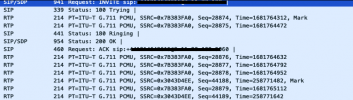
Did a Wireshark and I am not too sure how to see which devices are ringing, all I can see is this:
1624447150246.png
But this trace is for the Ring Group where both phones rang, but it only shows on 180 message as Ringing - should it not show both??

Thanks in advace! :)
 
Is the ext that isnt ringing logged in to the queue?
 
Please confirm the setup - call queues or ring groups as each one works differently.
 
Please confirm the setup - call queues or ring groups as each one works differently.
It is currently set up as a Call Queue, but when I change it to a Ring Group it works fine. It is set to Ring All polling on both.
 
Is the queue set to ring all when polling?
 
So how would I determine what devices are ringing in a Wireshark trace? as the above doesnt show it :(
 
Hi @jpskinner The WP810 is not supported, so it may complicate your troubleshooting further than what is needed. Some advice if I may: usually these issues are either due to the extension setup or the phones.

A quick way to check is to unplug all your phones, and then use webclients, mobile clients, or windows clients to log in to those extensions. If you can replicate the issue with the clients, then there is not point to waste time on wireshark or the phone devices. Go and troubleshoot the extension setup instead until you get the clients to ring as needed.

If the clients work as expected, then it becomes more likely that your phones might have been the problem. At this stage, wireshark can be used to see what the PBX sends (does it ring each extension? and what did each phone reply to the invite? etc).

So confirm setup first, troubleshoot phones later (especially when using unsupported devices that might introduce more variables in the mix)
 
Status
Not open for further replies.

Forum statistics

Threads
112,148
Messages
590,963
Members
165,169
Latest member
Isaac415