Unable to make calls with Patton SmartNode 4141 FXO PSTN Gateway

Status
Not open for further replies.

Kirsty - Fountain IT

Forum User
Joined
Apr 20, 2010
Messages
9
Reaction score
2
I have installed a Patton SmartNode 4141 4 Port FXO PSTN Gateway and connected up 3 working PSTN lines to the first 3 ports.
Patton firmware has been updated to the latest and I have meticulously followed all the instructions on the 3CX webpage to configure and provision this device.
After the configuration has been uploaded into the Patton Gateway and it is rebooted, 3CX shows it as provisioned (green dot).
The Patton web interface also shows it as provisioned (green bar).
I have set up an Outgoing rule and specified the Patton device.

However when I go to make a call 3CX thinks about it for a while then the call fails with this error message:-
Call or Registration to 074xxxxxxxx@(Ln.10000@Patton Trinity Analog FXO (SN4141)) has failed. 192.168.xx.xxx replied: 504 Server Time-out; from IP:192.168.xx.xxx:5060

I can't see what I am doing wrong and why it doesn't work. Any ideas, tips, advice anybody?
Anybody got any experience with analogue lines and Patton Gateways?
I have tried this several times, each time factory resetting the Patton device and trying again from scratch to no avail.


3CX v18 with all updates hosted on-site on Raspberry Pi, 8GB RAM.
Firewall check has fully passed.
 
Hi!

This sounds like the communications between 3CX and the Patton device is fine, but the Patton device cannot dial the number out, possibly because it can't detect the tone.

When it comes to analog lines, the first thing you should do is connect an analog telephone device to each of the lines you have hooked up to the Patton and make sure there is tone and that you can make outbound calls.

Once that is done, in the 3CX settings there are 2 things that usually help:
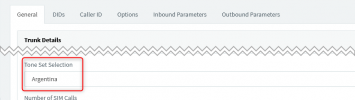
  • Make sure you have the right country selected here:
    1635326847993.png
    If you don't see your country listed, just do a quick search to find the tone your country uses and pick a country that has the same as yours from the drop-down.

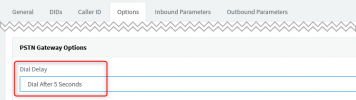
  • Sometimes even if you have the tone set correctly, the device still can't detect the tone, so it may be worth playing with this settings as well, maybe set it like this:
    1635326951737.png
Don't forget that after making any of these changes in 3CX, you need to re-load the config file into your Patton device in order for it to take the new settings.

If none of the above succeeds, my recommendation is to contact Patton Support.
I have never had to contact them myself as a customer, but from what I hear they are quite helpful.
 
Perhaps the call is "landing" on the fourth line, with no connection? Although it should fall over, to a working line.
 
Hi Nick,

I had already tested all the lines with an analogue phone and they all worked OK.

I factory reset the device and did it all again.
This time I made the DHCP router give out the final static IP I wanted the Patton device to use.
Set the configuration to Dial after 3 Seconds (not wait for dial tone), created the configuration script and uploaded it to the Patton and it worked!!
So I would say that not waiting for the dial tone and just dialing anyway did the trick. Thank you Nick.

I can't say i'm impressed with the Patton web user interface. It seems old and tired and the manual is generic for several models, with some parts not relevant to my specific model, even though some of these parts seem to be in the web interface. For instance, there is a DHCP LAN port and a WAN port in the web interface. Yet there is NOT a WAN port on this particular device itself, but it lets you configure it.
I was not happy to configure the DHCP LAN port to a static IP while it was still called a DHCP interface.

This particular client insisted they wanted to stay with analogue lines and not convert to VoIP SIP Trunks.
Maybe if I ever get another analogue line install I will try a different Analogue Gateway, like BeroNet or something else. What do you think? Is BeroNet better??
I won't touch a Grandstream device, lol.
 
  • Like
Reactions: NickD_3CX
Two further questions related to these devices and analogue lines.
The 3 lines the client has are just three separate individual lines, not even in number sequence.
One is designated their main incoming published number for incoming calls.
A second one is just for dialing out as such, it isn't published anywhere.
The third one was used for the old fax. The fax has been dumped and this line also used for outgoing call capacity, giving the three lines available to the Patton device.

First Question
It occurred to me that it would be beneficial to get the outgoing calls to use the second and third lines and keep the first line published number free for the incoming calls. (Outgoing Caller ID to be set to main number on all 3 lines).
The Patton is set to use the lines in sequence, not at random.

How can I get 3CX to only make outgoing calls on the second and third lines only?
Or do I just physically swap the lines over so that the main first line is in FXO port 2 and the other two lines are in FXO ports 1 and 0, causing outgoing calls to presumably use the lines up in FXO port number ascending sequence and the main line number last?

Second Question
If the client insisted that he wanted the second and third lines as incoming as well, (despite the fact they are not published or generally known to his customers), he has hinted at this.
Then I would obviously have to set up DID routing for these 2 other lines as well.
I noticed that I can do this in both 'Inbound Rules' and also in the Patton SIP Trunk 3CX Gateway configuration pages as well.
I'm used to doing it in the 'Inbound Rules' for VoIP SIP Trunks.
Would this result in the same thing? Or do I need to specifically do this in the Patton SIP Trunk 3CX Gateway configuration pages?
If it's to be done in the Patton SIP Trunk 3CX Gateway configuration pages, do I need to generate a new configuration file afterwards and upload it to the Gateway or not??
 
Hi Leejor,

I had assumed that the Patton device would start at FXO port 0 and work up. It is set to use the ports in sequence and not at random.
NickD's suggestion of not detecting dial tone and just dialing after a short delay seems to have worked, so I don't think the call was landing on line 4 (FXO port 3).
 
If you want to use specific ports on the gateway, then you will probably have to re-install as individual trunks, each using a different port, and not as one trunk group with 3 or 4 members. Some gateways (Grandstream, as I recall) do allow selection of lines with the use of a prefix, which is sent on the dialed number. I'm not aware of Patton's doing that. This will probably require some customization.

As far as DIDs...if you did break into individual trunks, then that won't be an issue. If you leave as one trunk group, they you can make use of the DID number sent, by he gateway on each line. This can be a real phone number, that you have data-filled, or may simply be something like 000001, 000002, etc. As long as your DID rules use the same number, then the call will follow that rule.
 
Status
Not open for further replies.

Members Online Now

Forum statistics

Threads
111,832
Messages
589,278
Members
164,662
Latest member
DejanMDS