Update 6 Alpha - The Next Generation 3CX!

Status
Not open for further replies.
I think Fanvil have done all the ones they will do already. There will certainly be more yealink models but one that will also soon come are the new Snom 8X models
 
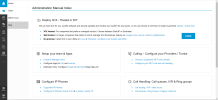
I'm really liking the new U6 Alpha, but still have a doubt that's bothering me. Even if a user is set to have Manager rights he gets access to the Administration Manual, is it just because we're in Alpha or do you plan on keeping it this way?
 

Attachments

  • Administration Manual Alpha.PNG
    Administration Manual Alpha.PNG
    127.9 KB · Views: 56
Glad you like it.... Yes he is a manager and he/she can configure quite a few things so he/she needs the manual? Admin manual is public anyway...
 
Last edited:
  • Like
Reactions: João Vitor
Snom D865, D862 will they be supported with SBC in U6 ?
 
@KjetilSorby Well as soon as Snom completes its development & testing, yes they will be added on the first update, not sure if that will be U6.
 
Are you really going to make Split DNS configuration mandatory in future releases???

I think this is a big mistake...

Not all customers have the infrastructure to do this.

Furthermore, on the installer side, it will greatly complicate life for those who propose 3CX without being an expert network system administrator...
 
Are you really going to make Split DNS configuration mandatory in future releases???

I think this is a big mistake...

Not all customers have the infrastructure to do this.

Furthermore, on the installer side, it will greatly complicate life for those who propose 3CX without being an expert network system administrator...
Absolutely. You need to have a proper DNS server or else just go to the cloud.
 
Why is that so?

And will it affect systems that already have extensions like that? We use those for routing extensions or template users.
Unfortunately, we have a number of clients who have used the 00X numbering for administrative purposes. Will there be a day when these extensions will be blocked/deleted/overwritten?
 
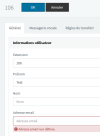
I comeback and I realise that we can't create a user without a email :

1669913761112.png

This will be really a thing ??? Or just a bug ?
 
  • Like
Reactions: Evolute IT
Thank you for all of the wonderful improvements. I've started playing around with it and have made a few observations. I understand this is an alpha build and wanted to offer feedback even though these items may already be on your radar:

  • Group Owner can see and edit System Owner and System Administrator’s extensions.
    • On my System Owner extension, I’ve checked Phone Provisioning > Block Presence information in 3CX Apps/ Web Client and I’ve checked Options > Hide this extension from 3CX company phonebook and 3CX Apps but it is still visible under Users for the Group Owner even though System Owner isn’t assigned to their group.
  • There is no role, including the root login for the 3CX Management Console, that gives you access to everything, specifically, setting the auto-switch options for a user.
    • I understand that the group owner can perform these functions but when onboarding a new client with multiple groups, it would be better if we could complete that part of the setup without having to log in as a different group owner for each group that has members that need auto-switch enabled.
  • If assigned to a group, system office hours are not recognized (at least for auto-switching, I didn't test call in office vs out of office call routing). The office hours must be set at the group level.
    • While having the option for different office hours is very helpful, there are plenty of cases where all/multiple groups will adhere to the system office hours.
    • Maybe under the User's Schedule tab, there should be a 3rd option "This extension uses group office hours"
  • When adding a phone from the web client's Admin interface, you cannot add a phone to use as Direct SIP. Will that option be added or is registering via Direct SIP going to be removed?
Again, thank you for the continued efforts.
 
@Sparky Bear Definitely more settings will be coming to the web client. You will have to move to the webclient over time for sure.
Just looking for clarification here, does this mean you are removing the current admin panel, or just adding functionality to the webclient?
 
Just looking for clarification here, does this mean you are removing the current admin panel, or just adding functionality to the webclient?
Nick said in the past moving it (so it doesn't have to be maintained 2x). Don't know if that's still the case, but that's what he said in the past
 
  • Like
Reactions: Evolute IT
Thank you for all of the wonderful improvements. I've started playing around with it and have made a few observations. I understand this is an alpha build and wanted to offer feedback even though these items may already be on your radar:

  • Group Owner can see and edit System Owner and System Administrator’s extensions.
    • On my System Owner extension, I’ve checked Phone Provisioning > Block Presence information in 3CX Apps/ Web Client and I’ve checked Options > Hide this extension from 3CX company phonebook and 3CX Apps but it is still visible under Users for the Group Owner even though System Owner isn’t assigned to their group.
  • There is no role, including the root login for the 3CX Management Console, that gives you access to everything, specifically, setting the auto-switch options for a user.
    • I understand that the group owner can perform these functions but when onboarding a new client with multiple groups, it would be better if we could complete that part of the setup without having to log in as a different group owner for each group that has members that need auto-switch enabled.
  • If assigned to a group, system office hours are not recognized (at least for auto-switching, I didn't test call in office vs out of office call routing). The office hours must be set at the group level.
    • While having the option for different office hours is very helpful, there are plenty of cases where all/multiple groups will adhere to the system office hours.
    • Maybe under the User's Schedule tab, there should be a 3rd option "This extension uses group office hours"
  • When adding a phone from the web client's Admin interface, you cannot add a phone to use as Direct SIP. Will that option be added or is registering via Direct SIP going to be removed?
Again, thank you for the continued efforts.
Hello, feedback is always welcome. With regards to the following points:

- Group owner can see and edit System Owner and System administrator extensions

------->>For this you cannot see them from the admin view if you are Group owner or to edit them.

- There is no role, including the root login for the 3CX Management Console, that gives you access to everything, specifically, setting the auto-switch options for a user.

----->> You can try to use the system owner role for this i believe please check and let us know

- While having the option for different office hours is very helpful, there are plenty of cases where all/multiple groups will adhere to the system office hours.

----- >> In this case you can create your groups and do not make changes to the group office hours via admin menu at all.. Make sure that your extensions in the group have auto switch on and then check if they change their status according to the pbx office hours please

- When adding a phone from the web client's Admin interface, you cannot add a phone to use as Direct SIP. Will that option be added or is registering via Direct SIP going to be removed?

most likely this will be removed as SBC is a better option to use
 
  • Like
Reactions: Evolute IT
where is the messaging tab now? with the Facebook integration
Removed from the management console, configuring it is now in the webclient along with system trunks...
 
  • Like
Reactions: Evolute IT
Hi all, can’t try this out until next week but can anyone tell me if it’s possible to set group specific holidays?

Would nicely complement the multi-branch capabilities to have current global holidays that affect the whole company (eg: Christmas, national days) and then branch specific local holidays where only specific groups close (state/province holidays, show days etc). Have to use a CFD for that at the moment.
 
Rights administration seems to be broken in this alpha release, tested in two systems. A user with only permission to "monitor has access to reports..." enabled under system management, it look like it still gives full access to everything in the new admin web client area (manage other extensions, trunks, call routing, everything)?!?

I'd really like to be able to manage access not just each area appearing in the new web client admin (so that matches what it says its granting permissions to) but even more granularly:
  • SIP Trunks, and SBC settings, messenger settings
    • I think messenger settings is something HR or marketing can manage but they don't need access to system trunks.
    • Low level techs may be permitted to upgrade or reboot and SBC but shouldn't have access to SIP trunks
  • Call handling is very strange. Would love to see tabs and better access broken out here. A queue manager for support doesn't need to be able to admin all things call handling. They are also all jumbled together in here, no tabs for different types (IVR, queues, ring/page groups). Forward SMS looks like it will be sweet (BIG THANKS), but it would be nice to do that per number though instead of all numbers associated with that IVR.
  • Office Hours looks broken: You select a number and it doesn't show its configured for doing anything in the web client, however, it it configured already in the main management console.
  • Generally just lots of things out of sync with whats actually configured.
Update: With "Allow access to 3CX Management Console" completely unchecked on a user but System Owner set. That user still has access to nearly everything in the webclient admin so thats ignored. Oddly enough it greyed out the ability to add a SIP trunk but it looks like everything else still has full access.
 
Last edited:
Just noticed the welcome email and login to webclient can now be done by the email address. ;) ;)
 
There's one feature I would love to see added, and that's to be able to assign an operator to each group, so remote branch offices can have calls routed from voicemail or parked/held calls that are not picked up to be able to go to a local operator not a centralized one, any plans for this?
 
Status
Not open for further replies.

Latest Posts

Forum statistics

Threads
111,973
Messages
590,075
Members
164,895
Latest member
jasonkkrause