- Joined
- Jun 6, 2006
- Messages
- 4,869
- Reaction score
- 9,372
I think Fanvil have done all the ones they will do already. There will certainly be more yealink models but one that will also soon come are the new Snom 8X models


Absolutely. You need to have a proper DNS server or else just go to the cloud.Are you really going to make Split DNS configuration mandatory in future releases???
I think this is a big mistake...
Not all customers have the infrastructure to do this.
Furthermore, on the installer side, it will greatly complicate life for those who propose 3CX without being an expert network system administrator...

Unfortunately, we have a number of clients who have used the 00X numbering for administrative purposes. Will there be a day when these extensions will be blocked/deleted/overwritten?Why is that so?
And will it affect systems that already have extensions like that? We use those for routing extensions or template users.



Just looking for clarification here, does this mean you are removing the current admin panel, or just adding functionality to the webclient?@Sparky Bear Definitely more settings will be coming to the web client. You will have to move to the webclient over time for sure.

Nick said in the past moving it (so it doesn't have to be maintained 2x). Don't know if that's still the case, but that's what he said in the pastJust looking for clarification here, does this mean you are removing the current admin panel, or just adding functionality to the webclient?

Hello, feedback is always welcome. With regards to the following points:Thank you for all of the wonderful improvements. I've started playing around with it and have made a few observations. I understand this is an alpha build and wanted to offer feedback even though these items may already be on your radar:
Again, thank you for the continued efforts.
- Group Owner can see and edit System Owner and System Administrator’s extensions.
- On my System Owner extension, I’ve checked Phone Provisioning > Block Presence information in 3CX Apps/ Web Client and I’ve checked Options > Hide this extension from 3CX company phonebook and 3CX Apps but it is still visible under Users for the Group Owner even though System Owner isn’t assigned to their group.
- There is no role, including the root login for the 3CX Management Console, that gives you access to everything, specifically, setting the auto-switch options for a user.
- I understand that the group owner can perform these functions but when onboarding a new client with multiple groups, it would be better if we could complete that part of the setup without having to log in as a different group owner for each group that has members that need auto-switch enabled.
- If assigned to a group, system office hours are not recognized (at least for auto-switching, I didn't test call in office vs out of office call routing). The office hours must be set at the group level.
- While having the option for different office hours is very helpful, there are plenty of cases where all/multiple groups will adhere to the system office hours.
- Maybe under the User's Schedule tab, there should be a 3rd option "This extension uses group office hours"
- When adding a phone from the web client's Admin interface, you cannot add a phone to use as Direct SIP. Will that option be added or is registering via Direct SIP going to be removed?
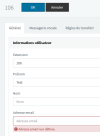
Strange, I'm not having that issue.I comeback and I realise that we can't create a user without a email :
View attachment 33024
This will be really a thing ??? Or just a bug ?
Removed from the management console, configuring it is now in the webclient along with system trunks...where is the messaging tab now? with the Facebook integration
His system is probably set to Email Voicemails, so in that case (for a number of versions) an email is required. Just put any account that doesn't exist - [email protected]Strange, I'm not having that issue.


Founded in 2005, when VoIP was an emerging technology, 3CX has gone on to establish itself as a global leader in business communications.