Update 8 Beta - Almost there!

N_G

Founder
Joined
Jun 6, 2006
Messages
4,857
Reaction score
9,291

System owner replaces root admin. - Configure to avoid the warning!​

A Recap on Update 8 So Far!​

This week we spoke about our refactored Customer Portal Shopping cart, extended 3CX Hosting and the name change from 3CX StartUP to 3CX SMB - Small Business. You’ll also recall in our Update 8 Alpha blog a coup...
Continue reading the Original Blog Post.
 
Last edited by a moderator:
Nice job! Will Fanvil X300 series phones be officially supported by 3CX when update 8 commercial version is released?
 
  • Like
Reactions: N_G
Nice job 3cx , Team integration looks very smooth. Any update on Rest API ?
 
Hi

I am missing something or "Windows" provisioning link is removed from webclient ?
There is no "Windows" icon in lefside menu in webclient.

How to provision desktop app in this case now ?

Thanks
 
Hi

I am missing something or "Windows" provisioning link is removed from webclient ?
There is no "Windows" icon in lefside menu in webclient.

How to provision desktop app in this case now ?

Thanks
Click the apps button and you can both install and provision your apps from there
 
Johns_3CX

More more thing, where is the PWA link now ?

Thanks
 
Johns_3CX

More more thing, where is the PWA link now ?

Thanks
As above, you simply click the Apps icon and you will also find the PWA there too
 
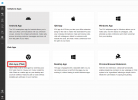
Here is the Apps content inside the crhome webclient. Missing
 

Attachments

  • MicrosoftTeams-image.png
    MicrosoftTeams-image.png
    61.3 KB · Views: 23
Here is the Apps content inside the crhome webclient. Missing
This is because you already installed the PWA on this PC. If you uninstall it and refresh the webclient, it will reappear I can confirm.
1689071864380.png
 
Hi 3CX,
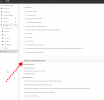
System owner and System administrator role, It's normal that they bypass “access to 3CX Management Console” setting ”allow or not” ?

I assigned the System Administrator role to an extension.. and intentionally did not check "allow access to 3CX Management Console" but .. he still has access to Management Console.

I understand that there must be at least one System Owner extension with Management Console access .. (root will no longer exist) , but don't you think that a system owner with access to Management Console should be able to choose who has access to Management Console, regardless of role ? :p

Can you share your views on the "roles" that bypasses the "management console access" setting, please? I only ask to be convinced of the logic :-) :p
If the behavior is normal, shouldn't the "Allow access to 3CX management console" checkbox be greyed out / force ☑️ “check” in the same visual logic as the rights in the role?
 
Hi,

"System owner replaces root admin"
Does this mean we will not be able to login with root user ?,and login with owner account only?

Thanks,
 
Hi,

"System owner replaces root admin"
Does this mean we will not be able to login with root user ?,and login with owner account only?

Thanks,
Yes, future major versions of 3CX will require a system owner instead of a root admin. Not in Update 8 but the next major version.
 
  • Like
Reactions: NatalyS_3CX
JohnS_3CX,

We still use setupconfig.xml for mass deployment (ansible)

We configure AdminUsername and use it as 3cx login, but if with 3CX next major update we can't configure owner we are stuck, right?, because we will not be able to login as root first and then configure the owner?.
System owner setup option will be available only during regular setup process i guess.

Any suggestions how to configure system owner with setupconfig.xml ?

Thanks,
 
JohnS_3CX,

We still use setupconfig.xml for mass deployment (ansible)

We configure AdminUsername and use it as 3cx login, but if with 3CX next major update we can't configure owner we are stuck, right?, because we will not be able to login as root first and then configure the owner?.
System owner setup option will be available only during regular setup process i guess.

Any suggestions how to configure system owner with setupconfig.xml ?

Thanks,

We are also deploying with this method.
But that won't change. Anyway, in your "setupconfig.xml" auto-build script, you probably already created at least 1 extension. Give him the role of owner. I even believe that the System Owner role is defined by default when creating the first extension (Operator).

Creating an Extension

System Owner already exists.. you can already create a system owner during the initial configuration or later by changing the role of an extension. You can have as many System Owners as you want. It is not restricted only during the initial configuration.


With the arrival of the cloud system to generate the configuration file ( https://www.3cx.com/install/ ), let's just hope that 3CX will not give up " setupconfig.xml " method.
 
Last edited:
System owner and System administrator role, It's normal that they bypass “access to 3CX Management Console” setting ”allow or not” ?
That's for Settings/Console Restrictions? Yes there was at least one thread this spring that discussed how the web client does not honor the console restriction setting for the management portal. I believe I read that was planned but cannot find a reference in a quick search.
 
That's for Settings/Console Restrictions? Yes there was at least one thread this spring that discussed how the web client does not honor the console restriction setting for the management portal. I believe I read that was planned but cannot find a reference in a quick search.

I refer to the role. :p
Even if a extension (System Owner or System Administrator) does not have the option checked, he can access login in the Dashboard Management Console the same way. Not related to the WebClient.

1689172851387.png
 
@Guillaume Bourgeois

not sure how to configure "Operator" extension as System Owner in setupconfig.xml (which tag to use?). I don't think it will be automatically assigned as system owner.

With setupconfig.xml only root account can be configured, but if we can't login with it after the setup is complete how to change one extension to system owner?

Thanks
 
Even if a extension (System Owner or System Administrator) does not have the option checked, he can access login in the Dashboard Management Console the same way. Not related to the WebClient.
Gotcha. That does seem incorrect. There's not another group/role assigned for that user, that has that checked?

Side note 1: it would be handy if there were user configurable roles.
Side note 2: if so, or maybe in any case, it would be handy if there was a "show me all rights" or "effective policy/rights" page that showed what was checked across groups/roles. It could also be used to quickly compare extensions.
 
Yes, future major versions of 3CX will require a system owner instead of a root admin. Not in Update 8 but the next major version.
Does this mean that management console will be removed, if there will be no root admin?
 

Forum statistics

Threads
111,993
Messages
590,178
Members
164,933
Latest member
bunthoeun.may