Solved Update/Renew Certificate

Status
Not open for further replies.

ajcke

Customer
Joined
Feb 3, 2014
Messages
23
Reaction score
0
I need to renew my SSL certificate on my self hosted 3CX server (Windows). I found this article: https://www.3cx.com/docs/self-hosted-instances-ssh/. I am not sure how to create the files domain.org-crt.pem and domain.org-key.pem.

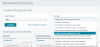
These are my download options in Digicert.

image.png
 
I downloaded the option "Individual .crt files with a .pem extension". I'll give this a try after hours. Is this the best option?
 
I haven't been able to find the 'renewing-ssl-certificate' article anywhere.
I also have an SSL certificate due to expire soon; ours is a self-hosted instance running Debian with a custom FQDN. Ours would be a UCC certificate that is also used in an on-premise Exchange server. So putting bits and pieces together from different forum posts I found the process as I understand it is:
Use this https://www.paessler.com/tools/certificateimporter to extract files from a .pfx
I will then have:
prtg.crt
root.pem
prtg.key
Rename the root.pem into <Youroldcertname-crt.pem>
Rename the prtg.key into <Youroldcertname-key.pem>
Copy these 2 .pem files to /var/lib/3cxpbx/Bin/nginx/conf/Instance1 - overwriting the existing .pem files (I plan to make backup copies of these first of course).
Restart the service '3CX PhoneSystem Nginx Server'

Is that all there is to it? What about the existing dhparam.pem file, does this stay untouched?
 
Last edited:
any update on doing this? - process steps - much appreciated
 
Step 1 - Pick a 3CX FQDN
Step 2 - Have a beer!
 
I have had no success. I even paid for an hour of support.
 
The process outlined above is correct. To provide further information on how we do it:

1) Generate CSR (we use the IIS cert generation tool because we often use a wildcard ssl with a bunch of IIS services too, so having a PFX is needed)
2) Send to CA, yada yada yada
3) Complete Cert Request in IIS
4) Export as PFX
5) Convert to correct format using OpenSSL
Code:
openssl pkcs12 -in [yourfile.pfx] -nocerts -out [keyfile-encrypted.key]
openssl rsa -in [keyfile-encrypted.key] -out [keyfile-decrypted.key]
openssl pkcs12 -in [yourfile.pfx] -clcerts -nokeys -out [certificate.pem]

Next 2 steps can be combined into previous step, but I want to make this clear
6) Rename [certificate.pem] to demo.example.com-crt.pem
7) Rename [keyfile-decrypted.key] to demo.example.com-key.pem
(demo.example.com is your 3CX FQDN)

8) Review demo.example.com-crt.pem and make sure the intermediate cert is present. Add it if needed.
9) Replace the files here: /var/lib/3cxpbx/Bin/nginx/conf/Instance1
10) Restart the service '3CX PhoneSystem Nginx Server'

Shouldn't take 30 minutes start to finish.
 
The process outlined above is correct. To provide further information on how we do it:

1) Generate CSR (we use the IIS cert generation tool because we often use a wildcard ssl with a bunch of IIS services too, so having a PFX is needed)
2) Send to CA, yada yada yada
3) Complete Cert Request in IIS
4) Export as PFX
5) Convert to correct format using OpenSSL
Code:
openssl pkcs12 -in [yourfile.pfx] -nocerts -out [keyfile-encrypted.key]
openssl rsa -in [keyfile-encrypted.key] -out [keyfile-decrypted.key]
openssl pkcs12 -in [yourfile.pfx] -clcerts -nokeys -out [certificate.pem]

Next 2 steps can be combined into previous step, but I want to make this clear
6) Rename [certificate.pem] to demo.example.com-crt.pem
7) Rename [keyfile-decrypted.key] to demo.example.com-key.pem
(demo.example.com is your 3CX FQDN)

8) Review demo.example.com-crt.pem and make sure the intermediate cert is present. Add it if needed.
9) Replace the files here: /var/lib/3cxpbx/Bin/nginx/conf/Instance1
10) Restart the service '3CX PhoneSystem Nginx Server'

Shouldn't take 30 minutes start to finish.
Thanks! I ended up following your steps with openssl instead of PRGT as originally planned and it worked perfectly.
Could you clarify step 8: I got "unable to get local issuer certificate" running openssl verify, however the pre-existing .pem files on the PBX also gave me the same error; is there another openssl command I should be using instead to review the demo.example.com-crt.pem file?
 
  • Like
Reactions: ajcke
The process outlined above is correct. To provide further information on how we do it:

1) Generate CSR (we use the IIS cert generation tool because we often use a wildcard ssl with a bunch of IIS services too, so having a PFX is needed)
2) Send to CA, yada yada yada
3) Complete Cert Request in IIS
4) Export as PFX
5) Convert to correct format using OpenSSL
Code:
openssl pkcs12 -in [yourfile.pfx] -nocerts -out [keyfile-encrypted.key]
openssl rsa -in [keyfile-encrypted.key] -out [keyfile-decrypted.key]
openssl pkcs12 -in [yourfile.pfx] -clcerts -nokeys -out [certificate.pem]

Next 2 steps can be combined into previous step, but I want to make this clear
6) Rename [certificate.pem] to demo.example.com-crt.pem
7) Rename [keyfile-decrypted.key] to demo.example.com-key.pem
(demo.example.com is your 3CX FQDN)

8) Review demo.example.com-crt.pem and make sure the intermediate cert is present. Add it if needed.
9) Replace the files here: /var/lib/3cxpbx/Bin/nginx/conf/Instance1
10) Restart the service '3CX PhoneSystem Nginx Server'

Shouldn't take 30 minutes start to finish.

Thank you for the step by step instructions! The cert is installed. Using an SSL checker there is only one error: "The server is not sending the required intermediate certificate." Is it necessary to resolve this? If so how can this be resolved?
 
If you edit the PEM file with something like notepad or nano... you will see a line ---BEGIN CERT--- and another line ---END CERT---

Do you have 1 or 2 of these sections?

If only 1, you need to add the intermediate cert to the file. You can use whatever tool you like.

Since you mention Digicert: https://www.digicert.com/kb/ssl-support/pem-ssl-creation.htm

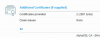
You can test with this site:https://www.ssllabs.com/ssltest/index.html and should see this in the results if done correctly:
View attachment 19377
This resolved my intermediate cert issue. Thank you!
 
Status
Not open for further replies.

Latest Posts

Forum statistics

Threads
111,962
Messages
589,996
Members
164,867
Latest member
swegner