Upgrade to v18 and Debian 10 (Buster)

  • Thread starter Thread starter B.lueken
  • Start date Start date
@Guy Zuercher on the machine you have upgraded, do you have custom templates for extensions ?
Also are your system prompts outdated and specifically were they before your update ?
 
To my knowledge, there is no such thing as templates for extensions. We just copy an extension and change it afterwards. In the past, we also used the bulk editing for templates.

Indeed. Our english prompts are outdated, i didn't pay attention to that. German prompts seem to be updated.
 
  • Like
Reactions: NikosT_3CX
Indeed. Our english prompts are outdated, i didn't pay attention to that. German prompts seem to be updated.
Update them, then give it another try.
 
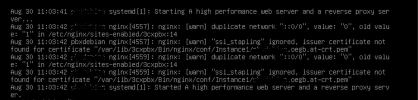
We updated our linux test server, everything went smoothly, except that the nginx wont start automatically any longer.
The server was installed with the ISO and we didn't change it. We use our own certificates from RapidSSL.

When we start the ngix manually it runs and this is what the status says
1630325372122.png

Is there a way to fix this, or do we have to start from scratch?
 
Hi there,

It seems that you are using a custom FQDN. Make sure the name of the certificate files matches the one configured in nginx's conf file (/etc/nginx/sites-enabled/3cxpbx)
 
  • Like
Reactions: NikosT_3CX
Hi there,

It seems that you are using a custom FQDN. Make sure the name of the certificate files matches the one configured in nginx's conf file (/etc/nginx/sites-enabled/3cxpbx)
Yes we do and yes it does.
 
@Ines Wild does your certificate with the key exist on path /var/lib//3cxpbx/Bin/nginx/conf/Instance1 ?
 
@Ines Wild does your certificate with the key exist on path /var/lib//3cxpbx/Bin/nginx/conf/Instance1 ?
Yes it does and before on Debian 9 and V16 there was no problem with the certificates.
 
Check the error log of nginx (or service logs) and you should be able to easily identify what is wrong. Commonly, the encryption might be considered too weak, an intermediate certificate might be missing, paths might be wrong (keep in mind that filenames are case sensitive) etc. Since the upgrade was actually successful and since you're using custom certificates you'll have to dig deeper and troubleshoot this on your own. The feedback we have provided should be sufficient to point you to the right direction.
 
@Ines Wild does your certificate with the key exist on path /var/lib//3cxpbx/Bin/nginx/conf/Instance1 ?
Whatever the error was is no longer appearing. The log was auto-purged this morning and I don't see it appearing any more. Last I checked, it was something like 20 or so entries then it stopped. Before I upgraded I was looking for an indication successful upgrades were occurring, hence my message. We are having no issues with v18 and the upgrade went very smoothly. Kudos to the development team, that was a major upgrade and it went very smooth.
 
  • Like
Reactions: N_G and NikosT_3CX
upgrade went very smoothly
We've upgraded all our clients without issues. Each took about 10 minutes, which I'm sure is relative to things like VM resources, download speed, etc.
System Prompts will likely need updating, as all our installs did. In fact one we installed new using 18 RC2 has an update showing today for English, I see.
 
  • Like
Reactions: N_G and NikosT_3CX
Hi, we use v16 under vmware and looking to upgrade to v18. Did I read correctly somewhere that once you have updated to v18, that my licence is also updated and it is no longer possible to revert to v16?
I would like to know that I could fail back if needed
We have modified the config and added a second network card, so I understand this change isnt supported. I have read all the common custom changes that will break the upgrade, any thoughts about a second NIC?

thanks
Michael.
 
Hi, we use v16 under vmware and looking to upgrade to v18. Did I read correctly somewhere that once you have updated to v18, that my licence is also updated and it is no longer possible to revert to v16?
I would like to know that I could fail back if needed
We have modified the config and added a second network card, so I understand this change isnt supported. I have read all the common custom changes that will break the upgrade, any thoughts about a second NIC?

thanks
Michael.
If my memory serves, you can go back within 30 days but not after that.

Second NIC shouldn't break the setup unless both NICs have a designated gateway address. If so, remove it from the second card. Only the primary (the one facing internet) should be set with a gateway.
 
If my memory serves, you can go back within 30 days but not after that.

Second NIC shouldn't break the setup unless both NICs have a designated gateway address. If so, remove it from the second card. Only the primary (the one facing internet) should be set with a gateway.

I can confirm multiple NIC's wont break the setup if done properly.

we have 3 nics in our setup... there are specific reasons for this :).
 
Has the version 18 upgrade been withdrawn? It's vanished from my updates page.
 
Nope. If you can't see it then either you are already updated, or perhaps your license has expired
 
Nope, neither of those things are true. I'm seeing this on multiple customer 3CXes, including one I was planning to update on Saturday.
 
I noticed this update last week it stressed me out. I didn't have time to do it then so I was going to attempt tonight only to find it was removed from my update page. I'm glad they suspended it I don't need any trouble I've been golden so far.
 
Currently, we have disabled the upgrade from Deb9 v16 to Deb10 v18.

This is sporadically needed to update the package list which we target in the upgrades. Once packages become unavailable we target, the upgrade is held as a precaution to ensure you have a positive outcome.

I assume by end of the day the team will enable it again as the pre-flight check was completed yesterday to the new package lists.
 
Last edited:

Forum statistics

Threads
111,974
Messages
590,083
Members
164,901
Latest member
Silent_Guru