Upgrade to V20 Update 1 for Scheduled Reports, Faster Backup & Restore

nikolascx

Staff member
3CX Support
Joined
Jun 14, 2023
Messages
576
Reaction score
1,865

Update 1 is available for download in production environments.​

Hot off the heels of the release candidate, Update 1 is now available for download in production environments. In case you missed the BETA and BETA 2 releases, these are the main features included:
  • Up to 50% faster backup & restore
  • Caller ID exceptions ...
 
any chance on call reports to add in the ability to sort calls from external to internal, and then internal to external? we like to run 2 reports on DID heavy systems, helps with billing. Not required, just helps speed up the process once a month!
 
  • Like
Reactions: Evolute IT
any chance there is a windows installer for on prem installations?
 
  • Like
Reactions: JohnWoodCC
@uhpadmin
Hi there.
This is the only installer we have, and for Windows OS it's in Alpha stage.
Feel free to give a try and leave your feedback.
 
Thank you.
What I am struggling with is creating a test environment of my current 3cx server so that I can test the upgrade process and connectivity. We use Veeam for backups, so I can isolate an environment in SureBackup, but it only lets out port 443, so when doing the install process, it can`t resolve download or activate dns and won`t continue install.
Any hints/tips would be greatly appreciated.
 
You are welcome.
When installing the system, you need to use XML file or URL to proceed with the installation.
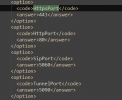
In that XML, you can change your port number and have your HTTPS port different to 443, its tab is HttpsPort

1715667185009.png
 
Thank you.
Do you have a URL where I can read some documentation on how to do this?
 
It's here mentioned in the 1st step of the Overview section. Keep it simple and use the original one (default that Wizard generates for you in a first step as an example).
 
this will set up a vanilla server, right?
I want to do an upgrade of my current server.
Whether that be by uninstalling old one and install new one with backup restore.
 
The above is meant for the new install, as you can't change the ports once the 3CX System is already installed and running.
 
yes. I understand that.
I am wondering how everyone else is getting their testing done...
As Veeam won`t resolve the DNS of those 2 sites, I can`t proceed that way.
Only way I can think of is to restore a backup, remove from domain, change server name and add to domain again and then try to upgrade.
But surely everyone must be doing it in an easier way..
 
Our client has configured scheduled reports on V18
Does it mean we need to reconfiguring the scheduled report after upgrading to V20 Update 1.
 
Will the already present scheduled reports on v18 be migrated to v20 scheduled reports?
 
Will the already present scheduled reports on v18 be migrated to v20 scheduled reports?
I can tell you from experience that they are not migrated, found out this morning myself.
 
I noticed that reporting in V20 Update 1 is lacking a few features that were available in V18. Is there a timeline on when these will become available?
- Schedule reports to be emailed.
- Generate reports by direct dial (DiD) numbers.
- Filter reports by user/extension.
 
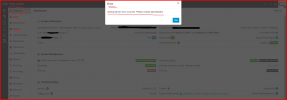
Unfortunately, after upgrading, I get this error message in Dashboard, in Users and Phones:

1715714874700.png

I'm unable to get inside Users and Phones menu ............. :-(
 
Unfortunately, after upgrading, I get this error message in Dashboard, in Users and Phones:

View attachment 41451

I'm unable to get inside Users and Phones menu ............. :-(

I'm getting the same popup error message in the dashboard, but I can get into User and Phones just fine.
 
@sergio-santos @jbrilliant
I've send you both a pm requesting some files in order to further check the issue with the internal server error
 
@jbrilliant Thx for providing the files over pm (issue was identified to be incorrect ownership of firmware directory).
 
Is that problem occuring due to some changes done by partners ? or is it something embeded in 3CX who didn't worked as expected?
If you already found the root cause , of course :)
 
Last edited:
  • Like
Reactions: Rick-Arcus-IT

Forum statistics

Threads
111,992
Messages
590,171
Members
164,931
Latest member
admintest