V18 Alpha 5: New Native Desktop App

Status
Not open for further replies.
Just to be clear the Windows app will remain supported it on v18 for the foreseeable future.

We are making a click to dial extension though keep in mind many websites and CRMs support the tel protocol which is more reliable.

Many of the Windows app features will make it into the new electron app. Just need a bit of time.

Yes we will look at tapi support but really you should contact these app vendors if they plan on updating their app to support something not built in the 90s. It's so simple to do with the tel protocol.

We will be adding blf to the electron app client! Then we will make it a beta! Soon!
 
@Phone systems NZ thanks for the heads up. You have a search bar on each screen and you can enter a number and hit enter...
@mikeodo I hope that covers your requirement to?
@Chris Waldie you have to try with v18 to v18 to see big improvements
@AlanRamsay we use Chromebooks in our company and I use Chrome OS on all my devices. So it is something we will definitely consider...
@Rhys Haskell yes we will support tali but the windows client who remain available for quite some time.
 
I'm missing two features before we can finally roll this out and replace the 3CX Windows Client.

1. Keyboard shortcuts. And in particular pasting a selected phone number into the app
2. The Q button. (And also a feature request: An easy way to let users log off and on to different queues)

Will these features be available in the 3CX Desktop App in upcoming releases?
 
  • Like
Reactions: Jeremy Bero
I'm missing two features before we can finally roll this out and replace the 3CX Windows Client.

1. Keyboard shortcuts. And in particular pasting a selected phone number into the app
2. The Q button. (And also a feature request: An easy way to let users log off and on to different queues)

Will these features be available in the 3CX Desktop App in upcoming releases?
The Q button is now under the Presence menu (profile picture, top left)

For the login/logout of independant queues, go into the switchboard, choose the queue and use the link below the agent names (Logged In/Logged Out)
 
  • Like
Reactions: VoIPTools
not sure if this is the right place, but with the new 3cx desktop app is there going to be a way we can make the keypad always on top?
we have a use case with our crm where the dialer needs to stay on top of the screen while the user works on the screen behind it, we are using a 3rd party voip app (microsip) which works well, but would rather use a native 3cx app, the crm uses the tel: protocol but for speed we need the user to be able to click the entry to dial, it gets auto dialed, then the keypad stay on top

Hope this makes sense
 
not sure if this is the right place, but with the new 3cx desktop app is there going to be a way we can make the keypad always on top?
we have a use case with our crm where the dialer needs to stay on top of the screen while the user works on the screen behind it, we are using a 3rd party voip app (microsip) which works well, but would rather use a native 3cx app, the crm uses the tel: protocol but for speed we need the user to be able to click the entry to dial, it gets auto dialed, then the keypad stay on top

Hope this makes sense
Right click the tray icon, there's a Keep on Top option.
 
The Q button is now under the Presence menu (profile picture, top left)

For the login/logout of independant queues, go into the switchboard, choose the queue and use the link below the agent names (Logged In/Logged Out)
Thanks for your reply.
I am still curious when the keyboard shortcuts will be implemented.
Does anyone have more information about this?
 
We've been testing version v18 since it's early alpha releases and its come a long way, really happy about one of the fixes implimented with recording in CFD. I hear a lot of work is being put into MMS/RCS support too which is great because we are already hearing of angry customers upset someone didn't respond to a pic a client sent of whatever they want help with.

Question, Is or will there be an option to switch to classic view for the webclient? A couple things with webmeeting are handy but by and an large most of our staff are not liking the new interface.

The feedback:
  • Not being able to expand the side bar of icons is rough and waiting with your cursor over an icon to read the tooltip or having to click on each looking for what you want is annoying.
  • The multi-tab search at the top right was removed which we use for quick dialing people while in any tab like chat (which we are in most of the time). We often would just start typing a name from the contacts page at the top and dial it on our desk phone without having to tab around.
  • Just the aesthetics and intuitiveness of the prior layout we felt was better. Because of this training clients was a breeze and we believe this change will not be liked by existing clients as well.
Are you hearing similar feedback from other partners? This consensus is pretty unanimous here.
 
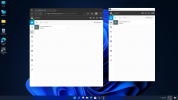
I love it, Nice UI, Works well Even on Windows 11, nice Job 3CX!

Screenshot 2021-06-21 143757.png
 
  • Like
Reactions: N_G
I love it, Nice UI, Works well Even on Windows 11, nice Job 3CX!

View attachment 22608
I would take this as a flex. Windows 11... ok. Well let's see where MS released W11. Oh wait: It's not released yet and you are flexing with using a leaked version. Wew. Congrats.

And now back to 3cx.

EDIT: sry, I may get triggered by such things. So no need to start a flame war now ;)
 
Oh wait: It's not released yet and you are flexing with using a leaked version.
Yes, it is a demo VM using the leaked Version of 11, I just did not want to uninstall my chrome extension for a Alpha version of 3cx for windows.
 
  • Like
Reactions: Jeff Koertzen
The feedback:
  • The multi-tab search at the top right was removed which we use for quick dialing people while in any tab like chat (which we are in most of the time). We often would just start typing a name from the contacts page at the top and dial it on our desk phone without having to tab around.
Wait a minute, it doesn't give any instruction that this is an option but in browser if you just start typing (not pressing the digit buttons in the GUI) and it works like the multi-tab search. I got the idea to try it in browser after seeing the windows client includes greyed out instructions to "Enter Name or Number". Again, this lends itself to the less intuitive interface comment.
 
Not sure if it has been reported or if the change is intentional, but Microsoft 365 integration and other options have been removed from all but the system admin. Other users with all System Management permissions cannot see Microsoft 365, Google, Instance Manager, or Parameters on the settings screen.
 
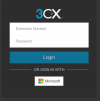
We have just upgraded to v18, and try to use Office 365 SSO for the web client login, we have done office 365 integration before v18.
But now, for admin login with Office 365 SSO works well, but for User web client SSO after Office 365 authentication it just redirect back to webclient login page without Sign in.

1624375536129.png
 
@StefanW ,

Thanks for your response; we know that a number of customers can't run linux packages on their ChromeOS devices - they simply don't support them; we do have a customer that does run a linux package on their ChromeOS device, but this does cause big performance overhead (probably due to the limited memory on the devices).

That being said, I'm not a big fan of the WebApp only approach; we have a customer (same one who we know can not run Linux apps on their ChromeOS devices) who runs their contact centre with their agents using Chromebooks; trying to search for the right tab to end the call / take the call would be a nightmare for them!

With regards to the Windows electron app, it would be really great if we could get a link to the click2call extension so that this can be tested alongside it too.

If they are managed, use the "WebAppInstallForceList policy" to make a launcher icon dedicated to the app.

then they don't have to "search" through tabs, and it looks almost native :).
 
Just to be clear the Windows app will remain supported it on v18 for the foreseeable future.

We are making a click to dial extension though keep in mind many websites and CRMs support the tel protocol which is more reliable.

Many of the Windows app features will make it into the new electron app. Just need a bit of time.

Yes we will look at tapi support but really you should contact these app vendors if they plan on updating their app to support something not built in the 90s. It's so simple to do with the tel protocol.

We will be adding blf to the electron app client! Then we will make it a beta! Soon!
Woo Hoo !!! Been waiting for BLF ! <3
 
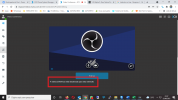
When did this sneak in? I didn't see a mention in the change logs:

1624401931792.png

And does that eliminate the security hole where users with old Welcome Emails/QR codes could re-register after an extension had it's passwords reset?
 
Guys, on V 18, where do I enable the extension to do webmeeting?
All extensions I create report that webmeeting is disabled for the extension.
I didn't find the setting to enable in any tab of the system.

1624415895571.png
 
@Ruymar Castro ,

On the extension makes sure that you enable Click2Meet on "Click2Talk/Click2Meet" tab. Also email address is required for that extension.
 
  • Like
Reactions: Ruymar Castro
Maybe I am lost/// How do we upgrade to V18 from version 16 on Amazon Lightsail, doesnt seem to be any option for this?
 
Status
Not open for further replies.

Latest Posts

Forum statistics

Threads
111,982
Messages
590,117
Members
164,908
Latest member
FarizQasimov