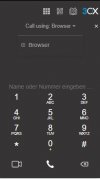
V18 Alpha 5: New Native Desktop App

Status
Not open for further replies.
I’m running my test server with v16 on Debian 10 (installed it myself, not with the 3CX ISO), but wasn’t offered the upgrade to alpha 4 or alpha 5.
All other v16 updates always went fine and were offered automatically.
Of course I can manually reinstall, but I thought I’d post it here as well.

looking forward to trying the new desktop app!
1623968508732.png

I assume the 3CX upgrade path includes adding the necessary repo so you probably want to backup and then do a fresh install from the ISO
 
  • Like
Reactions: JohnS_3CX
on version 16 web client there is a nice search box at the top where you can type in names or numbers and it searches the system for a match (extension, group, company directory, personal directory) to dial which is very handy and quick to use, Will this be added on V18 for the next beta or final version?

I have found the the new dialler pop up will search everything which is nice but just trying to limit the amount of new ways of doing things we will have to point out to some of our customers that are not very tech savvy.

I have also had a paly with the new web conferencing and it's looking very nice :)
 
Last edited:
  • Like
Reactions: MidiTélécom
Hi,

Does this new app support click to dial / clipboard dialling ? at present we use a short code (ctrl-shift-D) to highlight phone numbers (for example in an email) and send them to the windows client to dial - is there a feature for this in the new windows app please ?

I hope for click to dial browser extension too
 
Tested the new Alpha 5 now. Comparing with Alpha 4 there is no change of the webclient, it is still not really intuitive.
I saw the Electron App with same design. For small windows the icon-only design is good. For full screen usage it should provide responsive design where a textual version is being expanded. Or maybe add a manually expandable menu.

I guess alpha 5 did not focus on design but more on technical changes. So again: No blaming here, I just want to help further improvements.

To the electron app: TAPI support available here? TAPI is still a big thing as long as there is no fully functional rest api.

Thumbs up for the devs, great work so far :)
 
OK, so a bit more testing on Alpha 5 this morning; on a ChromeOS device, you are no longer prompted to install the 3CX chrome extension, rather you have to google for it, and install it from there? Why? It's now less intuitive for users on ChromeOS devices to set up - at least on the ChromeOS device you can still "activate" the extension.

On a Windows device, with the new electron app installed (not 3cx browser extension installed), we have now lost the ability to click on phone numbers within web pages and have 3CX dial them for us; this is widely used by our customers, and really is a must! Googled for the 3CX chrome extension to revert to previous way of working, and whilst the extension installs, there is no functionality to activate it, so on Windows it appears forced to use the electron app on all new installs

Hoping that you can give some assurances that these things can be overcome.
 
OK, so a bit more testing on Alpha 5 this morning; on a ChromeOS device, you are no longer prompted to install the 3CX chrome extension, rather you have to google for it, and install it from there? Why? It's now less intuitive for users on ChromeOS devices to set up - at least on the ChromeOS device you can still "activate" the extension.

On a Windows device, with the new electron app installed (not 3cx browser extension installed), we have now lost the ability to click on phone numbers within web pages and have 3CX dial them for us; this is widely used by our customers, and really is a must! Googled for the 3CX chrome extension to revert to previous way of working, and whilst the extension installs, there is no functionality to activate it, so on Windows it appears forced to use the electron app on all new installs

Hoping that you can give some assurances that these things can be overcome.

The chrome extension is been replaced in fav of the electron app and the chrome extension will be changed to a click2call browser extension to allow dialling numbers from CRMs/WebSites. Chrome users will remain on the web app for the time being.

In simple terms, there are things Chome changes (not to call it breaking) with no way for us to address them, such as "Take Focus". Native packages for other platforms are on the way. With ChromeOS soon allowing Linux packages we might be able to cover it with a native app too.
 
To the electron app: TAPI support available here? TAPI is still a big thing as long as there is no fully functional rest api.

Thumbs up for the devs, great work so far :)

Not right now but we have not forgotten about it...
 
Tested the new Alpha 5 now. Comparing with Alpha 4 there is no change of the webclient, it is still not really intuitive.
I saw the Electron App with same design. For small windows the icon-only design is good. For full screen usage it should provide responsive design where a textual version is being expanded. Or maybe add a manually expandable menu.

I guess alpha 5 did not focus on design but more on technical changes. So again: No blaming here, I just want to help further improvements.

To the electron app: TAPI support available here? TAPI is still a big thing as long as there is no fully functional rest api.

Thumbs up for the devs, great work so far :)
The TAPI support is also really important to us. I did post and was told it will continue to be supported as we have just signed up a customer who requires this:
https://www.3cx.com/community/threads/tapi-intergration.81696

Now that the Windows Client is being replaced by the Electron app, is TAPI still going to work?
 
  • Like
Reactions: N_G
Testing a call to a user between two extensions on v18 Electron app and a call from the webclient to webclient to the same user on v16, I am finding the audio quality to be clearer on the webclient than the windows app. Same codecs set.

Anything I can try to improve this?
 
The chrome extension is been replaced in fav of the electron app and the chrome extension will be changed to a click2call browser extension to allow dialling numbers from CRMs/WebSites. Chrome users will remain on the web app for the time being.

In simple terms, there are things Chome changes (not to call it breaking) with no way for us to address them, such as "Take Focus". Native packages for other platforms are on the way. With ChromeOS soon allowing Linux packages we might be able to cover it with a native app too.
@StefanW ,

Thanks for your response; we know that a number of customers can't run linux packages on their ChromeOS devices - they simply don't support them; we do have a customer that does run a linux package on their ChromeOS device, but this does cause big performance overhead (probably due to the limited memory on the devices).

That being said, I'm not a big fan of the WebApp only approach; we have a customer (same one who we know can not run Linux apps on their ChromeOS devices) who runs their contact centre with their agents using Chromebooks; trying to search for the right tab to end the call / take the call would be a nightmare for them!

With regards to the Windows electron app, it would be really great if we could get a link to the click2call extension so that this can be tested alongside it too.
 
@Chris Waldie on v18 check, Management Console > Settings > Codecs, check the order specified.
 
Hello,
a) 3CX Electron app -> No more browser extension = no more "click to call" feature :oops: ?
b) any secret shortcut to bring front the 3CX dialer instead of going to the system tray + right click on dialer?
c) any other shortcuts to pick call, end call etc with the app ?
kind regards
FB
 
On the forum, a category will be add for the Electron App ? (Clients and Ideas sub forum) Or consider as WebClient ?
 
It would be nice if you could also dial in the desktop app without open the dialer app.
 
  • Like
Reactions: chili
It would be nice if you could also dial in the desktop app without open the dialer app.
You have a shortcut from the app to open the dialer.
 
The Desktop App is nice. But it takes 25% of screen space.
It would be nice to have a smaller version which docks like a sidebar.

Also, some of my customers can't use this client or the web client, as they need to be able to easily and quickly switch between extensions/accounts. They are still using the old windows client for that reason, there you had quick account switching without closing the app. It would be nice to have that back in the new windows app.
 
I updated my test environment to the new alpha and installed and provisioned the new Windows app.
Will you add the feature back in to call using the Windows App from the webclient?
It works using the new web client and the old app but the new app doesn't show up in there:
3cx.JPG
 
  • Like
Reactions: N_G
Can we still use Custome Speed-Dials like the BLF Side Panel?
Is there a pop-up bubble that can be answered with "Anwser Call Hotkey" ?
"Copy number from clipboard" via Hotkey is supported

Thanks for clarification.
 
  • Like
Reactions: Jeremy Bero and N_G
@LewisBurgess thank you for the feedback. Definitely we want to support MSI provisioning. Interesting case about office 365 we can look into that and we will check on the audio devices with teams.
@simsyn , @telis I will look into this feature makes sense.
@PaulBC yes such features we definitely want to put in the windows app..
@Frederick Marcoux yes it should definitely remember the new size. We will fix this.
 
Status
Not open for further replies.

Latest Posts

Forum statistics

Threads
111,982
Messages
590,116
Members
164,908
Latest member
FarizQasimov