V18 Beta 1 - Gearing up for release

Hello,
we use a 3cx Pro (Build 18.0.1849) with waiting queues in the cloud (not hosted by 3cx).

If Microsoft Teams Direct Routing disable, waiting queues works fine.
If Microsoft Teams Direct Routing enable, incoming and outgoing calls work great, until call from waiting queues.
Answering (with 3cx app) the queue calls does not work if the agent also has MS Teams. has also observed this?

Thanks
Can you ensure that the user is actually correctly logged into Teams?
What exactly happens in this scenario? You hear silence? Caller hears a VMail prompt?
 
Hello,

Good news !

Is it possible to have a better french translation on the Windows Desktop App ? There is some french words and english words ...

Another point, on version 18.3.6, "Contacts", "Voicemail" and "Parameter" are not displayed on the left panel.
Users need to click on the three points, and they don't like this ....
Please, is it possible to revert back like the first version 18.1.6 on the next release ?

Best regards,
 
  • Like
Reactions: grp_cyr
Can you ensure that the user is actually correctly logged into Teams?
What exactly happens in this scenario? You hear silence? Caller hears a VMail prompt?
Yes, User looged into Teams (with windows or/and ios clients).
If Microsoft Teams Direct Routing enabled all user can
- dial out (MS Teams => 3cx => easybell),
- accept incoming calls which are DID assigned in 3cx to this user

Scenario:
  • Incoming call on DID, which a queue is assigned,
  • Call is signaled on all Phone (IP telephone,3cx APP, MS Teams) Agents, if Agent queue state is logged in and available.
  • Now User /Agend pick up ringing call on 3CX App (18.0.1.128 or 16.1.8) but this go fail. 3cx APP (and Phone) riniging continue/again. Caller hear music from waiting queue
 
Last edited:
  • Like
Reactions: Evolute IT
We have noticed that if the wallboard message is changed in the webclient it sticks just for webclient. If we open the desktop app it has the default message.

Once changed in the desktop app it seems to be saved. Shouldn't it stay the same regardless of where the message was changed? I ask as I haven't set up any queues yet and was testing. Most of my customers so far have used ring groups. Extension that changed message is queue manager.
 
Last edited:
We have noticed that if the wallboard message is changed in the webclient it sticks just for webclient. If we open the desktop app it has the default message.

Once changed in the desktop app it seems to be saved. Shouldn't it stay the same regardless of where the message was changed? I ask as I haven't set up any queues yet and was testing. Most of my customers so far have used ring groups. Extension that changed message is queue manager.
Hi!

The Wallboard message, like other settings the clients have, the data is stored client-side, they aren't synced with the server.
This means that if you have the WebClient, new Windows App (Electron) and old Windows App, all configured to the same extension and have the Wallboard open, you can have a different Wallboard message for each one.
 
  • Like
Reactions: jcostlow
Redo the whole config, sometimes it is needed. However, I didn't have to.

Are you sure you did the "Grant Admin consent"?
I get that you can wipe azure config and the 3cx config but id like to understand what the specific requirements are for this function to work before I resort to that because then we do not fix something if its broken in the alpha. Much like the bug we found when office365 sync was not working because of a capital letter in a word. :)
 
@esc_neil please send a pm to me.

Thank you
 
hi gusy,


create work so far. :)
can we also expect drag/drop transfer with the new windows app? until now it was only possible with the "old" windows client. it's no possible with the webclient as far as i know.
Regards, Alain
 
  • Like
Reactions: N_G and Evolute IT
Hi

The audio through the new Desktop APP is far superior. We have a few trial customers and are hearing nothing but good things. Bravo guys

The only bad feed back is the loss of the global search bar from the main Desktop APP interface and the lack of a choice of ring tones, or even just change the current one to something easier to listen to. When your in an office and 30 laptops bell out with the current ringtone its a sales killer. A seperate volume tone would also be good as this is offered from Telcoswitch.

We also lost a deal to because of a lack of outbound calls stats on the wallboard
 
Hi, i can not make the Teams Direct Routing config work for outgoing calls. Incoming Calls are fine.
In Teams Admin Center the SBC is fine and "Active"


When i try to make an outgoing call via teams i receive a message like:

The call could not be made
Your call license only allows you to call people within your organization. Contact your IT administrator to change your license

I have Office 365 E3 Plan with Phone System Addon. Thought that this should be enough??

I hope anyone has an idea or knows what i'm missing

Thank you

Best regards Thomas
 
Hi, i can not make the Teams Direct Routing config work for outgoing calls. Incoming Calls are fine.
In Teams Admin Center the SBC is fine and "Active"


When i try to make an outgoing call via teams i receive a message like:

The call could not be made
Your call license only allows you to call people within your organization. Contact your IT administrator to change your license

I have Office 365 E3 Plan with Phone System Addon. Thought that this should be enough??

I hope anyone has an idea or knows what i'm missing

Thank you

Best regards Thomas
Are you sure the O365 license has been applied to the correct user, the one that you have logged in with and are trying to make calls with?
 
Are you sure the O365 license has been applied to the correct user, the one that you have logged in with and are trying to make calls with?
Thank you for your answer. Yes absolutely sure!
 
Thank you for your answer. Yes absolutely sure!
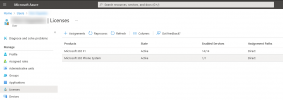
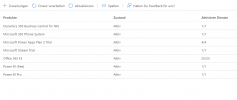
Can you confirm that under the Licenses for that specific user, you see something like this?
1627379841539.png
 
Hi,

After signing in with Microsoft, I am redirected back to the 3CX login page (without being logged in). This occurs on both the management console and user web client. All the other Office 365 integration features are working (user sync, contacts, etc.) and the accounts are selected under the “Sign In” setting. Google SSO also has the same issue.

The server was updated to V18 from V16 from the updates page.
 
Hi,

After signing in with Microsoft, I am redirected back to the 3CX login page (without being logged in). This occurs on both the management console and user web client. All the other Office 365 integration features are working (user sync, contacts, etc.) and the accounts are selected under the “Sign In” setting. Google SSO also has the same issue.

The server was updated to V18 from V16 from the updates page.
This usually happens if the login details don't match any of the extension emails or the integration hasn't been don correctly. Just to make sure:
  • You have correctly configured the MS365 integration and the banner at the top says "Status OK".
  • In the "User Sync" tab, you have synced the user you are trying to login with
  • In the "Sign In" tab, you have enabled both options (as you are trying to login to both MC and WC) and again, selected the user you are trying to login with.
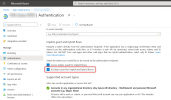
  • In your AD App settings, you have checked the "ID tokens option" as instructed in the Management Console
    1627392296581.png

If you have done the above, then the next thing I would suggest is opening an incognito windows of your browser and try again.
 
Last edited:
This usually happens if the login details don't match any of the extension emails or the integration hasn't been don correctly. Just to make sure:
  • You have correctly configured the MS365 integration and the banner at the top says "Status OK".
  • In the "User Sync" tab, you have synced the user you are trying to login with
  • In the "Sign In" tab, you have enabled both options (as you are trying to login to both MC and WC) and again, selected the user you are trying to login with.
  • In your AD App settings, you have checked the "ID tokens option" as instructed in the Management Console
    View attachment 23191

If you have done the above, then the next thing I would suggest is opening an incognito windows of your browser and try again.
Thank you! I missed the "ID tokens option" when I reregistered 3CX with O365.
 
Are there any plans to make the new desktop app compatible with ARM64 on Windows?
 

Forum statistics

Threads
111,980
Messages
590,106
Members
164,908
Latest member
FarizQasimov