V18 to V20

Status
Not open for further replies.

HS-ITops

Premier Customer
Joined
Oct 8, 2023
Messages
45
Reaction score
4
Hi Team

While Upgrading from V18 to V20. Currently we have IVR setup from CFD.
Do we need to re-setup for IVR from CFD or any inbound configuration changes? or can continue with same CFD will work?
 
Your CFDs will work as normal, and if you have any time configuration in your CFD it will take the Default department office hours and timezone.

Also please ensure that you follow the checklist we posted a few months ago https://www.3cx.com/blog/releases/v20-upgrade-checklist-faq/

The most major gotcha here is to have a unique email address on the system owner account, and make sure you have access to it before performing the upgrade!
 
  • Like
Reactions: Evolute IT
Thanks @NicholasP_3CX for your prompt response

Regarding Step-3 & Step-4 Moving to departments, We didn't found departments in V18 update 9 (Build 31) is this steps after upgrading to V20?

Or is that you mean Call Queues or Groups?
 
Departments are what the Groups become in Version 20.
you will need to assign your Queues and ring Groups to the relevant department so they can also get office hours
 
  • Like
Reactions: jed
Thanks @NicholasP_3CX

Noted, in V18 it's a Groups which will move to Departments.

According to the Queues, We can only able to move users to the Groups in V18, But regarding all Queue Configurations like (Polling Strategy, Queue Wait Time, SLA time, Queue Manager, etc) all these configuration do we need to make any changes or just users of Queue need to be moved in Groups to reflect in Departments?
 
Thanks @NicholasP_3CX

Noted, in V18 it's a Groups which will move to Departments.

According to the Queues, We can only able to move users to the Groups in V18, But regarding all Queue Configurations like (Polling Strategy, Queue Wait Time, SLA time, Queue Manager, etc) all these configuration do we need to make any changes or just users of Queue need to be moved in Groups to reflect in Departments?
All that configuration will remain intact. The only setting you will need to adjust on the queues is the assigning of a department so the queue can get its office hours. The agents themselves can be from various departments.
 
  • Like
Reactions: Evolute IT
Hi @NicholasP_3CX,

Could you please advise on which V20 update release is considered stable for upgrading? Additionally, if available, could you provide the release upgrade path? Is the update still under testing, or is it ready for production?

Thanks.
 
V20 update 2 was released.

Are you running Linux or Windows?
 
V20 update 2 was released.

Are you running Linux or Windows?
Windows server 2019.
You mean V20 Update 2 was a stable version? and can we able to upgrade till V20 update 2 released in production or still is there any bugs?
 
  • Like
Reactions: Evolute IT
Update 2 was officially released on the 9th of July.

And yes it is stable and fit for production.
 
  • Like
Reactions: Evolute IT
Thanks @NicholasP_3CX for the confirmation

What's the stable upgrade paths in between V18 U9 to V20 U2 according to this reference link as we can't jump directly from V18 U9 and it will be a time consumption in that case we have to plan in stages. Is it fine to upgrade according to below path?

V18 U9 > V20 Final > V20 U1 Build 20.0.1.731> V20 U2 Build 20.0.2.715
 
You can go straight to Version 20 Update 2.

Just download the latest Windows installer from your customer portal, under the downloads page.

  • Ensure you have a System Owner in Version 18 with a UNIQUE email address (I Cant stress the importance of this more than enough!)
  • Ensure you have access to the web client of this extension. This is the way you will now be configuring the PBX in Version 20. The Management Console is no longer with us.
  • Take a backup of your PBX in Version 18 Update 9.
  • Take this chance to do your Windows updates.
  • Uninstall Version 18.
  • Install Version 20 using the installer you downloaded.
  • Restore your configuration during the installation process.
  • log in with your system Owner account.
 
Thanks @NicholasP_3CX

As per V18 we have the scenario as below:

1. Inbound Rule > Select DID > Route Calls to (here we have selected our CFD project).
2. From CFD Project > Will Added Multi-Level Flow then the call will route to the Queue from (Call Queues).

Regarding Inbound Rules in V20 it's not available. Assigning for single user or Queue is fine able to see from Call handling. But How can we add our same CFD Project to the Inbound Rule.

Could you please advice, From where we can setup Inbound Rule with our Call Flow Apps (CFD) project and then Route call to the Queue?
 
  • Like
Reactions: Yellow_Flash
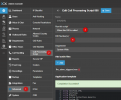
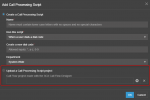
When you add your CFD project in Version 20, you have the option of triggering it when a DID has been dialled. This will allow you to select your DID.
1722839401440.png
 
Hi @NicholasP_3CX
Thanks for your response

Where we can add Call Flow Apps (CFD) in V20?
 
In the screenshot I showed above, steps 1 and 2.

Then you will have the chance to add a script. Select the 2nd option

1722854711956.png
 
Thanks @NicholasP_3CX

while upgrading from V18 to V20, will it create automatically CPS and add existing CFD's with same DID based on V18 configuration.

Or Do we need to configure Manually after upgrade from V18 to V20?
 
The DIDs should be carried over with the upgrade.

From what i remember from our own upgrade to Version 20 at the beginning of the year we did not have to reassign the DIDs, but I would keep it in mind as soon as you log in to jst go and check, and possibly reassign.

It is a simple drop down and selection to reassign.
 
Thanks for your response @NicholasP_3CX

Yeah, for DID we can assign if in case not. But I mean regarding CFD APP's which we obtained in V18 will it be reflected automatically in V20 with CPS section or manually we need to create again CFD setup?
 
Status
Not open for further replies.

Forum statistics

Threads
112,285
Messages
591,704
Members
165,406
Latest member
ARKC