V18 Users: Upgrade to Update 9A

Natassia Allery

Head of Customer Support
Platinum Partner
Joined
Jun 12, 2017
Messages
93
Reaction score
386

V18 Update 9A includes latest iOS & Android and License Certificates.​

Whilst we recommend that all users upgrade to V20 as soon as possible, we appreciate that some users need to schedule time to do so. If you can not upgrade to V20 in the coming months, then you will need to upgrade to update 9A.

Update 9A will[/HEA...​

Continue reading the Original Blog Post.

 
Last edited by a moderator:
Any idea when the windows version will be released? You guys are pushing for everyone to upgrade but we have no Windows option to update to.
 
  • Like
Reactions: layton
An actual release ... Alpha and Betas don't count. They've been pushing out this stuff for months:

"We recommend all users upgrade to V20 as soon as possible. However, if more time is needed to prepare for V20 - upgrade to V18 Update 9A."

We got nothing to really upgrade to ... Hello!?
 
  • Like
Reactions: oxybubbles
An actual release ... Alpha and Betas don't count. They've been pushing out this stuff for months:

"We recommend all users upgrade to V20 as soon as possible. However, if more time is needed to prepare for V20 - upgrade to V18 Update 9A."

We got nothing to really upgrade to ... Hello!?
Have you got an enterprise 3CX license as this is a requirement to continue running 3CX on Windows.
 
Have you got an enterprise 3CX license as this is a requirement to continue running 3CX on Windows.
I believe you don't need to have an enterprise license. Once you upgrade to v20, windows installation licenses will be automatically converted to Enterprise license for the remainder of the current License period. The next time you buy the annual maintenance, you'll have to buy the Enterprise License, that's all.
 
  • Like
Reactions: bitn2
I believe you don't need to have an enterprise license. Once you upgrade to v20, windows installation licenses will be automatically converted to Enterprise license for the remainder of the current License period. The next time you buy the annual maintenance, you'll have to buy the Enterprise License, that's all.
You need a pro license, that will be upgraded to Enterprise for the duration of you subscription.
 
We use Windows and use call flow designer for our workflows. Aparently CFDs are not supported in V20 until update 2. I'm not updating until we get clarification that this update is not going to break anything. I know the office hours have completely changed but if our CFD specifies office hours for a specific option will this still work in version 20?
 
We use Windows and use call flow designer for our workflows. Aparently CFDs are not supported in V20 until update 2. I'm not updating until we get clarification that this update is not going to break anything. I know the office hours have completely changed but if our CFD specifies office hours for a specific option will this still work in version 20?
3CX will support Windows in v20 Update 2, so you should wait for it to be released in order to upgrade.

Said this, CFD apps should work without changes after the upgrade, but there are a few things that you need to check. For example, in 3CX v20 there are changes related to office hours. Previously these were global and now they are related to departments. Because of this change, your existing CFD apps might require some changes. You need to know the following:
1) A CFD app is considered "global" if you don't specify otherwise.
2) You can edit the CFD app to assign it to a department.

When a CFD app is global, and the app uses the Date & Time Conditional component with "Office Hours", "Out of Office Hours" or "Holidays" configuration, then it will follow the default department office hours. If your CFD app is assigned to a department, then it will follow the office hours of that department. With this in mind you should be able to configure it to do what you need.

In any case, as 3CX v20 is a big change compared to v18, you should carefully test your CFD app before upgrading the production environment. There are other things that might affect your upgrade. For example, I remember in the past a CFD app that was accessing a database, and stopped working after an upgrade because the new version of .NET used by 3CX was preventing unsecure connections. The user had to upgrade their SQL server to fix the issue. So in some cases, if your app is interacting with external systems, you should check if that part needs some adjustment.....
 
3CX will support Windows in v20 Update 2, so you should wait for it to be released in order to upgrade.

Said this, CFD apps should work without changes after the upgrade, but there are a few things that you need to check. For example, in 3CX v20 there are changes related to office hours. Previously these were global and now they are related to departments. Because of this change, your existing CFD apps might require some changes. You need to know the following:
1) A CFD app is considered "global" if you don't specify otherwise.
2) You can edit the CFD app to assign it to a department.

When a CFD app is global, and the app uses the Date & Time Conditional component with "Office Hours", "Out of Office Hours" or "Holidays" configuration, then it will follow the default department office hours. If your CFD app is assigned to a department, then it will follow the office hours of that department. With this in mind you should be able to configure it to do what you need.

In any case, as 3CX v20 is a big change compared to v18, you should carefully test your CFD app before upgrading the production environment. There are other things that might affect your upgrade. For example, I remember in the past a CFD app that was accessing a database, and stopped working after an upgrade because the new version of .NET used by 3CX was preventing unsecure connections. The user had to upgrade their SQL server to fix the issue. So in some cases, if your app is interacting with external systems, you should check if that part needs some adjustment.....
Hi Jed,
This is what Im worried about. The CFD is global and has time conditions defined on top of the office hours to allow certain calls through externally.
I use the global office hours now to determine when the phones go into do not disturb mode but allow office users to continue to ring externally or internally. The CFD though has tighter time frames to direct and manage external calls during certain times so they run a little independently.

So Im not sure if the CFD time conditions will take precedence or if the new department office hours will override the work flow.

I guess I just need to test and see what happens.
 
Hi Jed,
This is what Im worried about. The CFD is global and has time conditions defined on top of the office hours to allow certain calls through externally.
I use the global office hours now to determine when the phones go into do not disturb mode but allow office users to continue to ring externally or internally. The CFD though has tighter time frames to direct and manage external calls during certain times so they run a little independently.

So Im not sure if the CFD time conditions will take precedence or if the new department office hours will override the work flow.

I guess I just need to test and see what happens.
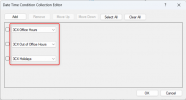
To be clear, if your CFD app is using the Date & Time Conditional component, and configured with any of these 3 options:
1718660658105.png

Then the CFD app will behave according to the office hours from:
- The default department if the CFD app is "System Wide".
- The actual department if the CFD app belongs to a department.

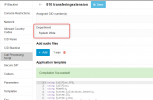
By "System Wide", I mean this configuration for the CFD app:
1718660802202.png


But from what you describe, I'm not sure if you're using the Date & time conditional component, or you're referring to the routing of inbound calls to the CFD app.....
 
To be clear, if your CFD app is using the Date & Time Conditional component, and configured with any of these 3 options:
View attachment 42016

Then the CFD app will behave according to the office hours from:
- The default department if the CFD app is "System Wide".
- The actual department if the CFD app belongs to a department.

By "System Wide", I mean this configuration for the CFD app:
View attachment 42017


But from what you describe, I'm not sure if you're using the Date & time conditional component, or you're referring to the routing of inbound calls to the CFD app.....
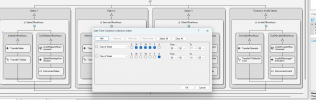
Hi,

No not using the 3CX Out Of Hours condition but just a Date Time Condition Seperate to the built in defaults.

See below

1718668882335.png
 
An actual release ... Alpha and Betas don't count. They've been pushing out this stuff for months:

"We recommend all users upgrade to V20 as soon as possible. However, if more time is needed to prepare for V20 - upgrade to V18 Update 9A."

We got nothing to really upgrade to ... Hello!?
I strongly agree with this.

I'm hoping 3CX can extend the deadline to upgrade from V18 to V20 as V20 is not yet complete (BLFs need to be edited one by one, export is not showing the "Department, etc).

I feel that this is premature or rushed (sad to say). Please extend it to a reasonable timeline (probably the end of 2024).
 
is 9A build 31?
I cant find a mention of 9A in the version details or Dashboard
1720483747741.png

also, is there a way to see the versions across all our systems without logging into each one?
 
  • Like
Reactions: Kritaluk.K
I want to update to v18 update 9A 18.0.9.31
What change to 3cx system ?
i want to remain with the v18
nothing change in the GUI ??
i want to know if with the upgrade there are change to CID rules and inbound rules
 
Last edited:
I want to update to v18 update 9A 18.0.9.31
What change to 3cx system ?
i want to remain with the v18
You are using the free licence, you need to upgrade to v20.
 

Latest Posts

Forum statistics

Threads
111,991
Messages
590,167
Members
164,929
Latest member
Cloudstar