V20: 3CX Re-engineered

Status
Not open for further replies.
I 100% can tell you this is false.

Just because you bypass activation doesn't mean it's legal. There is no free version of Windows Server (not to be confused with HyperV Server).

I can steal the keys for a car off your belt, but that doesn't mean the car is mine / it's free.
I don't bypass anything
3gQES9Z.png
 
Looking forward to the new Evolution of 3CX. The replacement of the Admin Console will take some getting used too but I am encouraged. I will have my eye on the New Road Map. Thanks to the 3CX Team for your efforts! v20 did not come without commitment and effort.
 
Hi.

Thanks for the Release.
I got some windows Installations, if they wanna change to Debian they wanna install it on an Hypervisor.
vmware is very expensive since it's under the hood from Broadcom, so you think about to support xen in the future?

Bye
Timm
 
Is there even a rough ETA for V20 on windows ?

I have been patiently waiting but I am pretty sure I want to stay on windows.

I run enterprise at work but am posting under my home account before I get some no V20 on windows for free user advice ;)
 
is it safe to assume those of us that were on RC4 are now on the final version? didn't see any updates on our two systems we have this runnign on.
 
So let me see if I understood what you are asking - you want us to support additional hypervisors so that you can use it to run a debian instance ON Windows, so that you can avoid the enterprise edition of 3CX?
No he means instead of a Windows baremetal, they would do like VMware/Proxmox/Xen and the Debian VM on top. You already support Xen and KVM but Promox uses QEMU which I think would need some packages in your repos.

If I understand correctly.
 
is it safe to assume those of us that were on RC4 are now on the final version? didn't see any updates on our two systems we have this runnign on.
Yup same build number.
 
So let me see if I understood what you are asking - you want us to support additional hypervisors so that you can use it to run a debian instance ON Windows, so that you can avoid the enterprise edition of 3CX?
Hi Nick.

No, no, i asking for Linux.
Vmware The most of my customer uses the Essential License from vmware, this one is not available anymore, and the next higher level will costs anual fee, and i don´t want them to switch to Proxmox, because this is not support from you. So that is the reason i ask you maybe to think about it for xen.
Wht is think is that vmware for the smaler customers is not an option anymore to use it.

Update: I just saw, that you are supporting xen already, i thought only Hyper-V/ESXi/KVM.
Then for me its ok.

https://www.3cx.de/docs/adminhandbuch/debian-linux-telefonanlage-installieren/

Bye
Timm
 
Last edited:
I don't bypass anything
3gQES9Z.png
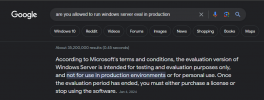
You are not allowed, per Microsoft's T&C, to run Evaluation edition in production:

1709145002836.png

Hi.

Thanks for the Release.
I got some windows Installations, if they wanna change to Debian they wanna install it on an Hypervisor.
vmware is very expensive since it's under the hood from Broadcom, so you think about to support xen in the future?

Bye
Timm
You can run HyperV on Windows at no additional cost and the Debian VM doesn't have any license cost. This is true of Windows 10 even.

So, cheap desktop runs windows 10 today and 3CX on windows.... here is how you get debian with no additional hardware or cost.
1. Backup and uninstall 3CX
2. Enable HyperV
3. Install Debian VM from ISO
4. Restore Backup

Or, just install Debian on the bare metal.
 
Great news Team!!!!
Thank you & Ευχαριστούμε!!!!
 
ETA on Release date?

You're up to date.

Last updated: 02/16/2024 6:24 AM
 
Good Day,

Congrats on the v20 re-write.

Here is my situation to outline what I see as a problem. I have six Enterprise 3CX systems deployed globally on-prem (Hosted does not support the functionality we need). I used to be able to run the 4SC free version on my home lab (different account that is no longer able to post in the forums due to policy changes) to test new features and validate previously released ones. As you can appreciate, we can't just upgrade production systems to a new "rewritten from the ground up" system without thorough preparation, documentation and instructions for our IT Help Desk and end-users. I used to prepare those materials with screenshots from my home lab prior to any upgrade.

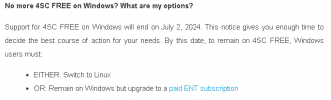
I received an email saying:

1709147927099.png

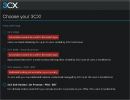
Not a problem, I've always been on Linux and upgrading to v20 is no issue. When I go to the portal to try and download the v20 Linux installer I get this screen.

1709148021965.png

And here we are. I see the same screen on our Enterprise account as well. Wondering what the options are to grab a Linux v20 ISO so we can prepare for this transition correctly.

Thank you.
 
  • Like
Reactions: Gasha
I don't bypass anything
That is not exactly true:

Microsoft provides free of charge evaluation software as a direct download on the internet. For example Microsoft Windows Server 2019. This software can be used for 180 days and is intended to evaluate if the product is right for you. Can one use this evaluation version within a production environment? No, one cannot.

But why are you worried? If you run Microsoft Windows Datacenter (regardless of activation status), you can enable Hyper-V and run unlimited VMs. One of these VMs can be 3CX. You do not need to do anything special.
1. Create the VM (be happy that 3CX has also made sure it runs as a Gen2, so you benefit from SCSI and more - just disable secure boot)
2. Boot from the 3CX provided ISO
3. Next-next-next-finish
4. Setup 3CX as you wish
5. Enjoy 3CX stable and faster without the Windows OS overhead resources


I understand that we can move to using the Linux appliance but for a business who runs on Microsoft servers, we now have to ensure our staff can support Linux too, which is another consideration we must factor in when hiring. All of this is lost time and extra thought required simply because of a change we have no control over.

You just have to make sure that you backup your system religiously, then you have nothing to worry about.
If it fails and your staff does not know how to fix it you can spin up another VM, restore backup and be up in less than 5 minutes.
 
@SweetAction - Thanks for the offer re Grafana - we are still working on it but will be in touch!
2. Yes RC4 became the final its the same build
@Drain Bamaged (nice nickname :) ) - Good point. Well first off you have time to switch but i think you can download a trial and apply your current key...
@OAH We are 100% sure making a Windows version. We like Windows Server, we are just making a way to update NGINX, OpenSSL Postgres on the fly like we do for Linux (postgress only minor versions) and then it will be tested and released. We need to run a full test plan.
@CallingFromMars Thanks for the heads up! I believe the updates to be released over the first half of this year will making it very very good.....

I wouldnt switch to Linux just to avoid the enterprise edition because new enterprise features will come to the enterprise edition so sooner or later a real enterprise will want them
 
I don't bypass anything
3gQES9Z.png
You should reread and respect the MS license terms and pay for software that is not free. And this is seriously not the right place to discuss this.
 
Please bring back the msi for deploying the desktop app! App Store is blocked due to security reasons.
How should the desktop app run on terminalservers?! There is no store.
If you‘re afraid to get hacked again give us md5sums for the downloaded msi! But store only is just not enterprise ready.
 
Does anyone know where to enable hotdesking in V20?
I checked everywhere and I cannot find an option to enable it.

Thanks!
 
Does anyone know where to enable hotdesking in V20?
I checked everywhere and I cannot find an option to enable it.

Thanks!
Hi
Admin-menu Users --> Options

Bye
Timm
 
And here we are. I see the same screen on our Enterprise account as well. Wondering what the options are to grab a Linux v20 ISO so we can prepare for this transition correctly.
You're practically there. Through the Customer Portal just find your key, click on "install" and at the "Choose your 3CX!" screen select "3CX Self Hosted / On-Premise", follow the step-by-step wizard and at the end you'll be able to select your platform (Linux), download the config file and the ISO.
Easy Peasy!
 
Status
Not open for further replies.

Forum statistics

Threads
111,973
Messages
590,079
Members
164,899
Latest member
mazet