V20-Call Queues and Ringtones

Status
Not open for further replies.

LAvoip

Free User
Joined
Dec 12, 2022
Messages
38
Reaction score
1
Hello, is there any way in V20 to have 1 department with a set group of users and create a ring group with a certain DID where calls come into all users, and then have a que with a differnet DID that rings all users, but then put a different ring tone on the queue?
 
I take it this is not an SMB instance, as you mentioned v20. In any case, you can have different ringtones for queue calls.

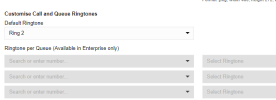
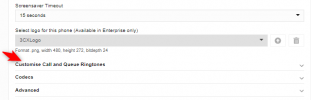
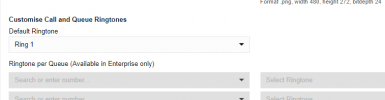
Navigate to the user's settings in the admin console, and from the IP phone section, expand the option near the bottom of the page for the 'Customise Call and Queue Ringtones' and you will see the the section 'Ringtone per Queue'.

1707342025564.png

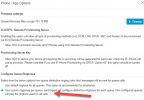
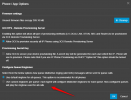
If you dont see the cusotm ring tones option for the queues then under the phones node >options tab you can enalbe the option 'Use custom ringtones per queues'.

1707342100468.png
 

Attachments

  • 1707342085899.png
    1707342085899.png
    33.9 KB · Views: 90
Thanks for the info but when I look it seems it is telling me the diff ring tones per queue is only in enterprise version. Let me try another question that is what I should of asked first. How can I have calls to 2 different DIDs in the same department have different ring tones? One numbrer is the main business line and the other number is the doctor line that needs to have the different ring tone. Thx.
 
Last edited:
Different ring tones can only be configured for Queue calls and internal calls.
In this case you can set each DID to route to a queue and then configure different ringtone per queue.
 
I can't figure out how to get it to work by putting each DID on a different queue..it keeps just going to 1 queue regardless of what number I call
 
Have you assigned the DID to the queue?
1707365324042.png
 
yes I have, but the problem also seems to be that the DEFAULT department is always called and overrides everything
 
Create different departments and assign DID and Department.
 
continues to go to DEFAULT, I'm assuming because that is the dept. on my 1 trunk, in which houses the 2 DIDs?
 
Set the Sip trunk to System Wide and the test.
 
I had it set to system wide and tested and it always goes to Default, if I set the dept in the trunk to each department then it goes to whatever queue I have set behind that department, however, calling each diff. number always goes to the dept. set behind the trunk
 
I believe it was, also is the ability to have a diff ring tone per que only in enterprise version?
 
for what I understand in Enterprice you can choose different ringtones for each queue
in pro version you can choose only one ringtone for all queues.
however this does not work and ringtone is the same for every call :(
 
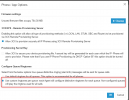
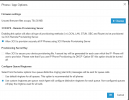
I'm just doing my first v20 and noticing in phone provisioning, there is no longer Configure queue ringtone. We have always set Default ringtone and Queue ringtone. Not looking to customize for each queue but clients have had a different tone for queues up to now. This is very important to them. Please bring setting default queue ringtone that can be different from the default ringtone when not on enterprise and not needing different ringtone for each queue.


1711134146394.png1711134156324.png
 
@bbaker73 Hi there.
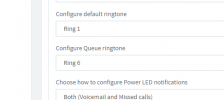
Its actually the same in V20, so in you go to the users, and IP Phone tab, and scroll down, you will see the category "Customize call and Queue ring tones"

1711530050135.png

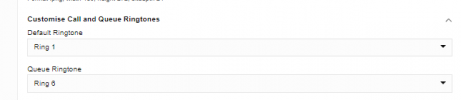
expand it and the Default Ringtone option is there


1711530091059.png
 
Ah, thanks for your response @OlegR_3CX. I looked further and found that on v18, this pbx had Use custom ringtones per que set in the phone/app options. It is a pro system, not enterprise but I believe this is a feature was available to pro prior to v20. Perhaps on v20, this should not be selectable with verbiage (enterprise only) on this screen.

1711572582468.png
Thanks Again! :)
 
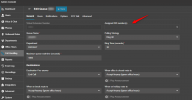
This option is available in PRO editions:
1711599947344.png
 
@TheodorosG_3CX I sincerely apologize if I'm missing something. This is my first v20 upgrade so I'm looking to see what is different before deploying to other instances. This is a 4 SC Pro License. If I select use custom ringtones per queue, as in your image, on the Users, IP phone provisioning tab, Queue Ringtone field is replaced with Ringtone per Queue (Available in Enterprise Only)
1711625249503.png
 
@bbaker73
Apologise for the confusion and misunderstanding here.
So, the ringtone, per specific Queue (once you enable the option shown above), is indeed an option for the Enterprise edition.
With normal settings, you can only change a Different single ringtone for all the queues.
 
Status
Not open for further replies.

Forum statistics

Threads
111,973
Messages
590,079
Members
164,898
Latest member
grahamaskew