V20 - Connection Issues - Stun - Remote Sites and Users

MarkyMark69

Bronze Partner
Basic Certified
Joined
Apr 14, 2023
Messages
6
Reaction score
1
We manage loads of 3CX tennants, The move to V20 we have tried to embrace. But we seem to always get stuck with the same problem.

This is the lack of connectivity options for remote workers and remote sites.

So it would seem we need a router phone or an SBC at every site. So huge expense. Especially for small systems.

This expense is something the customer an not understand. It used to work just fine, It works on my Mobile and my Laptop App. so Why do we need a router phone or an SBC.

One customer had three sites and only DECT phones at each site. - Only viable solution was to enable Stun via Custom Template. Something that is not supported by 3CX.

Other customers we have had to purchase Router Phones at our expense.

The next Customer our Largest are gearing up for the V20 switch. They have 5 remote Users out of 150. All have been working fine on v18 - We suggested they buy Router phones, which they have.

But now the router phones will not work for 3 of the 5 because they were using WiFi (and WiFi will not work with router phones fanvil x5u-v2) - and before you say it I know 3CX dont support WiFi - but this does not help us. As the solution that worked great under V18 now does not work and the customer has come back to us saying 'I am reading this as 3CX are no longer able to offer remote phones.'

This is 2025 and there needs to be a supported method of connectivity for phones that operate remotely without the need for SBC's, We cant be installing SBC's in customers houses - Its not supportable and in all honesty crazy that we would have too. I know i could use the STUN method via custom template but this particular customer does not like seeing unsupported in the dashboard.

I ask that 3CX review this with the end customer and your MSP's in mind. On reading other threads this is clearly an issue for many.
 
The only solution is to use STUN as your own risk and without support or go the supported way with an sbc. You can install it like everywhere. It is really easy to use and to maintain.
 
I understand this is the defacto answer - You say i can install SBC anywhere. But where would I install it. in this scenario.

Remote User - works from home - Needs desk Phone - Desk to far from router to be cabled. Cant install SBC on their laptop as this wont always be on. Cant expect the Remote User to have a Rasberry Pi installed. Router Phone does not not work on WiFi.

Hence the frustration.

We operate other VOIP systems Cloud based for our super small customers - They have no issues at all. We was hoping to migrate these super small users to 3CX Multitennant but its not going to work if we cant connect phones to 3CX.
 
A router phone doesnt cost any more than a normal phone. So for example a Fanvil V65 is the same whether it is a router or normal phone.

Its just the firmware of 3CX has the SBC built in to it. So any new customers with that requirement should be specced up with a phone with that particular capability.

Any existing clients on the other hand can be configured to use STUN. You would just need to create a custom template and configure them, and you would provide the support for them. We wont be able to assist if anything happens for that particular user/extension.

If youre comfortable with that then go for it.
 
  • Like
Reactions: GregG_3CX and bitn2
Thanks Nicholas,

As you can see from my first post this is what we have tried to do. Purchased 5 new phones for 5 remote users - only to find out 3 were using WiFi - Which does not work when the phone is configured as a router phone.

STUN it is I guess.

Would it be possible to get a comprehensive answer as to why configuring Remote Users and Sites is now so difficult. So I can explain to my customers.

I not trying to be difficult but i have already had replies like;
Never had an issue with my old Supplier.
Ive only been with you 2 years why do i now need to buy new phones.
It works on my my mobile why does it not work on this 1 year old phone.
Why does it not work on WiFi if it works on my mobile.
Why do I have to use an unsupprted method of connectivity.
 
Its not difficult at all... Why they switched to use an sbc, its a lot more secure and more easy to deploy. You dont need any port forwardings for any phone, just port 5090 and https.
 
  • Like
Reactions: GregG_3CX
Router Phone does not not work on WiFi.
While 3CX doesn't officially support using any phones over wireless, in my experience it is possible to set them up as router phones, at least on Yealink phones. Connect the phone on a wired connection, as a router phone, then enable wireless and unplug the Ethernet cable. I figure, if they're using the phone by itself (as its own SBC) any wireless issues would still only affect that one phone and not others. Since router phones are portable, the initial setup can be done anywhere, and one can log in to the phone GUI to add the wireless connection info.
 
The other option is to get your client to use 3CX software...web client, PWA, mobile app, Store app.
 
If setting up a new remote site, the Yealink AX83H will operate as a cordless handset and router phone. It also connects via wi-fi, and there is no base unit, just a handset. They also support headset connections via Bluetooth, and charge via the cradle or USB-C
 
If setting up a new remote site, the Yealink AX83H will operate as a cordless handset and router phone. It also connects via wi-fi, and there is no base unit, just a handset. They also support headset connections via Bluetooth, and charge via the cradle or USB-C
 
  • Like
Reactions: N_G
Gingerr6, Ash, Steve Thank you for this. this could solve all the issues above in one hit.

Seems out of stock everywhere :(
 
  • Like
Reactions: ashkmspblueshift
We too have been waiting for ships and containers with this from China for many weeks.
 
While 3CX doesn't officially support using any phones over wireless, in my experience it is possible to set them up as router phones, at least on Yealink phones. Connect the phone on a wired connection, as a router phone, then enable wireless and unplug the Ethernet cable. I figure, if they're using the phone by itself (as its own SBC) any wireless issues would still only affect that one phone and not others. Since router phones are portable, the initial setup can be done anywhere, and one can log in to the phone GUI to add the wireless connection info.
I suppose this won't work, I'm having the same issue with a Fanvil WiFi phone. The phone has a MAC address for the Ethernet port and a different MAC address for the WiFi. When you configure the phone on 3CX, you need to put the MAC address as well. I've tried it with both MAC's (Eth and WiFi) and the phone only works while connected through the LAN cable. I'm using an SBC installed on my lPC and on 3CX, the phone was provisioned through this SBC (so it's not a router phone).
 
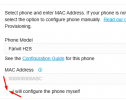
We're also in the scenario of having 1 DECT phone / location . whilst there is a way of manually configuring IP Phone, this seems to be missing for the FXS/DECT section. When looking in the templates under DECT / FXS, I see the models we are using (W60B / W70B) and can create a copy. But when we go to the user and select configure phone, it only looks in the "Phone templates" library. Adding a phone through "Voice & Chat" and selecting "Add DECT / FXS", there no "I will configure the phone myself" option, even after changing the template. As a result, there's only auto provisioning as a possibility for those phones.

I hope I am mistaken, but I've gone through several extensive STUN related forum posts so far, and except from TimEllis' post, there's no mention of this.

Anyone has gotten it to work for DECT base stations?
 
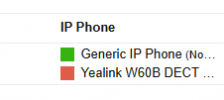
We have a W60B as a ring all situation that we keep in another building. After v20 upgrade it stopped working. And like you, I couldn't find FXS DECT section. I ultimately found it under Phones>PNP Phones, my W60B is listed there, it seems like that section isn't good for anything


However, if you read this older support document you can still configure it.
https://www.3cx.com/sip-phones/yealink-dect-w52p/

You just have to add phone and configure it manually. Then you can copy and paste the credentials and such into the web interface for the device.
1745604823275.png

Kind of lame you can't choose a custom name, which I think you could do on the prior version. But I'm back online again.
1745604953774.png
 
We have a W60B as a ring all situation that we keep in another building. After v20 upgrade it stopped working. And like you, I couldn't find FXS DECT section. I ultimately found it under Phones>PNP Phones, my W60B is listed there, it seems like that section isn't good for anything


However, if you read this older support document you can still configure it.
https://www.3cx.com/sip-phones/yealink-dect-w52p/

You just have to add phone and configure it manually. Then you can copy and paste the credentials and such into the web interface for the device.
View attachment 47636

Kind of lame you can't choose a custom name, which I think you could do on the prior version. But I'm back online again.
View attachment 47637

If an SBC phone or SBC PC is not an option or not possible, you need to make a custom W60B 3CX provision template with STUN enabled..

Go into 3CX advanced settings, copy and save a new W60B DECT provisioning template

And replace the below

<AllowedNetworkConfig>
<option value="LOCALLAN">1</option>
<option value="SBC">1</option>
<option value="REMOTESTUN">1</option>
</AllowedNetworkConfig>


With this

<AllowedNetworkConfig>
<option value="LOCALLAN">0</option>
<option value="SBC">0</option>
<option value="REMOTESTUN">1</option>
</AllowedNetworkConfig>


Then go back to 3CX advanced settings, then parameters and set the STUN disable parameter to 0

Then add the DECT base to the system under whatever you called the template.

I would recommend using SIP over TLS in cases like this.
 
  • Love
Reactions: tronic
Then go back to 3CX advanced settings, then parameters and set the STUN disable parameter to 0
that doesn't matter

The 3CX parameter STUNDISABLED is automatically set to 0 or 1 depending on your internet connection. If you have a static public IP it is set to 1 (because the 3CX need no STUN server to resolve it's own address) otherwise to 0.

Disabling the “Block remote non-tunnel connections” option per user is crucial.
 
  • Like
Reactions: JohnS_3CX
that doesn't matter

The 3CX parameter STUNDISABLED is automatically set to 0 or 1 depending on your internet connection. If you have a static public IP it is set to 1 (because the 3CX need no STUN server to resolve it's own address) otherwise to 0.

Disabling the “Block remote non-tunnel connections” option per user is crucial.

Yes that is crucial and worth mentioning for others, however ZenMasta must have already disabled this because the generic voip phone is registered.

Regarding STUNDISABLED. Things could be different in the latest versions of V20. But when I first started using V20 in early-mid 2024 It was essential to have it on 0. So my experience could be outdated if you are correct.
 
You can run an SBC anywhere technically. If you know how to setup the port forwarding and IP restrict access to it, you can have phones remotely connect to it without risk of security issues. I have an SBC with a public IP. Inbound is completely restricted by source IP (dynamic DNS where needed). At first it worked without RTP ports open in the firewall, but that was coincidence. I simply had to open port 5090 and the RTP port range found in the config file of the SBC.
 

Latest Posts

Forum statistics

Threads
111,932
Messages
589,807
Members
164,806
Latest member
dyoun