- Joined
- Oct 26, 2023
- Messages
- 3
- Reaction score
- 2
Hi All,
We have two departments:
DEFAULT
WA Users
DEFAULT is set to Global Time Zone (AEST). Office hours: Mon-Fri. 8:30-17:00
WA Users is set to +8:00 Australia (Perth).
It was my understanding that if the WA Users department has a timezone set to "+8:00 Australia (Perth)", that the time should be regular hours compared to DEFAULT (8:30-17:00), however, the behaviour I found whilst testing is that users in the WA Users department were recieving an "office closed" voice prompt past 17:00 AEST. Which if their timezone is linked to the office hours, should not happen.
However, if I manually included the shift in time in the office hours in the WA Users department to 10:30-19:00 it began working operating correctly. Does this mean that the office hours is actually linked to the server timezone?? How would that account for daylight savings in that instance?
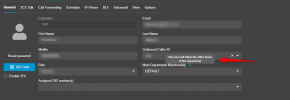
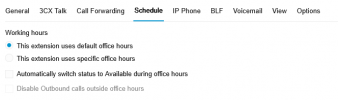
I double checked the user I was calling to test and they are definitely in the correct WA Users department (as their main dept) and also their Schedule is set to use default office hours (which I would assume is refering to their main department).
This has left me very confused as I would expect the timezones to be linked to the office hours, so if I were to set the timezone, then the office hours would be related to the timezone I set. But based on my testing this doesn't appear to be the case.
We have two departments:
DEFAULT
WA Users
DEFAULT is set to Global Time Zone (AEST). Office hours: Mon-Fri. 8:30-17:00
WA Users is set to +8:00 Australia (Perth).
It was my understanding that if the WA Users department has a timezone set to "+8:00 Australia (Perth)", that the time should be regular hours compared to DEFAULT (8:30-17:00), however, the behaviour I found whilst testing is that users in the WA Users department were recieving an "office closed" voice prompt past 17:00 AEST. Which if their timezone is linked to the office hours, should not happen.
However, if I manually included the shift in time in the office hours in the WA Users department to 10:30-19:00 it began working operating correctly. Does this mean that the office hours is actually linked to the server timezone?? How would that account for daylight savings in that instance?
I double checked the user I was calling to test and they are definitely in the correct WA Users department (as their main dept) and also their Schedule is set to use default office hours (which I would assume is refering to their main department).
This has left me very confused as I would expect the timezones to be linked to the office hours, so if I were to set the timezone, then the office hours would be related to the timezone I set. But based on my testing this doesn't appear to be the case.