V20 Update 3 Alpha

Status
Not open for further replies.

AshleyPhones

Silver Partner
Joined
Aug 20, 2024
Messages
15
Reaction score
1
I just wanted to share some bugs that we have come across with Update 3 Alpha:

  1. Users cannot hear the callee after taking the call off of hold.
  2. Building a Default Outbound Rule can no longer have a blank Outbound Caller ID.
    1. On V20 U2, if the rule was blank, it was used to take the main trunk number from the trunk for display.
    2. As this is now needed, it overrides DDIs assigned to a user.
I'm sorry if this is the incorrect place to raise these, but I want to ensure that they are raised and that other community members are aware of the challenges in the Alpha.
 
  • Like
Reactions: PhoneMan123
The rule is at the bottom as a catch-all rule. As stated, this worked on Update 2 but now only stops on Update 3 Alpha.
Than check the extension for other departments and put the rule on top to test. Also check what @JohnS_3CX mentioned
 
Also restart the pbx.. the logs stated there are still restrictions on the rule
 
I don't see DEFAULT here, you made a rule that matches nothing basically.
1724231916425.png
 
  • Like
Reactions: Evolute IT
This should be correct, that rule matches every department.
Okay so I have restarted, deleted the rule, created a new one, tried with no department, tried with the Default department and still no rule matches without a default caller id set in the catch-all rule
 
Okay so I have restarted, deleted the rule, created a new one, tried with no department, tried with the Default department and still no rule matches without a default caller id set in the catch-all rule
Did you already restartet your pbx... You dont need a default caller id in the rule
 
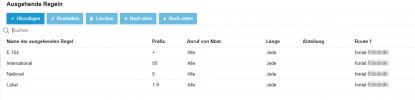
This are my rules and everything is working just fine: 1724232498318.png
 
Ashley try to move your catch all rule to the top, to see if it works as a sanity check.

Look at the logs to confirm it went out via the rule you wanted.

Make sure the route is indeed working (ie. the trunk is ok)
 
Ashley try to move your catch all rule to the top, to see if it works as a sanity check.

Look at the logs to confirm it went out via the rule you wanted.

Make sure the route is indeed working (ie. the trunk is ok)
Already tried. see logs below:
Code:
21/08/2024 10:31:49.260    [Flow] Target endpoint for 07xxxxxxxxx can not be built!
21/08/2024 10:31:49.260    Caller '100' does not belong to any of allowed groups: [36]
21/08/2024 10:31:49.260    Rule BDM: mask=; exts=; prior=11; numlen=; type=0; from: 100
21/08/2024 10:31:49.260    Caller '100' does not belong to any of allowed groups: [35]
21/08/2024 10:31:49.260    Rule 7: mask=; exts=; prior=10; numlen=; type=0; from: 100
21/08/2024 10:31:49.260    Rule 6 Outbound: mask=9*; exts=; prior=9; numlen=; type=0; from: 100
21/08/2024 10:31:49.260    Rule 5 Outbound: mask=5*; exts=; prior=8; numlen=; type=0; from: 100
21/08/2024 10:31:49.260    Rule 4 Outbound: mask=4*; exts=; prior=7; numlen=; type=0; from: 100
21/08/2024 10:31:49.260    Rule 3 Outbound: mask=3*; exts=; prior=5; numlen=; type=0; from: 100
21/08/2024 10:31:49.260    Rule 2 Outbound: mask=2*; exts=; prior=4; numlen=; type=0; from: 100
21/08/2024 10:31:49.260    Rule 1 Outbound: mask=1*; exts=; prior=3; numlen=; type=0; from: 100
21/08/2024 10:31:49.260    Rule Default Outbound: mask=; exts=; prior=2; numlen=; type=0; from: 100
21/08/2024 10:31:49.260    Looking for outbound rule: dialed = [07xxxxxxxxx], processed: [07xxxxxxxxx]; from-ext: 100
21/08/2024 10:31:49.260    [Flow] Building target endpoint to 07xxxxxxxxx from "IT Support" <sip:[email protected]:0> on behalf of 100
 
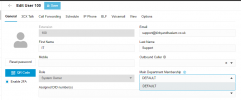
Show a screenshot where 100 appears in Department 'DEFAULT'

Show a screenshot of the rule, with DEFAULT being the only rule requirement
 
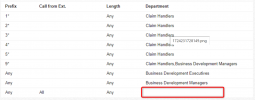
1724233923420.png

Currently, the rule is set to no departments. However even when i have Default as the department it still doesnt work but looks like this:
1724233995860.png
 
This should be correct, that rule matches every department.
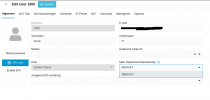
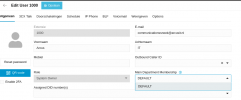
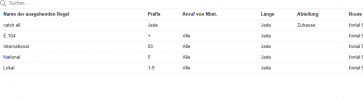
I tried replicating this, but I experience the same issue. On my test 3CX there is only 1 outbound rule, with no department defined, any prefix, all extensions, but when I try to call from my system owner extension, which is in DEFAULT group, 3CX gives the error that there was no outbound rule found. Are you sure that you don't need to define the department in the outbound rules?
1724236375917.png
1724236402738.png
1724236670997.png
 

Attachments

  • 1724236473330.png
    1724236473330.png
    40 KB · Views: 1
I tried replicating this, but I experience the same issue. On my test 3CX there is only 1 outbound rule, with no department defined, any prefix, all extensions, but when I try to call from my system owner extension, which is in DEFAULT group, 3CX gives the error that there was no outbound rule found. Are you sure that you don't need to define the department in the outbound rules?
View attachment 43339
View attachment 43340
View attachment 43342
I'm glad im not the only person :)

The only way to get a rule to work currently in Update 3 is to have a department assigned and a number in the Outbound caller ID in the outbound rule.
 
I am on Update 3 as well and dont have such problems at all.

I tried to replicate your configuaritons... No problem without department and caller id.

Edit #1: I tried again... I need to put the department in there but no caller id. Without department it takes the second rule.
1724238072103.png

Edit #2:I think since update 3 you need one part of the configuration.. Präfix, extension or departmen... Could this be possible? @JohnS_3CX

Edit #3:Now its clear for me... Sure you need one thing to match your rule.

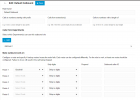
This one should work for a catch all: 1724239235270.png
 

Attachments

  • 1724238516205.png
    1724238516205.png
    1.4 KB · Views: 9
Last edited:
I am on Update 3 as well and dont have such problems at all.

I tried to replicate your configuaritons... No problem without department and caller id.

Edit #1: I tried again... I need to put the department in there but no caller id. Without department it takes the second rule.
View attachment 43344

Edit #2:I think since update 3 you need one part of the configuration.. Präfix, extension or departmen... Could this be possible? @JohnS_3CX

Edit #3:Now its clear for me... Sure you need one thing to match your rule.

This one should work for a catch all: View attachment 43345
Just tried on the PBX of on of our customers, this is not an update 3 thing. One of my customers running on v20 u2 has the same thing. You can't have an outbound rule with nothing defined.
 
S
Just tried on the PBX of on of our customers, this is not an update 3 thing. One of my customers running on v20 u2 has the same thing. You can't have an outbound rule with nothing defined.
Sure, I missed you guys had nothing defined... You always need anything to match a rule. I posted a catch all rule that should work
 
  • Like
Reactions: Rick-Arcus-IT
Just as mentioned earlier, you must match one thing at the very least.

Either Department, or one of the 3 fields above (prefix, extension, length).

If you don't match 1 of these 4 things, then the rule is considered unmatched and we move on to the next one.

The only problem I see here is that Ashley claims 100 was part of group Default, and the rule had Department Default, and wasn't matching. But this is not something I could replicate on my end and OutBound ID appears to be a red herring.
 
@AshleyPhones, if you put your user in the Business Development Executives group (remove from default), is it able to call out?
 
Status
Not open for further replies.

Latest Posts

Forum statistics

Threads
111,953
Messages
589,915
Members
164,851
Latest member
DrunkeMeister