V20, Update 3 Makes it to Release Candidate

Status
Not open for further replies.
Increase the log level to VERBOSE.
Restart your services.
Go to the updates page.
If the "released" update is not available, download the Support Info.
Upload it to your Google Drive or OneDrive.

Send it to me privately (not here).

I will analyze the logs and check which URL is being used to retrieve updates.
If you prefer, you can look into it yourself.
In the Support Info (ZIP file), there is a Logs folder containing files.
Check the file named 3cxManagementConsole.log.
Search for the term: /sp150/servicepackupdate.xml.
Share the full URL with /sp150/servicepackupdate.xml .

This is the URL your 3CX is trying to use to retrieve updates.
 
It is final since some days
 
Yes, but this isnt the correct version. Its Build 806 that is final. You need to resolve the problem why you stil see the old version.

@Guillaume Bourgeois said already how to do it.
 
Yes, but this isnt the correct version. Its Build 806 that is final. You need to resolve the problem why you stil see the old version.

@Guillaume Bourgeois said already how to do it.
Yes, I need the solution for my problem. I have already sent to him info which he asked.
 
This may be best moved to a separate thread as it seems to be hijacking the rest of the thread.

However, check your network if you have any restrictions from reaching https://downloads-global.3cx.com.

Did you change anything on your network which would prevent the PBX from reaching the 3CX downloads server and getting the new list of available updates?
 
This may be best moved to a separate thread as it seems to be hijacking the rest of the thread.

However, check your network if you have any restrictions from reaching https://downloads-global.3cx.com.

Did you change anything on your network which would prevent the PBX from reaching the 3CX downloads server and getting the new list of available updates?
Nothing is changed in my network. I can reach downloads-global.3cx.com by 3CX server SSH using PING. Can you help me to locate the problem?
 
Honestly, Id just go and apply the version shown and then the PBX would go and identify the next update and apply the next one.

Yes it is extra steps, but I identify as part of the #YOLO crowd who would just do it.

But you might be hesitant to do this.

Also, being able to reach a server via a PING response is different to being able to establish a HTTPS connection.
 
Honestly, Id just go and apply the version shown and then the PBX would go and identify the next update and apply the next one.

Yes it is extra steps, but I identify as part of the #YOLO crowd who would just do it.

But you might be hesitant to do this.

Also, being able to reach a server via a PING response is different to being able to establish a HTTPS connection.
I have installed Apha and 2 Beta versions but still no final release. Current version: Version 20.0 Update 3 (Build 786 Beta)
 
I have installed Apha and 2 Beta versions but still no final release. Current version: Version 20.0 Update 3 (Build 786 Beta)
Ahhh, when you installed the alpha/beta part, you need to go the whole way throug. So just install the next relase and so on until you are on final. Remember the next time that Alpha/Beta is not for production.
 
Ahhh, when you installed the alpha/beta part, you need to go the whole way throug. So just install the next relase and so on until you are on final. Remember the next time that Alpha/Beta is not for production.
I did not do in production but in test environment to see if we will get final release but it is not the case. After we installed Apha version and after that Beta version with 2 build numbers, final version is not shown. I had the same issue in production and test environment as well. This procedure is suggested by @NicholasP_3CX
 
I did not do in production but in test environment to see if we will get final release but it is not the case. After we installed Apha version and after that Beta version with 2 build numbers, final version is not shown. I had the same issue in production and test environment as well. This procedure is suggested by @NicholasP_3CX
You are still not on the latest beta... after that you will see the final.
 
  • Like
Reactions: KoesioOccitanie
You are still not on the latest beta... after that you will see the final.
Yes, I am aware that my current version is Beta but final version is not shown in System>Updates section yet. That is issue now
 
Yes, I am aware that my current version is Beta but final version is not shown in System>Updates section yet. That is issue now
Oh man... you need to go throug the full path... Update to the next beta and so on until you will get the final.
 
Oh man... you need to go throug the full path... Update to the next beta and so on until you will get the final.
My path is blocked now because it is not shown any version for update now. Is it clear to you?
 
My path is blocked now because it is not shown any version for update now. Is it clear to you?
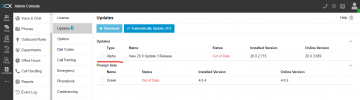
On your screenshot you have an update ready for you. On which version are you now? Maybe you should come with all infos we need to help you.
 
On your screenshot you have an update ready for you. On which version are you now? Maybe you should come with all infos we need to help you.
Version 20.0 Update 3 (Build 786 Beta)
and update section
 

Attachments

  • Update section.png
    Update section.png
    39.1 KB · Views: 23
Last edited:
Standard License = Free License.
That might be related to this issue ?
@NicholasP_3CX

( not good idea publish your license key in public forum )
 
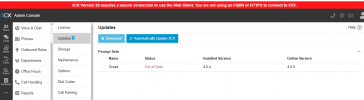
Ok, thats infos we need to help. First you need to access your pbx by fqdn. Did the firewallcheck pass?
 
Status
Not open for further replies.

Latest Posts

Forum statistics

Threads
111,973
Messages
590,074
Members
164,895
Latest member
jasonkkrause