Guillaume Bourgeois
Advanced Certified
- Joined
- Aug 20, 2019
- Messages
- 1,148
- Reaction score
- 1,288
Increase the log level to VERBOSE.
Restart your services.
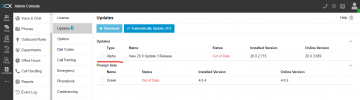
Go to the updates page.
If the "released" update is not available, download the Support Info.
Upload it to your Google Drive or OneDrive.
Send it to me privately (not here).
I will analyze the logs and check which URL is being used to retrieve updates.
If you prefer, you can look into it yourself.
In the Support Info (ZIP file), there is a Logs folder containing files.
Check the file named 3cxManagementConsole.log.
Search for the term:
Share the full URL with
This is the URL your 3CX is trying to use to retrieve updates.
Restart your services.
Go to the updates page.
If the "released" update is not available, download the Support Info.
Upload it to your Google Drive or OneDrive.
Send it to me privately (not here).
I will analyze the logs and check which URL is being used to retrieve updates.
If you prefer, you can look into it yourself.
In the Support Info (ZIP file), there is a Logs folder containing files.
Check the file named 3cxManagementConsole.log.
Search for the term:
/sp150/servicepackupdate.xml. Share the full URL with
/sp150/servicepackupdate.xml .This is the URL your 3CX is trying to use to retrieve updates.