Version 18 Update 6 Simplified. Modernized.

Hello everybody.

When I create an extension, queue or ring group via Desktop APP, I can't choose the extension number?

And if I create it through the management console, can I choose the number but not link it and limit it to a group?

Or am I doing something wrong?
 
  • Like
Reactions: Phone systems NZ
When I create an extension, queue or ring group via Desktop APP, I can't choose the extension number?

And if I create it through the management console, can I choose the number but not link it and limit it to a group?

Or am I doing something wrong?
No you are not doing something wrong. I would recommend using the WebClient for this. The extension number will be auto selected for you when creating the Queue in the system extension range of the PBX. It will be the first available.
 
Hi, we have problems with creation extensions with 0xxx. Our customers need this feature return, because they have CFDs, Room-Hotels, and other existent integrations that NEED create 0xxx numbers...

How can we resolve this?
When can they have it resolved?


Thanks.
CR
 
After a few upgrades this week and some of them going wrong, I'm a bit on edge at the moment. I just need someone to clarify one thing for me. With having to assign a system owner, does this mean at some point, the root credentials we have in place under Security -> Root Credentials may stop working at some point?

It does not state anywhere that they won't, but I'm airing on the side of caution here.
 
  • Like
Reactions: Charli
The root credentials will work for the management console for the foreseeable future. There will be ample warning in advance when it will be replaced.
 
I am seeking some clarification on this. Does this mean that after updating to V18 Release 6, remote phones on dedicated installs which previously worked without a SBC (i.e. via STUN) will not work without one?

If so, can 3CX provide the exact date when users will be forced to upgrade to Release 6 or when STUN will no longer work with phones on a separate network from the PBX?

Screenshot 2023-02-09 at 5.53.43 AM.png
 
Last edited:
No you are not doing something wrong. I would recommend using the WebClient for this. The extension number will be auto selected for you when creating the Queue in the system extension range of the PBX. It will be the first available.
I see this as a problem, when we migrate from another solution to 3CX the customers already have their extension number known and the extensions are not always in sequential order when we use the webclient it will select the first available extension this can cause some inconvenience.
 
I am seeking some clarification on this. Does this mean that after updating to V18 Release 6, remote phones on dedicated installs which previously worked without a SBC (i.e. via STUN) will not work without one?

If so, can 3CX provide the exact date when users will be forced to upgrade to Release 6 or when STUN will no longer work with phones on a separate network from the PBX?

View attachment 34143
Hello,

No, existing STUN phones will not stop working when updating to U6.

However, STUN has the propensity to fail when you least expect it, even if you didn't change a thing on your system.
We created the SBC to overcome the main reasons that cause STUN to fail and we highly recommend using either a dedicated SBC (especially in environments with many phones) or use models that include the built-in SBC.

If you have some STUN phones that are already capable, switch them over to SBC mode as soon as it is convenient to you.

See the current models here: https://www.3cx.com/blog/docs/sbc-router-phone/
 
I don't understand the value of requiring a system owner extension when the management console exists for administrative functions.
 
Agreed though removing generic/unsupported SIP would be a big change because some companies have long term contracts. I'd suspect/hope they would leave that for dedicated installs...
Not only long-term contracts, but some of us are our own SIP provider. We have our own Metaswitch environment, SS7 links, PRIs to tandem switches, etc.
 
  • Like
Reactions: timmbo
Hi. We used to have an Standard Annual license before upgrade to V18, but when we renewed the licensed we got Professional Annual. Is it something proper of the upgrade or we could make a mistake when we were installing the new version that changed the plan? also, I cannot find the standard annual licence in the pricing list. Can you please help me with that?
 
I don't understand the value of requiring a system owner extension when the management console exists for administrative functions.
Per other posts from 3CX they plan to migrate most/all things to the web client over time.

We used to have an Standard Annual license
Standard was discontinued last summer sometime.
 
  • Like
Reactions: N_G
@QCCI IT
Heard from a customer that their headsets was working out of the box on a new PC, without installing the Poly Hub Desktop - so try to uninstall the hub, and try it out, with just the Universal Headset Driver
Thanks ,Jed, I should have figured that having Poly Hub Desktop installed would be the issue. The call button worked fine without it.
 
  • Like
Reactions: jed, rewdey and N_G
Hello,

No, existing STUN phones will not stop working when updating to U6.

However, STUN has the propensity to fail when you least expect it, even if you didn't change a thing on your system.
We created the SBC to overcome the main reasons that cause STUN to fail and we highly recommend using either a dedicated SBC (especially in environments with many phones) or use models that include the built-in SBC.

If you have some STUN phones that are already capable, switch them over to SBC mode as soon as it is convenient to you.

See the current models here: https://www.3cx.com/blog/docs/sbc-router-phone/

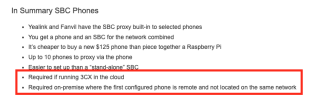
Thank you for the response. However I was really hoping for someone to specifically address the bullet point in the U6 announcement that says SBC Phones are "Required on premise where the first configured phone is remote and not on the same network". If you're installing in a private cloud (i.e. dedicated install in a 3rd party data center), 100% of your phones match this description, I would think.

I am trying to to understand exactly what the implications are. If you have a customer with a bunch of remote T33G phones (supported, but no SBC) will they need to upgrade one to a T53 so it can act as a "router-phone" at some point? At some point are the phones provisioned using STUN/RPS going to fail?

That's the type of clarity I am hoping for. Thank you in advance!
 
Thank you for the response. However I was really hoping for someone to specifically address the bullet point in the U6 announcement that says SBC Phones are "Required on premise where the first configured phone is remote and not on the same network". If you're installing in a private cloud (i.e. dedicated install in a 3rd party data center), 100% of your phones match this description, I would think.

I am trying to to understand exactly what the implications are. If you have a customer with a bunch of remote T33G phones (supported, but no SBC) will they need to upgrade one to a T53 so it can act as a "router-phone" at some point? At some point are the phones provisioned using STUN/RPS going to fail?

That's the type of clarity I am hoping for. Thank you in advance!
Based on everything 3CX has shared, STUN isn't going away. If it's working for you - great, you can use it. If it's a new install - great, you can use it. STUN is here to stay but no one is spending time to support it and it will likely break at some point (but not because of anything 3CX is planning on doing) because that's how STUN goes.

Using the SBC (regardless of router phone or dedicated) is better and preferred but the word required isn't actually what was intended here.
 
  • Like
Reactions: JohnS_3CX and N_G
address the bullet point in the U6 announcement that says SBC Phones are "Required on premise where the first configured phone is remote and not on the same network".
I think it was just worded poorly:
  • an SBC is highly recommended for phones not on the 3CX LAN
  • an SBC is required for 3CX hosted
  • if you have no phones yet, any SBC will work but if you have one that can be a router phone, you can use that as an SBC instead
  • (and, side note: DECT, hotdesking, and FXS don't work through router phones...at least not yet)
 
Thank you for the response. However I was really hoping for someone to specifically address the bullet point in the U6 announcement that says SBC Phones are "Required on premise where the first configured phone is remote and not on the same network".
It basically means that in the WebClient/DesktopApp the wizard that adds a remote phone won't let you add a normal (i.e. non-router) phone unless you already have either a router phone or an SBC. This prevents misconfigurations from less experienced admins.
 
  • Like
Reactions: JohnS_3CX and N_G
I apologize if this isn't the right place to ask but I was hoping for some clarification for on-prem installs needing dedicated IPs and split DNS in the future?

When I installed the 3CX VM 18-24 months ago, I gave the VM a dedicated internal IP, a static dedicated external IP with 1:1 natting (and locked down firewall of course) and this has been working great for us.

Is this is spec with the new requirements or will there be additional actions to take?

Thanks
 
In the past I could go to the webclient and click on the three dots next to an existing ext and click assign. Then I could change the name and email address to a new person who is replacing the current assigned user. This would erase the existing voicemails, etc. Has this feature moved? Thanks in advance.
 

Forum statistics

Threads
111,973
Messages
590,079
Members
164,897
Latest member
ferpeba83