Version 18 Update 6 Simplified. Modernized.

I may be blind but I can't find the option to change my password anymor after update 6.
Im pretty sure it was under Settings -> General in update 5 or older.
Has anyone found out where it moved to?
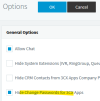
In the management console, Settings/Options, uncheck:
1675700004830.png
 
  • Like
Reactions: MH_INDUS
I just joined a webinar and they stated that generic sip trunks will never be added to the webclient and all settings will eventually go to the webclient and the management console will be removed is this true as being forced to only use support ed trunks would be a big issue.
 
all settings will eventually go to the webclient and the management console will be removed

Technically I think they said "most" settings would move and the management console would be minimal. I think they're trying to make management easier for StartUP (no console, because multi-tenant).

Agreed though removing generic/unsupported SIP would be a big change because some companies have long term contracts. I'd suspect/hope they would leave that for dedicated installs...
 
  • Like
Reactions: Evolute IT
After update we are not able to create an extension starting with 0 (zero).

Is a problem or a behavior of the new version?
 
Hi,

The first extension must start from 1xx, or 1xxx etc. starting from Update 6 onwards.

Pre-existing 0xxx extensions coming from older systems will still work.
 
  • Like
Reactions: Gioal
Please could 3CX consider an option to change what the starting extension is, or have an option to set your country that then changes the starting extension for the system. For country's like New Zealand extensions starting with a 1 can be a problem. In New Zealand our emergency number is 111, we also have 3 digit telco numbers starting with 1 like 120, 123, 126, 160 -169, which will cause issues for customers if the phone system extension are the same.

Many thanks.
 
  • Like
Reactions: N_G and EmmettsIT
Well, I did the update on 70 or so 3CX instances and nobody's called me with problems, so that's really REALLY good news.
 
Nick, thanks for continuing to aggressively improve 3CX! One of the reasons I like it most, and renew maintenance, is for it's impressive features and flexibility.

The upgrade announcement says SBC-capable IP Phones are Required if running 3CX in the cloud. What does that mean? Are RPi SBC no longer supported in the cloud? I'll take this moment to emphasize we're an old school Grandstream GXP2160 lover and have highly optimized it and our SBC deployments, including adding cellular failover, so we definitely want to see RPi SBC continue to be supported, at least on self-hosted systems. BTW, we have no problem getting RPI 4's for about $90.00.
 
Last edited:
The upgrade announcement says SBC-capable IP Phones are Required if running 3CX in the cloud.
I caught that too. I think it’s just worded poorly. An SBC is required, not necessarily a phone. Our old SBC VM sill works on 18u6 without even an upgrade offered.
 
  • Like
Reactions: accentlogic
I caught that too. I think it’s just worded poorly. An SBC is required, not necessarily a phone. Our old SBC VM sill works on 18u6 without even an upgrade offered.
Ahh, another highly attentive person. :-) Thanks!
 
@uptime1 thank you for the heads up! :) Yes sorry thanks for catching that. Normal SBC will do fine too!
 
I'm a little bit unsure about the new System Owner role, that has to be assigned... I don't want to assign that role to my own extension, since I don't need the ability to listen in to calls etc..

Right now I'm using a dedicated Admin User to log in to the Admin Webinterface. This user is defined under: Security > root credentials.

I don't see any way to create an extension for this admin user.. But i could create a new dummy user/extension and assign the system owner role. Would my old admin user still work afterwards? Or would I have to use this new admin user going forward?

kind regards! :)
 
Hello, I am contacting you because we are 3CX integrators and since the last update it is impossible to install 3CX from the AZURE market place with a CSP subscription. This is very problematic because it worked very well before and we had to install 3CX from the market place because the SFR SIP trunk requires changing the sip port to 5070. This is impossible via the pbxexpress. Is it possible to re-enable the installation on an AZURE CSP subscription? This impacts many customers that we need to deploy quickly. Do you know why this is no longer possible?
Thanking you in advance.
 
@Kevin Cyrtel - We have logged a support ticket with Azure and we expect the option to be enabled soon again
 
Hello, I am contacting you because we are 3CX integrators and since the last update it is impossible to install 3CX from the AZURE market place with a CSP subscription. This is very problematic because it worked very well before and we had to install 3CX from the market place because the SFR SIP trunk requires changing the sip port to 5070. This is impossible via the pbxexpress. Is it possible to re-enable the installation on an AZURE CSP subscription? This impacts many customers that we need to deploy quickly. Do you know why this is no longer possible?
Thanking you in advance.
Hi,

Do you currently get the same error? (Currently as in the last 30 minutes - not earlier).
 
I don't see any way to create an extension for this admin user.. But i could create a new dummy user/extension and assign the system owner role. Would my old admin user still work afterwards? Or would I have to use this new admin user going forward?
The management console admin user is unrelated to the system owner extension, which is used in the web client.
 
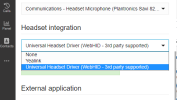
The new update is working fine for us except for our Plantronics/Poly Savi 8210 UC headsets' call answer buttons are no longer working. Our users have (Poly) Hub Desktop installed, the Universal Headset Driver selected, and the headset is shown to be connected, but even after resetting the headset, it still does not work. I have tried this with and without Hub Desktop for completeness.
From the resources I could find, Poly does have WebHID support for all of their current headsets, so this should work, right?
WebHID.png
 
  • Like
Reactions: rewdey
@QCCI IT
Heard from a customer that their headsets was working out of the box on a new PC, without installing the Poly Hub Desktop - so try to uninstall the hub, and try it out, with just the Universal Headset Driver
 
Hi,

Do you currently get the same error? (Currently as in the last 30 minutes - not earlier).
it works. THANKS. what was the problem?
 
it works. THANKS. what was the problem?
Thanks for confirming that it works. There was an issue with our offer listing thus we had to raise a ticket with MS.
 

Forum statistics

Threads
111,973
Messages
590,079
Members
164,897
Latest member
ferpeba83