- Joined
- Jul 19, 2024
- Messages
- 2
- Reaction score
- 2
At a reception desk we have 2 computers and one DECT phone, all are logged in to Ext.11
When the receptionists want to listen to the voice mails they open the web client because they find it easier. From here they 'play' the voice mail so they can listen to it via the phone.
However the manual of operations is different on both PC's.
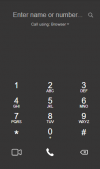
On PC 1 they can 'play' the message, the phone starts ringing, they pick up, listen to the message, hang up from the browser, and click callback in the browser.
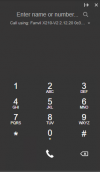
On PC 2 they first have to pick up the phone horn, then press play, have to hang up on the physical phone, again pick up the horn and click dial back in the browser.
If they first click 'play' the browser starts calling, but the green 'pick up' button is grayed out and the physical phone does not ring, picking up the phone does nothing at that point.
Both pc's run the same version of Windows and chrome. We have already cleared all cookies and cache of PC 2's browser and compared all user settings.
When we set up and tested a new voice mail it worked as PC 1, which is the preferred method.
Is there any way to set the behavior of the voice mail in the browser, or a reason they respond differently?
Kind regards
When the receptionists want to listen to the voice mails they open the web client because they find it easier. From here they 'play' the voice mail so they can listen to it via the phone.
However the manual of operations is different on both PC's.
On PC 1 they can 'play' the message, the phone starts ringing, they pick up, listen to the message, hang up from the browser, and click callback in the browser.
On PC 2 they first have to pick up the phone horn, then press play, have to hang up on the physical phone, again pick up the horn and click dial back in the browser.
If they first click 'play' the browser starts calling, but the green 'pick up' button is grayed out and the physical phone does not ring, picking up the phone does nothing at that point.
Both pc's run the same version of Windows and chrome. We have already cleared all cookies and cache of PC 2's browser and compared all user settings.
When we set up and tested a new voice mail it worked as PC 1, which is the preferred method.
Is there any way to set the behavior of the voice mail in the browser, or a reason they respond differently?
Kind regards