Solved Where can I find transcribed text data for "recordings"?

Status
Not open for further replies.

George@

Customer
Basic Certified
Joined
Aug 21, 2020
Messages
7
Reaction score
1
Hi
I have been through the following steps and configured google's speech to text API.
However, transcribed text for VOICEMAIL comes in email but "recordings".
Where can I find transcribed text for recording?

https://www.3cx.com/docs/voicemail-transcription/
 
Hi George,

To see the transcription of a recording, you log into your webclient.

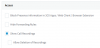
It requires enabling the option to view recordings first so they will appear.
1598021793967.png

Once you are in the webclient, go to the recordings section and next to each entry you should see the text
 
John
I can't find that "access" menu. Where is that located?
 
I could find under Extension>phone provisioning.
However, the extension configured IP phone (physical phone), there is not "access" menu.
 
Hi George

  1. Go to your Extensions page
  2. Select your extension and edit it
  3. Go to the provisioning page
  4. Select the 3CX App from the drop down menu (not the IP phone)
  5. Scroll down a bit and you should see the Access box
 
That worked. Thanks
However, is there any way to remove one minute limit for texting?
 
Hi George,

Unfortunately no, it will be limited to 1 minute.
 
Status
Not open for further replies.

Forum statistics

Threads
111,957
Messages
589,929
Members
164,861
Latest member
LewisJC