Yealink Router phone log location

Status
Not open for further replies.

Matthew Marven

Forum User
Joined
Oct 4, 2017
Messages
17
Reaction score
3
Hi All,

Is it possible to check the SBC log of a Yealink router phone?

We are using a Yealink T53W (Firmware Version 96.86.0.74 | Hardware Version 95.1.0.0.2.1.2) and all of a sudden, the SBC is dropping in and out constantly. I wanted to check the SBC logs but I am not sure of the log location.

Thanks
 
Hi Matthew,

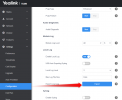
Export this and you will see the 3cxsbc.log file in there.

1686307587352.png
 
Hi JohnS,

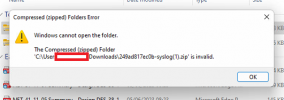
Thank you for the suggestion, when I try that I can't extract the data as it throws an error (I've tried to generate the file multiple times).

error.png


This is the first time we have experienced an issue with a router phone. If we factory reset it during troubleshooting, will we need to create a new SBC in 3CX and clear the old one down for the phone to download the config and provision the SBC again?

Thanks
 
Hmm I'm able to extract just fine from mine so not sure why you are getting this error unless it doesn't like your browser.

This is the first time we have experienced an issue with a router phone. If we factory reset it during troubleshooting, will we need to create a new SBC in 3CX and clear the old one down for the phone to download the config and provision the SBC again?
Edit your extension in the management console and simply press OK (not need to change anything).
Navigate to the 3CX Event log and confirm the RPS message was delivered for the correct MAC address.

You can now hold down the OK button on the Yealink until you see the option to factory reset.
Press OK again, and it should factory reset then re provision itself automatically with no further actions needed.

PS: Make sure that the phone is running on ethernet, do not use WiFi.
 
That's a great tip and done exactly what you said, thank you :)

Unfortunately, that did not fix my fault. I managed to extract the local phone log and get to 3cxsbc.log using 7Zip however I am a little confused about what to look for. The users are finding that calls ring through and establish OK, however, if they park a call no one is able to pick it back up. Can you think of how best to troubleshoot this issue?
 
What about the router phone itself?
Assign SP1 to a BLF and park a call. Then press the same BLF to unpark.

If your phones were on STUN previously, I hope you factory reset them and assigned them correctly to connect via the SBC phone. I mention this because we often see parking issues when on STUN.
 
I've checked and it is the same for the router phone too.

We've never used STUN, the phones have been configured with the router phone since they were installed around 7 months ago.
 
As the other phones are the same model, I may configure one of the other extensions as an SBC and see if I can recreate the behaviour. That should rule out if it's a problem with the current router phone or something with the network. I will report back with what I find..
 
Easier to just check using the webclient, you can transfer into SP1.
Just make sure the dialer has Browser selected in the drop down, not the Yealink
 
Easier to just check using the webclient, you can transfer into SP1.
Just make sure the dialer has Browser selected in the drop down, not the Yealink

I run that test and we can transfer into and pick up from SP1 without issue from the web client
 
To update this post, I added a second router phone and it's been stable so not sure what is wrong with the other phone. We've moved the other extensions to point to the replacement router phone for now as that is an acceptable solution for us.

Thank you for your help and suggestions @JohnS_3CX
 
  • Like
Reactions: JohnS_3CX
Status
Not open for further replies.

Members Online Now

Forum statistics

Threads
111,832
Messages
589,285
Members
164,662
Latest member
DejanMDS