Yealink T7x Out of Box Experience

lancerichards

Platinum Partner
Advanced Certified
Joined
Aug 14, 2024
Messages
159
Reaction score
196
Hi All

We are using the new Yealink T73U devices and have found the firmware which arrives on them needs to be manually updated.
Has anyone come up with a streamlined way so that each handset doesn't need to be touched?

Best
Lance
 
It likely only needs to be updated first if you are using it in sbc mode as yealink doesn’t ship with the special 3cx router/sbc version of the firmware.

We did a massive deployment of yealink t54w phones for a customer that took 18 months and over 1M$ in desk pbones. What we did to make our lives easier was to pay our distributor TDL Gentek $2.50 per router phone, and they updated the phones ahead of shipping. Check with your distributor if they offer that.
 
  • Like
Reactions: accentlogic
Thanks @CentrexJ
We've had that discussion already - would rather use real automation rather than having to rely on human time.

I think I'll just write a base template which injects the firmware on first boot via Option66.
That should at least get the phone home to happen, grab the right firmware, install, reboot and then grab the full config package.

Looks like you can user firmware.url=http://serverurl/yealink/fw/firmware.rom in the response which should deal with giving it the right firmware.

Shall do some tinkering in the lab :)
Lance
 
Ok, so I think I have found the solution here for 3CX to be able to implement and it should be reasonably straight forward and probably just an update to the core templates and logic.

Currently, the firmware.url = is pointing to https://server/provisioning/serverid/firmware/yealink/

The actual firmware is sitting in https://server/provisioning/serverid/firmware_new/yealink/

There isn't a symlink between firmware and firmware_new.

If I query https://server/provisioning/serverid/firmware_new/yealink/T7X-185.87.0.16.rom the file downloads which is good.
If I manually put the config with the full url to the file, the phone updates.

So it's just a matter of 3CX implementing a setting on the provisioning when the phone does a request, it uses something like the User-Agent "Yealink T73U [VERSION] [MAC]" and if the version is not 3CX compatible, it forces the update.

It just needs to dynamically put the correct URL for firmware based on the Make, Model and MAC.

This way, when converting customers to 3CX, it streamlines the process having to manually touch phones, also the out of box would work with the Yealink RPS as the phone would hit 3CX and get the routerphone firmware and config.

@N_G something you think could be added to the roadmap?

Best
Lance
 
Last edited:
Ideas forum material :)

Good write up of the request!
 
  • Like
Reactions: lancerichards
You can already uploaded untested firmware directly from the interface

Supposedly Yealink should ship phones that can be upgraded directly but it depends from which distributor you bought this, its something to discuss with them.
 
  • Like
Reactions: Evolute IT
Hi Nick @N_G
It's not unsupported firmware we're trying to support - it's streamlining the loading of the 3CX supported firmware to devices when they check in for the first time. A huge improvement as we try and get more customers on to the platform.

The easier we can make it, the more customer we can get on the platform. A win win :)

At the moment, the firmware.url = variable doesn't have the smarts to detect what the handset is to offer the firmware, so it actually does nothing.

Given you already know the MAC, Make, Model you have enough info to parse the User-Agent to dynamically make the firmware.url= correct for the handset and deliver up the 3CX supported firmware out of the box :)

The User-Agent looks like this "Yealink SIP-T73U 185.87.0.16 44dbd2d69700"

Hope that makes sense.

Best
Lance
 
Its a decision by yealink. snom and fanvil phones can be provisioned out of the box
 
Its a decision by yealink. snom and fanvil phones can be provisioned out of the box
Completely understand Nick.
I think that it's a really simple solution to implement given you're already generating a provisioning template.

The only change here is to correctly reference the firmware in the provisioning file and it would pickup the 3CX firmware which would be awesome.

You could symlink on the server for Yealink_T7X_Current.rom > T7X-185.87.0.16.rom so that you don't even have to update the provisioning file, but you would have to maintain the symlink.

Or, you could have it dynamic as the file is generated for the model the first time.

Small win that would save a lot of onboarding time :)

Lance
 
Hi Lance, we are looking in to the process and see what we can do. Thanks for flagging and for your suggestions.
 
1766563755291.png
What a Christmas present to see this in the Update 8 RC.

Thanks @N_G this will make moving more customers to 3CX so much easier!

Merry Christmas!

Lance
 
Note that this feature right now works only when the phone is added manually. Auto update on import was moved to SP9 due to time constraints.
 
Note that this feature right now works only when the phone is added manually. Auto update on import was moved to SP9 due to time constraints.
Can you please explain what you mean by added manually @ivank ?
Do you mean added as a handset using an import or manually via the IP phone TAB on a user?
 
View attachment 50537
What a Christmas present to see this in the Update 8 RC.

Thanks @N_G this will make moving more customers to 3CX so much easier!

Merry Christmas!

Lance
And thank you for flagging this matter it helped us move faster with this feature - merry xmas!!
 
Last edited:
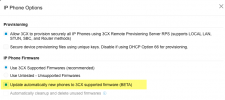
This works for me for Yealink T54W phones but not for Yealink T7x phones. Multiple systems, all with the "update automatically new phones to 3cx supported firmware (BETA)".

Has anyone seen this work with the T7x phones?
 
This works for me for Yealink T54W phones but not for Yealink T7x phones. Multiple systems, all with the "update automatically new phones to 3cx supported firmware (BETA)".

Has anyone seen this work with the T7x phones?

Yes, I've upgraded all the T7 and T8 phones this way.


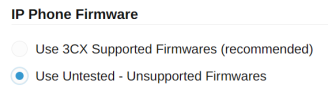
The one exception that you need to keep in mind for all phones regardless of model, is if your firmware happens to be too old and the phone itself refuses to upgrade. We do also provide this option, so you can easily install your interim firmware, then switch back to supported and install the latest 3CX certified FW.

1778217320987.png
 

Members Online Now

Forum statistics

Threads
111,832
Messages
589,282
Members
164,662
Latest member
DejanMDS