Your 3CX Debian OS failed to update

Status
Not open for further replies.

sonnyh1

SOHO User
Joined
Jan 18, 2023
Messages
112
Reaction score
16
Hi,
Currently runnung:
Product Professional Annual
Version Number 18.0 Update 9 (Build 20)
Debian 10 Buster (AWS)

Update is showing:
Version 20 is now available. Before upgrading, take a full backup of 3CX and save it outside of the instance. This upgrade will also upgrade Debian from 10 to 12.

When I try to update I receive the following error:
Your 3CX Debian OS failed to update
3CX Phone System Management Console ID: 10012

Thoughts / suggestions?
 
refering to my case, I never got an email except at the begining when process do a backup, since that , nothing.
 
refering to my case, I never got an email except at the begining when process do a backup, since that , nothing.
We would need to check if a log was produced or if there was an issue where the machine crashed completely, so no log was produced, but we need you to open a support ticket to check.
 
Your CNO already answered me yesyterday saying no more troubleshouting, so I fixed my case restarting from scratch , creating a new AWS lightsail VM and then a complete reinstall including settings from my v18 backup, all is now updated to V20
 
Charles_3CX
I have already been through that.
I have a new AWS setup, but if I do another 3CX PRO instance I will be charged again.
I need to set the new instance of 3CX to test before I restore from my prior 3CX that will not update to V20
 
Your CNO already answered me yesyterday saying no more troubleshouting, so I fixed my case restarting from scratch , creating a new AWS lightsail VM and then a complete reinstall including settings from my v18 backup, all is now updated to V20
What level of 3CX are you running? Did you have to buy a new license?
 
Pro licence, you have nothing to pay to reinstall the same pbx
What is yours as you didn't reply to me about this ?

You speak about new aws setup, what do you mean exactly?
did you only open a new VM and choose debian 10.8 and nothing else ?
Or did you do the full 3CX reinstall including your V18 backup?
 
Charles_3CX
I have already been through that.
I have a new AWS setup, but if I do another 3CX PRO instance I will be charged again.
I need to set the new instance of 3CX to test before I restore from my prior 3CX that will not update to V20
Sorry but i do understand what you mean, can you clarify?
 
Pro licence, you have nothing to pay to reinstall the same pbx
What is yours as you didn't reply to me about this ?

You speak about new aws setup, what do you mean exactly?
did you only open a new VM and choose debian 10.8 and nothing else ?
Or did you do the full 3CX reinstall including your V18 backup?
I am running 18.0 Update 9 (Build20).
It is 3CX POR license.

My AWS was too small, 1 CPU.
I stopped the service and upgraded to 2CPU and 4GB, and restarted AWS.
After about 5 minutes 3CX was running and all phones were connected.
V20 still will not upgrade.

I have setup a new instamce on AWS for the reinstall of the 3CX PRO.
I want to test the new PBX before remove the old installation and restore from my existing backup
 
Sorry but i do understand what you mean, can you clarify?
If I need to reinstall 3CX Pro, I want to test it before I remove the old installation, which will not upgrade to V20
 
I am running 18.0 Update 9 (Build20).
It is 3CX POR license.

My AWS was too small, 1 CPU.
I stopped the service and upgraded to 2CPU and 4GB, and restarted AWS.
After about 5 minutes 3CX was running and all phones were connected.
V20 still will not upgrade.

I have setup a new instamce on AWS for the reinstall of the 3CX PRO.
I want to test the new PBX before remove the old installation and restore from my existing backup
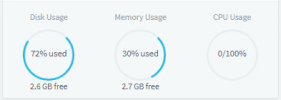
Did you check the free disc space before trying to update?
 
I have setup a new instamce on AWS for the reinstall of the 3CX PRO.
do i need to understand you have now 2 VMs with same 3CX settings on it?

Where is your V18 backup stored? do you have it OUT of the AWS instance ?
 
  • Like
Reactions: Charles_3CX
I bet your drive need some more space , if only 2.6Gb is remaining free perhaps it's not enough for migration process to accomplish without failure
 
  • Like
Reactions: Charles_3CX
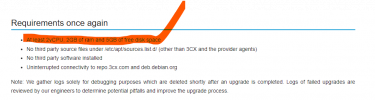
So, your disk usage is 72%, and you have only 2.6GB available. And how much disk space is required to have for the update mentioned in the guide that you already went through?
If I remember correctly, it says "adequate" disk space, what ever that means.
 
1700759079348.png
 
  • Like
Reactions: Charles_3CX
Status
Not open for further replies.

Forum statistics

Threads
111,973
Messages
590,071
Members
164,892
Latest member
Phone1stStop