

What Is a Virtual Phone System and How Does It Work?
A virtual phone system offers a flexible and efficient way to manage business calls, without the need for traditional landlines. But what exactly is a virtual phone system, and how does it work?
At 3CX, we’ve been helping businesses (including major brands like BMW and Pespi) improve their communication since 2005. In this post, we’ll break down the basics of virtual phone systems, their benefits, and how they can help your business stay ahead.
What is a virtual phone system?
A virtual phone system is a cloud-based communication platform that allows businesses to manage their phone calls over the internet rather than through traditional phone lines. Instead of being tied to physical hardware, calls are routed through the cloud, giving companies flexibility and the ability to stay connected from anywhere.
What is the difference between landlines and a virtual phone system?
Unlike traditional landlines, which require physical hardware and dedicated phone lines, a business virtual phone system operates entirely online. This means there’s no need for physical equipment or complex installations. Landline systems can be expensive to set up and maintain, whereas a virtual phone system is more cost-effective and easier to manage. They're also highly flexible—you can add new users, manage calls from any device, and scale up or down as your business grows, all without the limitations of a physical phone line.
In short, a virtual phone system offers the modern, efficient, and adaptable communication that today’s businesses need to stay competitive.

How does a virtual phone system work?
A virtual phone system works by using VoIP to route both inbound and outbound calls over the internet. Let's go into more detail on this.
VoIP technology: the foundation of virtual phone systems
At the core of virtual phone systems is VoIP technology (Voice over Internet Protocol). VoIP converts voice signals into digital data, allowing calls to be made over the internet. These packets are then reassembled at the receiving end, allowing for real-time communication.
To use VoIP, you’ll need three main things:
- A VoIP service or app to make the calls.
- Internet access to handle sending and receiving the data.
- A VoIP provider or SIP Trunk to connect your calls to the wider telephone network, including recipients who aren't using VoIP.
VoIP uses a few important protocols to make sure your calls happen smoothly:
- RTP (Real-Time Transport Protocol): This helps make sure your voice or video is sent over the internet and arrives without delays.
- SIP (Session Initiation Protocol): This is the system that connects the call, making sure both parties are linked for the conversation. It also helps end the call when it’s over.
Virtual phone numbers
Virtual phone numbers are not tied to a specific physical location and can be assigned to businesses as local or international numbers. These numbers function like traditional phone numbers, but with the added flexibility of being accessible on any device, such as a desk phone, mobile device or computer. Whether employees are working from an office, home, or on the move, virtual phone numbers ensure that calls are managed efficiently and professionally.

Benefits of using a virtual phone system for businesses
How can using a virtual phone system benefit your business?
Cost savings
At 3CX, we’ve seen first-hand how virtual phone systems can deliver significant cost savings. One clear example is our work with Newman College, where we helped reduce telecom costs by an impressive 75%.
The school needed to connect staff across a large site, enable remote work, and ensure safeguarding with call recording—all of which were becoming difficult and expensive with their existing setup.
By switching to 3CX, Newman College was able to implement a virtual phone system in less than 24 hours. This solution not only reduced their costs but also provided the flexibility they needed, with features like call queues, a digital receptionist, and built-in call recording.
Flexibility
A virtual phone system grows with your business, not against it. Need to add more users, new phone numbers, or extra features as your business expands? With a few clicks, your system can scale to meet your needs—no need for expensive upgrades or complicated installations. Whether you’re a start-up or a rapidly growing company, virtual systems offer the flexibility to adjust on the go.
Remote working
In today’s world, remote work is the new normal—and a virtual phone system ensures your team stays connected no matter where they are. Whether your employees are working from home, traveling, or on-site, they can make and receive business calls from any device with an internet connection. In fact, 67% of mobile workers report increased productivity when using VoIP systems.
Improved customer experience
Delivering an exceptional customer experience is easier with a virtual phone system. Features like call routing and Interactive Voice Response (IVR) direct your customers to the right department quickly, cutting down on wait times. In addition to this, with call tracking and analytics, you can keep an eye on customer interactions, ensuring your team is delivering a high quality service.
Features of a virtual phone system
What features can you find in a virtual phone system?
Automatic call distribution (ACD)
One of the most critical features of a virtual phone system is ACD. It ensures that incoming calls are directed to the right person or department quickly and efficiently. Wherever your team is working, call routing helps to improve communication by automatically connecting customers to the right team member.
Interactive voice response (IVR)
A well-designed IVR system allows customers to interact with your business via automated voice prompts, guiding them to the right department or information without the need for human intervention. IVR systems work alongside ACD to help reduce wait times, improve call handling, and ensure that customer inquiries are managed efficiently.
Voicemail to email
Missing a call doesn’t mean missing the message. With the voicemail-to-email feature, any voicemails left by customers are automatically sent to your inbox as an audio file. It’s a simple way to stay on top of communication, even when you're away from your desk.
Call forwarding
With call forwarding, you can ensure that no call goes unanswered, no matter where you or your team are located. Calls can be automatically redirected to a mobile phone, home office, or another location. This is especially beneficial for remote teams or businesses that operate in multiple locations, helping you maintain communication at all times.
Call recording
For businesses focused on quality assurance or training, call recording is an essential feature. It allows you to record and store customer interactions for future review. Whether you need to monitor customer service calls, provide feedback to your team, or maintain records for compliance, this feature ensures that every conversation is documented and can be easily accessed when needed.
Integrations
A great virtual phone system doesn’t operate in isolation—it connects with the other tools your business relies on. Integrations with CRM (Customer Relationship Management) software and other business tools allow you to manage your customer interactions and data more effectively.
This means that calls can be automatically logged, customer information can be updated in real-time, and your team has access to the data they need during every call. With the combination of CRM and virtual phone system software, you can see who's calling before answering the phone.

What is the difference between a virtual phone system and a PBX?
A PBX (Private Branch Exchange) is a business phone system that manages and routes calls. In the past, PBX systems were typically installed on-premise, requiring physical hardware and regular maintenance. However, with the rise of cloud technology, PBX systems can now be hosted off-site, known as a hosted PBX. A hosted PBX is the same as a virtual phone system—both use cloud-based technology to handle calls without needing on-site infrastructure.
Both virtual phone systems (hosted PBX systems) and on-premise PBX systems can use VoIP (Voice over Internet Protocol) to make calls over the internet instead of traditional phone lines. However, the key difference is where the system is hosted and how it's managed.
On-premise PBX
An on-premise PBX requires physical installation at your business location. You’ll need to invest in the hardware and be responsible for its maintenance and upgrades. This is often the ideal phone system for enterprises or larger businesses with in-house IT teams or specific needs for customization and control. While offering full ownership of the system, it comes with higher upfront costs and ongoing maintenance responsibilities.
Virtual phone system
A virtual phone system (hosted PBX), on the other hand, is hosted in the cloud, so there’s no need for physical equipment at your office. The provider manages everything from maintenance to upgrades, making it a more cost-effective and scalable option. This flexibility makes it ideal as a small business phone system, or as a solution for companies with remote or hybrid teams. They can easily add new users or features without significant investment, and everything is managed remotely.
How to choose the best virtual phone system for your business
Choosing the right virtual phone system can feel overwhelming with so many options available, but breaking it down into key factors can help you make the best decision for your business.
Scalability:
- Can the system easily grow with your business?
- Does it allow you to add new users or lines without significant extra costs or complex installations?
- Is there flexibility to upgrade or add more advanced features as your business evolves?
Features:
- Does the system include essential features like call routing, IVR, voicemail-to-email, call forwarding, and call recording?
- Are there integrations available with CRM or other business software to improve communication and workflow?
- Are any advanced features, such as video conferencing or analytics, and are they necessary for your business?
Ease of Use:
- Is the system intuitive and easy for your employees to navigate?
- Will the setup process be straightforward, or does it require extensive IT involvement?
- Can the system be managed easily, reducing the need for ongoing technical support?
Pricing:
- Is the pricing transparent, and does it fit within your budget?
- Does the system offer per-user, per-month pricing, or are there options for annual plans that might offer savings?
- Are there hidden fees for adding users, lines, or advanced features?
Reliability:
- Does the provider offer a high uptime guarantee to ensure consistent service?
- Are security measures in place to protect your business communications and data?
- Does the system have a solid reputation for performance and stability?
What are the best virtual phone systems for 2025?
When looking for a virtual phone system, it's essential to consider both cost and the range of features included. We've compared and ranked five different virtual business phone systems below.
3CX
- Annual pricing, per system – starting from $0.
- All features are included, including live chat and contact center software.
- Calls are priced based on the number of simultaneous calls, not users—so you're not paying more than you need to.
- Hosting options include 3CX-hosted, self-hosted (AWS, Google, Azure), or on-premise.
Avaya
- Monthly pricing, per user – starting from $19.99.
- Premium plans can cost up to $50 per user/month depending on the features and hardware required.
- Self-hosted phone systems are priced around $500 per user upfront.
- Hardware costs range from $70 to $600 per device.
Microsoft Teams
- Essentials plan – $4 per user/month (annual billing).
- Business Basic – $6 per user/month.
- Business Standard – $12.50 per user/month.
- Video conferencing and mobile apps are included.
- Calling is an optional add-on; Teams can integrate with systems like 3CX for telephony.
- Contact center and customer live chat are not included.
8x8
- X2 plan – $24 per user/month.
- X4 plan – $44 per user/month.
- Includes unlimited calls, video conferencing, and messaging.
- Pricing is per user, billed monthly; custom enterprise quotes are available.
How to set up a virtual phone system
Setting up a virtual phone system should be straightforward, no matter which provider you choose. Here's what it looks like with 3CX.
Step 1: Sign up and choose your hosting method
The first step is to sign up for 3CX and choose how you want your system to be hosted. You have three options:
- 3CX Cloud Hosted PBX (hosted by 3CX): This is the easiest option as we manage everything for you in the cloud.
- Self-Hosted PBX on a Cloud Provider: If you prefer more control, you can choose to self-host using providers like Amazon Lightsail, Google Cloud, or Azure.
- On-Premise Installation: For businesses that need everything in-house, you can host 3CX on your own hardware or a local server. This of course is not a virtual phone system, but it can use VoIP to connect calls through the internet.
Step 2: Installing the 3CX phone system
Once you’ve chosen your hosting method, the installation process is guided by a straightforward setup wizard. The wizard takes you through the key configuration steps:
- Select Your Hosting Provider (if cloud-hosted)
- Select Your Extension Length: This is the number of digits for your PBX extension numbers.
- Configure the PBX: Entering basic details such as company name and admin credentials.
- Select Your Domain Name: You’ll be given a free domain, or you can use your own.
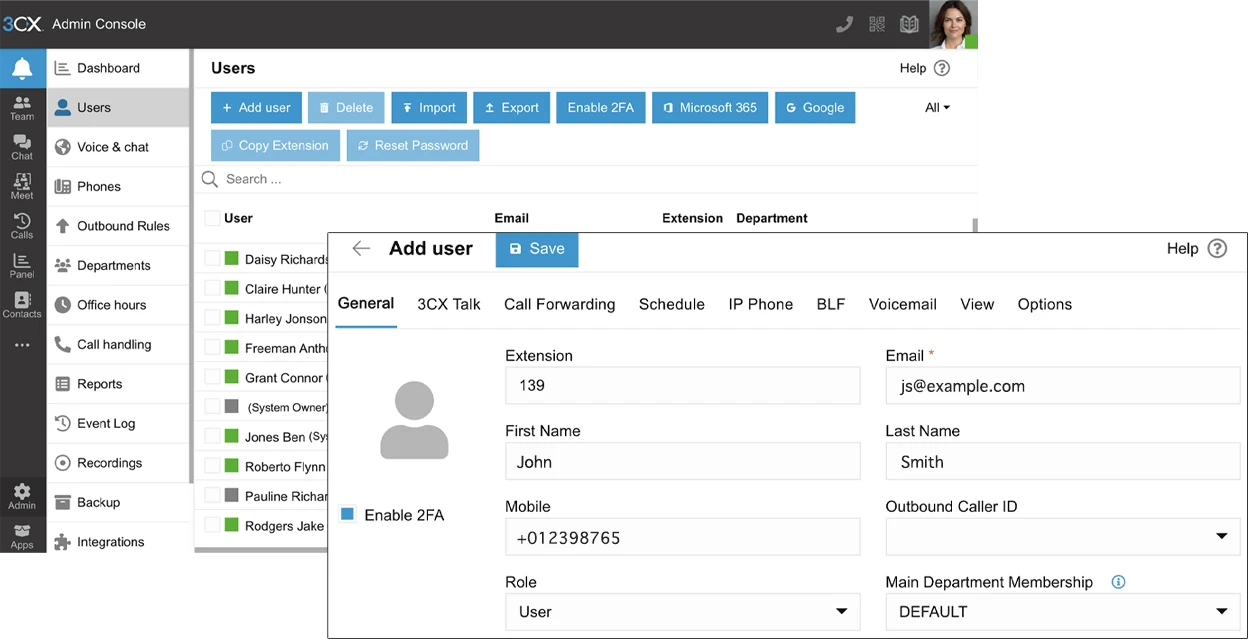
Step 3: Add users and extensions
After installation, it’s time to add your users. 3CX makes this easy:
- Add users by entering their names, email addresses, and other details.
- Each user will get a "3CX Talk" link, which they can send to customers to connect with them without dialling or paying for calls.
- Each user will automatically receive an email with their account details.
Step 4: Configure your SIP Trunks
To enable external calling, you’ll need to set up your SIP trunks.
- Select your provider from the drop-down box.
- Fill out the account details given to you by your provider, as well as your main trunk number. If you don't have account details, you'll need to specify an IP.
- There are more options available to you, like adding DID numbers (which allow you to route calls directly), and limiting the SIP trunk to specific departments.
Step 5: Test your system
Before going live, test your system by making internal and external calls to ensure that everything is functioning correctly. This is also the perfect time to fine-tune any settings or features, including setting up IVR and call routing.
Step 6: Go live!
Once you’ve completed the setup, your 3CX virtual phone system is ready to go. You can now start making and receiving calls, manage your users, and monitor performance all from the easy-to-use management console.
Your questions answered…
Last Updated
This document was last updated on 4 July 2025
https://www.3cx.com/pbx/virtual-phone-system/

 Copyright © 2026