




Start with the transcription workload you have, plan for peaks and growth, and expand as demand rises.
You can size a 3CX AI Server for the demand you have today and add capacity as it grows, so there is no need to buy for every future workload up front.
That is because your first AI Server does not have to be the only one, and each PBX does not need its own. One PBX can use one AI Server or several, and multiple PBXs can share one server or a pool.
A partner, for example, can share AI resources across several customers to make better use of them, then add servers to create room for growth and resilience. A business with one large PBX or several systems benefits from the same flexibility.
Whichever deployment you choose, the sizing method stays the same: calculate the recordings you need to process, add a margin for near-term growth, check that capacity against your busiest periods and expand as demand grows. The connection options are covered in 3CX AI Server Upcoming Updates.
Calculate the Workload You Actually Need
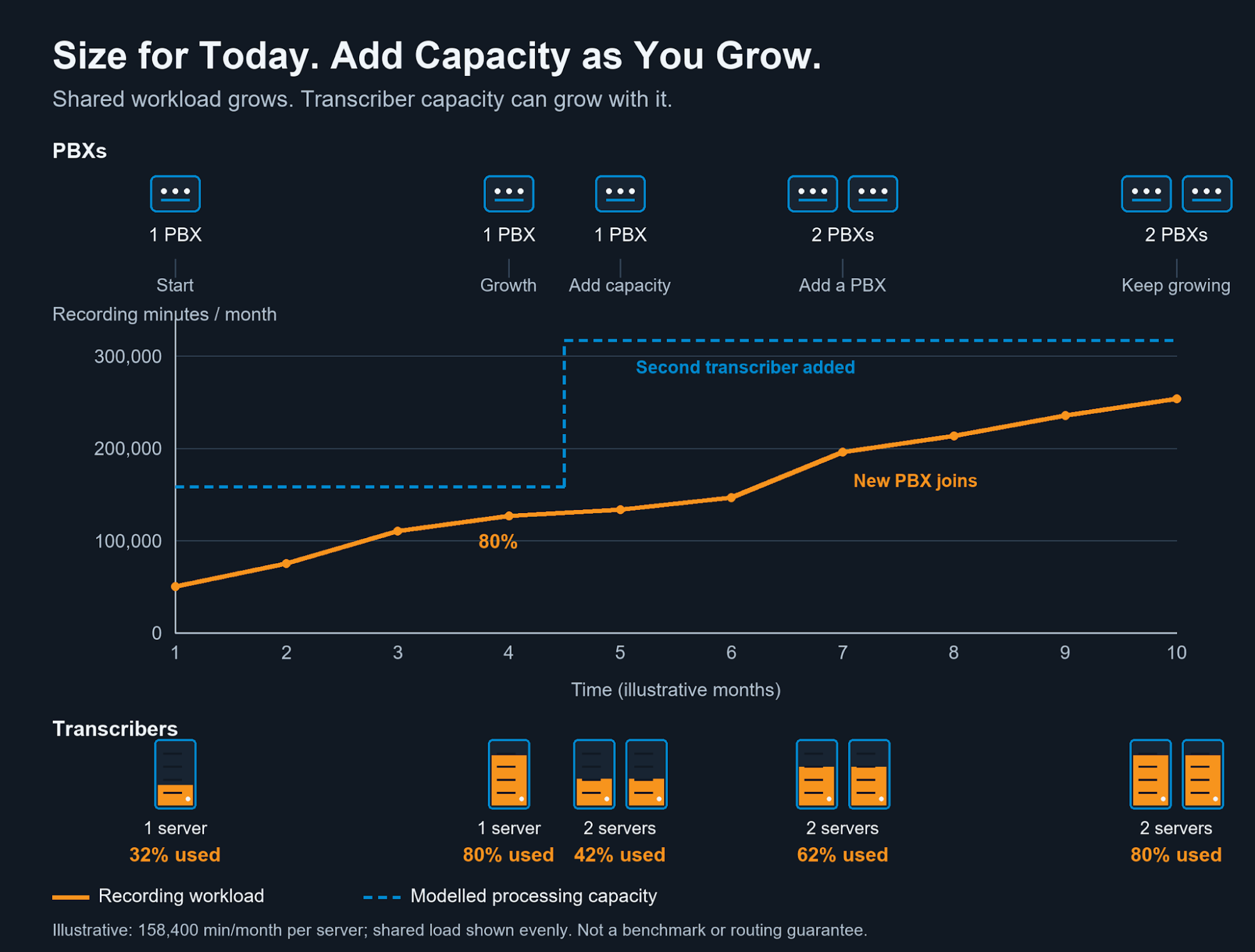
Illustrative timeline: a single transcriber (AI Server) handles the starting workload. When it reaches 80% of its capacity, a second transcriber is added, leaving headroom for a new PBX to join the shared pool.
Size your AI Server around the recording and voicemail minutes that will be sent for transcription, not around all of your phone traffic.
Only those minutes use AI Server capacity, and the time you allow to process them decides how much throughput you need. Spreading work across the whole day gives a different requirement from completing it within business hours, so choose a processing window that matches the service you intend to deliver. Do not assume overnight capacity is useful when users need results sooner.
If several PBXs share AI resources, include every one of them, and keep each PBX’s figures separate so you can see what a new customer or department will add.
In this illustrative example, a business sends 50,000 recording minutes a month for transcription and wants them processed within 12 hours on each working day. That turns the monthly total into an average hourly workload of about 189 recording minutes:
| Sizing input | Worked example |
|---|---|
| Monthly recording workload | 50,000 minutes |
| Working days per month | 22 |
| Processing hours per working day | 12 |
| Available processing time | 22 x 12 = 264 hours/month |
| Average hourly workload | 50,000 / 264 = 189.4 recording min/hour |
This average hourly workload is your baseline demand: the figure you compare with your server’s measured capacity in the next step.
Compare Demand With Measured Capacity
Next, check your baseline demand against throughput you have actually measured on the proposed server, with a margin added for growth.
General hardware figures cannot reflect your call lengths or analysis workload, so use representative recordings that include both to measure sustained processing throughput. For hardware comparisons and the meaning of Speed Factor and round-trip time, see 3CX AI Server - Speed and Response Time. Hardware and platform requirements are in the AI Server installation guide. Adding a growth margin then shows whether the server can absorb near-term demand without immediate expansion.
Continuing the previous example, assume your AI Server hardware has a measured 10x Speed Factor and you want to allow a 30% growth margin. Replace these inputs with your own measurements and expected growth.
| Capacity check | Calculation | Result |
|---|---|---|
| Measured capacity (10x Speed Factor) | 10 x 60mins | 600 recording min/hour |
| Average + 30% growth | 189.4 x 1.30 | 246.2 recording min/hour |
| Planned average capacity used | 246.2 / 600 x 100 | 41.0% of AI Server capacity |
| Observed busy-hour workload | Measured input | 300 recording min/hour |
| Busy hour + 30% growth | 300 x 1.30 | 390 recording min/hour |
| Planned busy-hour capacity used | 390 / 600 x 100 | 65.0% of AI Server capacity |
In this example, the planned average uses 41% of measured throughput and the busy hour 65%, so the server fits the workload with room to spare. The average alone is only a first check, though, because it can hide a busy period. Note that these percentages compare recording demand with measured throughput; they do not represent CPU or GPU utilisation.
Check Peaks and Leave Room to Recover
Your AI Server needs to keep up with your busiest periods and still return results within an acceptable time when part of your capacity is unavailable.
Several customers can fit comfortably on monthly totals while sending most of their recordings at the same time, and longer calls also change how quickly individual jobs finish. Growth allowance and resilience also answer different questions: growth allowance covers more work, while resilience requires enough remaining capacity when a server is unavailable.
So repeat the check for your busiest observed period, including overlapping peaks across PBXs that share servers. Then test a representative busy batch and watch how long results take to return. A queue that clears within your acceptable delay is different from one that keeps growing. Finally, check the reduced-capacity scenario, with a server unavailable, against your required turnaround time, rather than counting every server as available all the time.
If the queue does not recover, or turnaround suffers at reduced capacity, revisit the processing window, workload or available capacity before adding more demand.
Add Capacity as Demand Grows
Recalculate your requirements whenever your workload changes, and add capacity before the server falls behind.
Adding a PBX, extending recording to another department or seeing sustained growth all increase demand. Shared servers let you use spare capacity across systems, while additional transcribers (AI Servers) let the pool grow. A mixed pool does not necessarily scale exactly in proportion to its server count, so measure the combined throughput after each expansion.
The timeline at the start of this post shows this in practice: organic growth takes the first transcriber to 80% of its capacity, a second transcriber creates headroom, and that headroom then absorbs a new PBX joining the shared workload. The 80% expansion point is an example, not a recommendation. Add capacity early enough to preserve your chosen growth and resilience margins.
Start with today’s measured demand, allow for the growth you can reasonably expect, and review actual turnaround as the workload changes. That way, your AI resources grow alongside your customers, without buying for every possible future workload on day one.
Join the Discussion
Join the 3CX discussion in our dedicated Partner or Customer Forums. Follow us on X and LinkedIn to stay-up-to date on latest news and feature releases.









 Copyright © 2026