





Introduction
By default, 3CX Phone System has a limit of 2 minutes for callers to leave voice mails. However, there are many cases when people calling your company might want to leave voice mails that are longer than 2 minutes. This article will describe how to increase the length of a voice mail.
Increase Voice Mail Length
- Log in to your 3CX Phone System Server. You will need access to the actual computer.
- Press ⊞ Win + R on the keyboard, type Services.msc and stop the 3CX Webserver. If you use Abyss, stop "abyssws.exe" or if you selected IIS as your web server, stop "W3WP.exe".
- Press ⊞ Win + R on the keyboard, type in %allusersprofile%\3CX\Data\Http\Interface\ivr and search for "RecVmail.vxml".
- Right click on "RecVmail.vxml" and edit with a text editor, for example Notepad++.
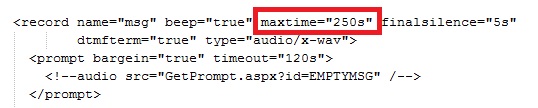
- Search for the xml node "record name". In the maxtime attribute, set the value to your preferred timeout. In this example we have increased the voicemail timeout to approx 4 minutes (250 seconds). This value should be in seconds.
- Save your changes, and start the Web Server.
From this point on, any Voicemails received can be up to 250 seconds long.









 Copyright © 2026