





How to fit your Agents into the correct OpenAI usage Tier.
Once you’ve set up an AI Agent, typically one of its tasks is to understand the caller's intent, and transfer the call to an appropriate extension. The caveats - your AI Agent must have access to the OpenAI service and must not be restricted by rate limits. If your AI Agent hits a rate limit, the caller will not get a response, and the call flow will break. The call will not transfer, and the caller will hang up. To avoid hitting rate limits we’re setting out some guidelines for you to follow.
This blog is a long read! In summary, here’s what we’re covering:
-
- Typical log messages when rate limits are reached
- Some mathematics about how token consumption can be estimated
- The technical complexity of a call and how it affects token consumption
- How knowledge sources affect token consumption
- Translating rate limits to simultaneous AI Agent calls
- How to navigate OpenAI to understand and adjust your rate limits
- OpenAI accounts who pay a minimum of $100 are typically elevated to Tier 3 directly
Log Messages When Rate Limits Are Reached
When you hit the OpenAI Rate limit, you can see this in the 3CXAI.log file; here's an example:
 2026-03-09 10:17:26.674|DEBUG|{'call': 110, 'dir': 'ai', 'detail': True} [OpenAI] response.done content> :

{'type': 'response.done', 'event_id': 'event_DHYWMxZ4ipQABCDEFGHIJ', 'response':

{'object': 'realtime.response', 'id': 'resp_DHYWMnVTGk1234567890', 'status': 'failed', 'status_details':

{'type': 'failed', 'error':

{'type': 'tokens', 'code': 'rate_limit_exceeded',

'message': 'Rate limit reached for gpt-4o-realtime in organization org-LwDoeGAu4fbAABBCCDDEEFF on tokens per min (TPM): Limit 40000, Used 31222, Requested 14701. Please try again in 8.805s.

Visit https://platform.openai.com/account/rate-limits to learn more.'}},

'output': [], 'conversation_id': 'conv_DHYW8SqVAABBCCDDEEFFG', 'output_modalities': ['audio'], 'max_output_tokens': 'inf', 'audio': {'output': {'format': {'type': 'audio/pcm', 'rate': 24000}, 'voice': 'marin'}},

'usage': {'total_tokens': 0, 'input_tokens': 0, 'output_tokens': 0, 'input_token_details': {'text_tokens': 0, 'audio_tokens': 0, 'image_tokens': 0, 'cached_tokens': 0, 'cached_tokens_details':

{'text_tokens': 0, 'audio_tokens': 0, 'image_tokens': 0}}, 'output_token_details': {'text_tokens': 0, 'audio_tokens': 0}}, 'metadata': None}}
…which clearly shows that
-
-
- the token-per-minute (or TPM) rate limit has been reached
- no requests can be handled inside the next 8.805 seconds
-
We can also see the problem mathematically:
-
-
- the current rate limit for this account is 40,000 tokens per minute
- inside of the last minute 31,222 were consumed
- this leaves 8,778 available for use
- the request made would have required 14,701, which exceeded the available number of tokens inside of the one-minute time window
-
Token Consumption - Rough Estimate Mathematics
Natural Conversation Baseline
-
-
- Token usage depends on a number of factors, including:
- language
- model used
- conversation style
- number of words spoken
- Here are some real-world assumptions/averages:
- A natural conversation is normally conducted at around 150 words per minute
- Each call has a maximum duration of 7 minutes
- This means that a 7 minute conversation would be around 1,050 words
- OpenAI's widely accepted token conversion ratio (for English) is 1 word consuming 1.3 tokens
- A 7 minute conversation would consume 1,365 tokens
- Token usage depends on a number of factors, including:
-
We can estimate a Natural Conversation to come in at a typical maximum of 1,500 tokens.
Adjustments Based on the Nature and Complexity of the Call
-
-
- If the caller is simply checking in, or scheduling a meeting, the AI Agent has very little thinking to do.
- A conservative estimate would be around 1,000 maximum tokens for the call
- If the call is a balanced conversation about work, or reviewing a document, or a general chat exchange
- This falls into the ‘Natural Conversation’ estimate of around 1,500 maximum tokens for the call
- If the call is dense and technical, we can infer that the AI Agent needs to do more "thinking":
- You can estimate around 2,500 maximum tokens for the call
- If the caller is simply checking in, or scheduling a meeting, the AI Agent has very little thinking to do.
-
AI Agents using Knowledge Sources
If you are using knowledge sources with your AI Agents, you should also factor in a Token Overhead for knowledge sources retrieval; estimate up to an additional 2,000 tokens for the retrieval cost.
Total Token Usage Estimate
Based on the assumptions and estimates above, you can conclude that a Technical AI call with knowledge sources would consume:
-
-
- 2,500 tokens for the call
- 2,000 tokens for knowledge sources retrieval
-
If you include a safety buffer of 500 tokens, your call would consume 5,000 tokens, or 714 tokens per minute. You can round this up further to 1,000 tokens per minute.
How Many AI Agent Calls Can Be Handled?
You need to fit into 2 constraints:
-
-
- Tokens per minute
- Request per minute
-
Tokens Per Minute
If you have configured your AI model's rate limit to 20,000 tokens per minute, then at 1,000 TPM per call the AI Agent can handle 20 simultaneous calls.
Requests Per Minute
We won't go into detail here, but keep in mind that each AI call may generate multiple requests per minute. If you’re configuring your system to handle, for example, 50 simultaneous AI calls, and the types of calls you receive typically generate 3 requests per minute, then you would logically also need to set your RPM to at least 150.
Navigating OpenAI Usage Tiers & Rate Limits
Most users start in the free tier by default - so it’s understandable that you may hit rate limits. OpenAI accounts who pay a minimum of $100 are typically elevated to Tier 3 directly.
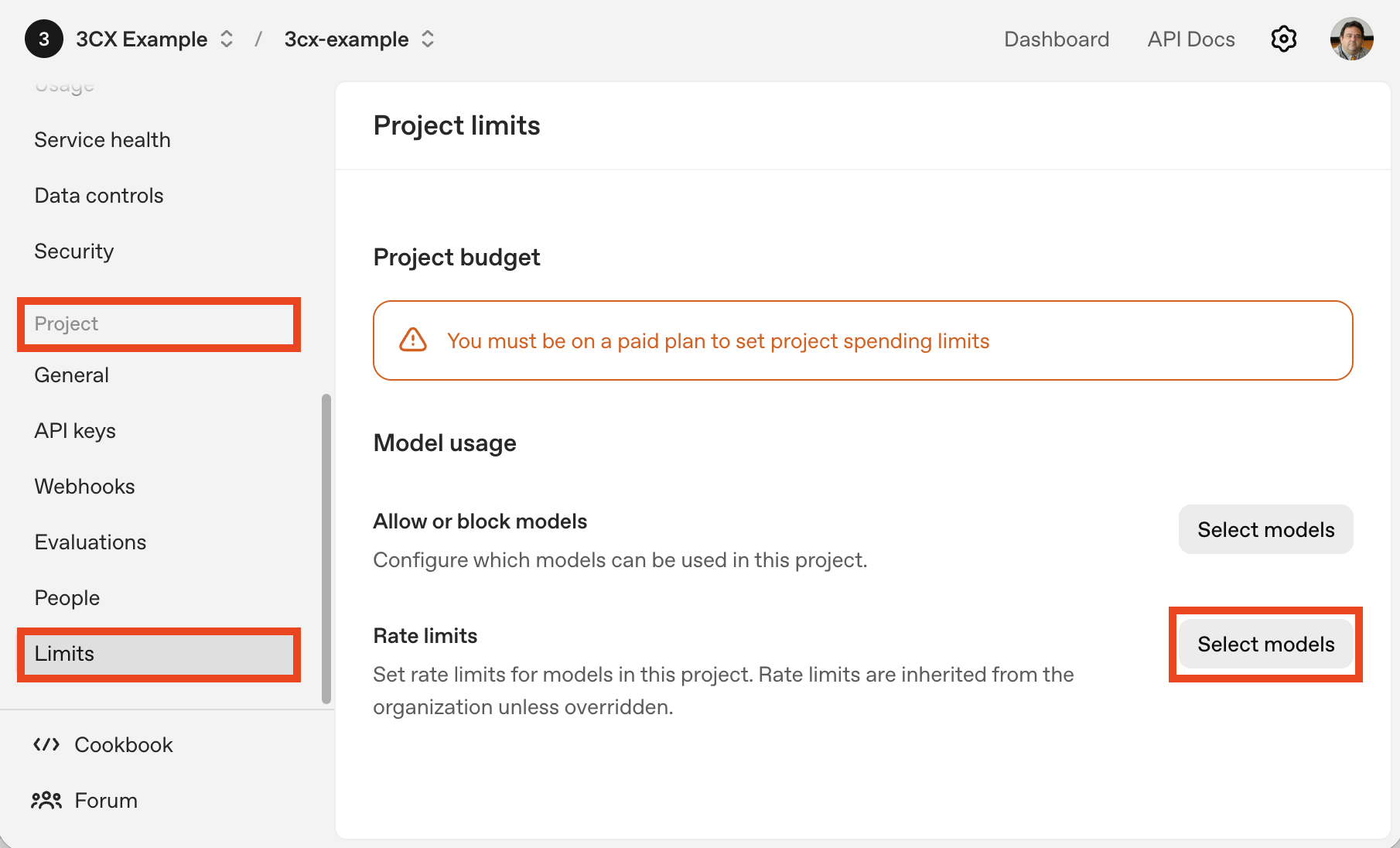
On the OpenAI Platform, navigate to your project dashboard and go to the Project -> Limits page; under the "Rate limits" heading, click the "Select models" button.
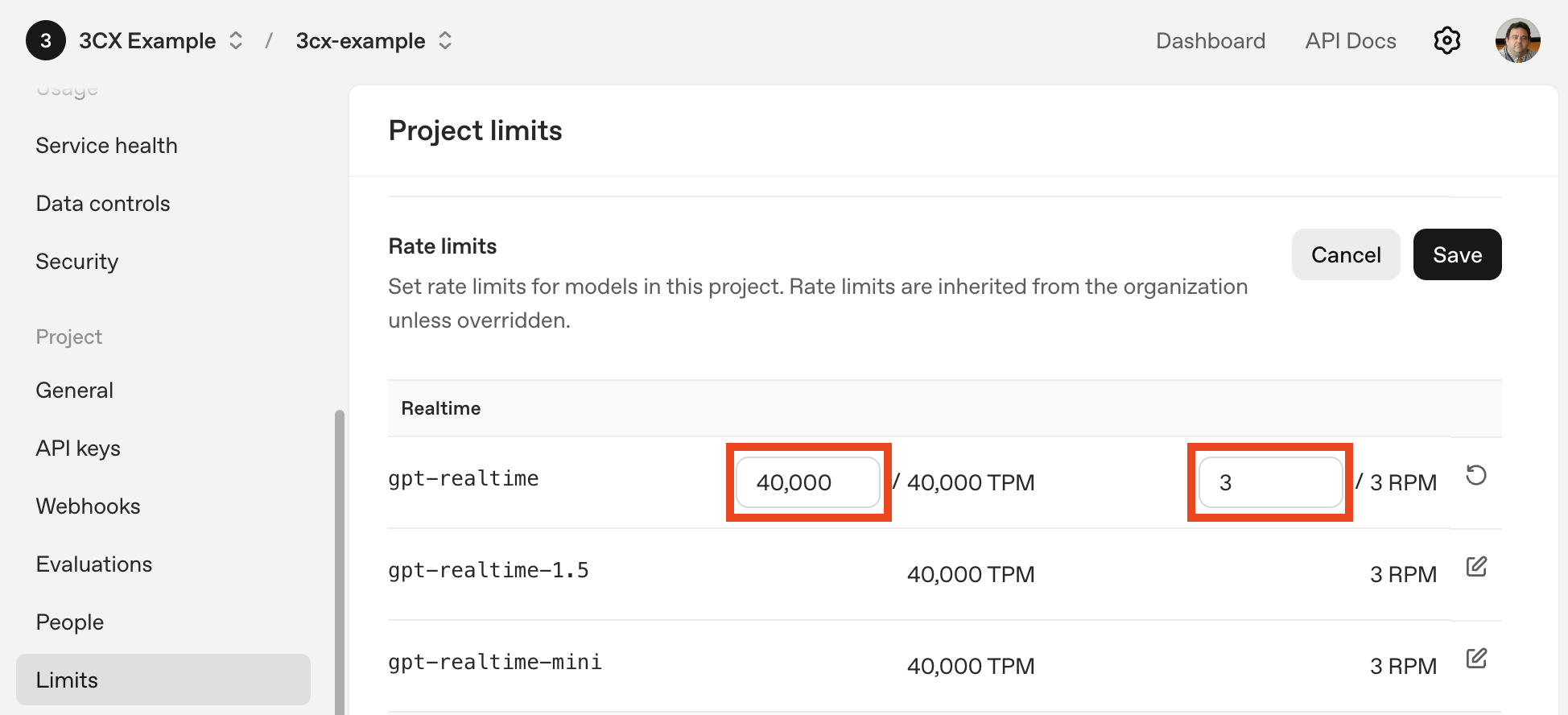
Scroll down to the "Realtime" Rate limits, where you get to adjust your rate limits, where:
-
-
- TPM is your maximum Tokens Per Minute
- RPM is your maximum Requests Per Minute
-
The screenshot above is for an account which is in the Free tier, and you can see that the maximum allowed is 40,000 TPM and 3 RPM. Navigate to the Organization -> Limits page and edit your budget to move into a higher tier.
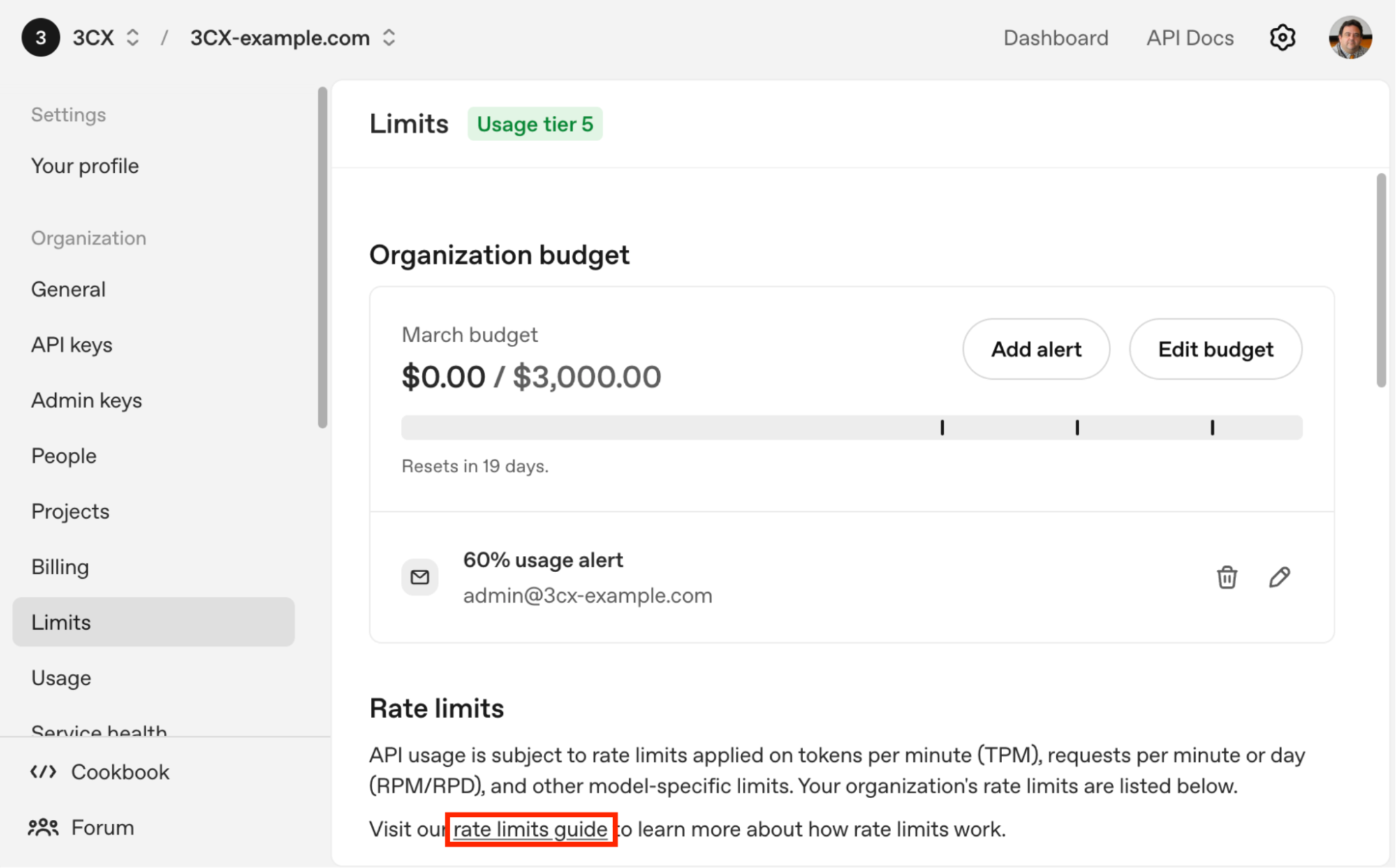
You can click on the rate limits guide link for more details; here is the main Usage tiers table:
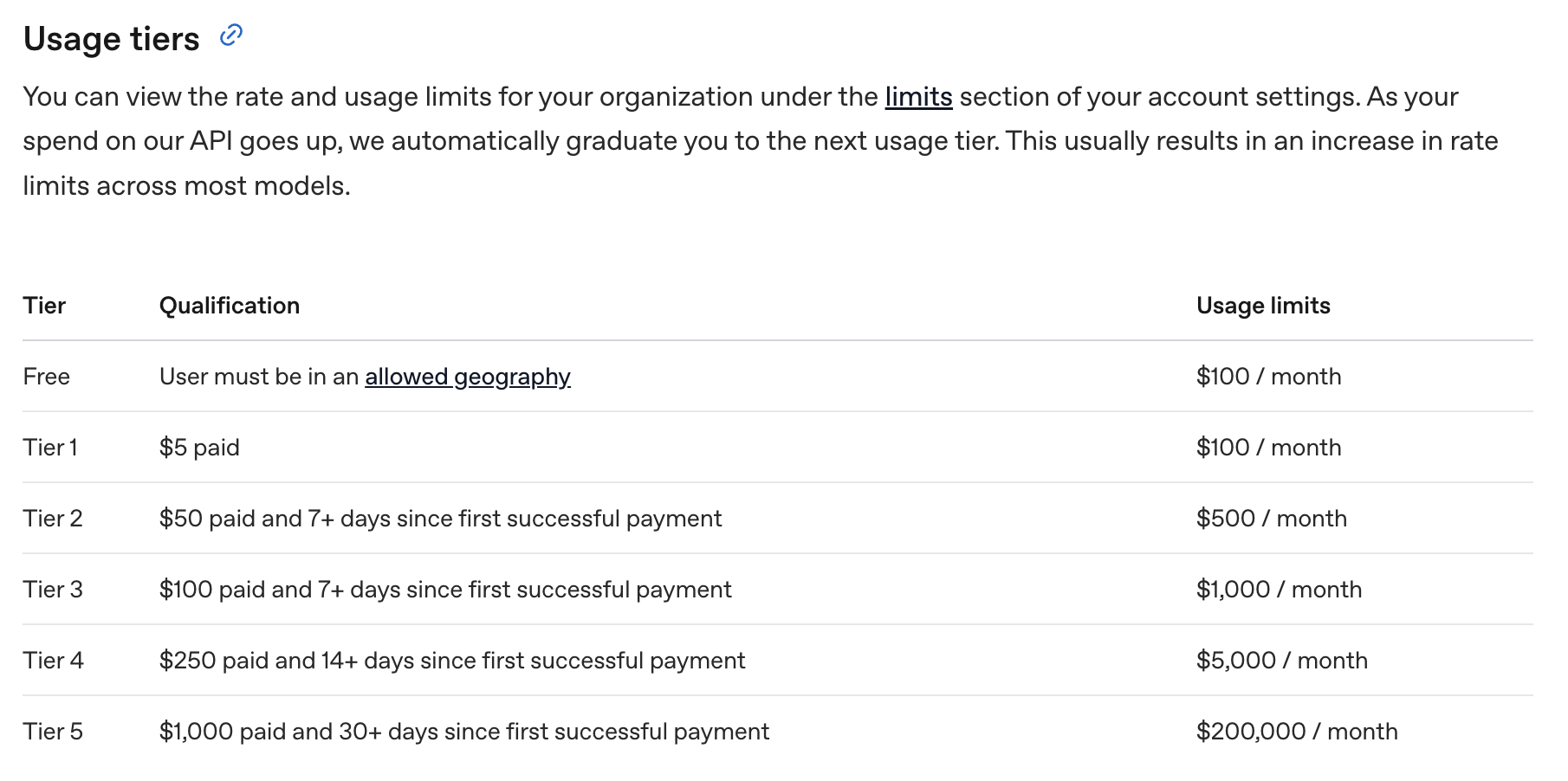
Once you have met the required thresholds, your tier level will be adjusted automatically. Navigate once again to your Project -> Limits page to raise your limits as required.
Forum
Continue the conversation in our dedicated AI Forum. Follow us on X and LinkedIn to stay-up-to date on latest news and feature releases.









 Copyright © 2026