





localhost kernel: Out of memory: Kill process 2154 (3CXManagementConsole) score 369 or sacrifice child
To avoid out-of-memory errors such as this on your memory-restricted Azure Linux PBX instance, there's a simple trick: add swap space on the temporary disk. Swap acts as a buffer to your system when valuable memory is exhausted so that Linux off-loads parts of memory to the swap space on the slower hard disk. Follow these instructions and you'll have your 3CX instance up and running with swap in no time!
Add Swap Space to your Azure Instance
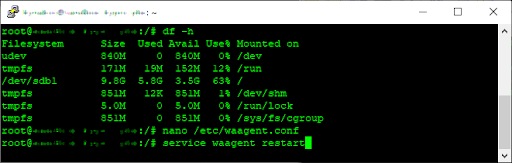
Open an SSH session to your Azure Linux instance and run these commands as root or using sudo:
- Test the available disk space for your instance:
-
df -h
-
- Edit the Azure Linux Agent configuration file:
-
nano /etc/waagent.conf
-
- Update these parameters:
-
ResourceDisk.Format=y
-
ResourceDisk.EnableSwap=y
-
ResourceDisk.SwapSizeMB=4096
-
- Set the "ResourceDisk.SwapSizeMB" value to the number of megabytes to allocate to the swap file. Usually this value can be up to the size of the installed system memory. Make sure you have sufficient available space on the disk to do this.
- Press <Ctrl>+<X>, <Y> and then <Enter> to exit the nano editor and save the "waagent.conf" file.
- Restart the Azure Linux Agent service:
-
service waagent restart
-
- Verify that your swap file is available:
-
-
swapon -s
-
If you followed the instructions but the swap file isn't available at this point, you can try restarting the virtual machine using:
shutdown -r now

And some words of caution:
- Ensure you don’t assign more space to the swap file than available on disk, otherwise, you can run into abnormal system behavior, including not being able to log in to your instance.
- Also, be careful when resizing your VM, as the available disk space may decrease to the point of causing issues stated before.
Swap Away!
And that's it! With your newly installed swap file, the Linux Kernel can move allocated memory that is infrequently used into swap, to ensure increased memory availability for 3CX. Now your Azure 3CX instance can "breathe" more freely memory-wise, without the pressure on memory resources causing errors or even bringing your system to a halt.
And keep in mind that you can always monitor memory and swap usage with this command:
free -h









 Copyright © 2026