




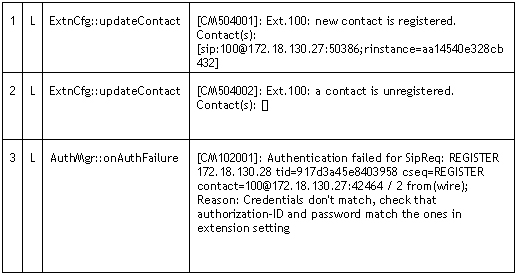
Introduction This article describes how an extension or a gateway line registers itself with the PBX Server to make itself available for making and receiving calls, and how the PBX Server will register itself with a VoIP Provider to make itself available for making and receiving calls. We trace through these steps by reading the server status log. The Server status log can be a [...]
Although we recommend the use of supported VoIP Providers, in some cases it may be necessary to use an unsupported VoIP Provider. 3rd Party Supported VoIP Providers 3rd Party supported VoIP providers have been tested by the VoIP Provider or by 3CX and at the time of testing they we're known to work. You can find a list of 3rd party supported VoIP Providers here. Community teste [...]
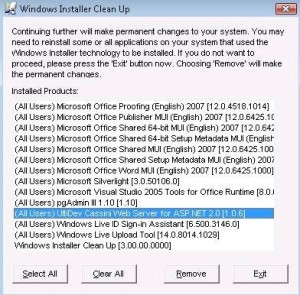
To uninstall any MSI installation that fails to uninstall itself for whatever reason, use the MSI Cleanup Utility: http://download.microsoft.com/download/e/9/d/e9d80355-7ab4-45b8-80e8-983a48d5e1bd/msicuu2.exe This version of Windows Installer CleanUp Utility works correctly in all 32-bit and 64-bit versions of Microsoft Windows. MSI cleanup utility The following will show how [...]
Advanced Webcast on Phone Provisioning and 3CX Assistant 9 February 2010 at 1500hrs (GMT+1)
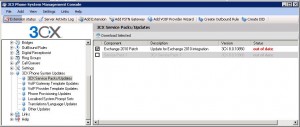
New 3CX Phone System build 8.0.10824 with Update functionality
Introduction to the 3CX Media Server The 3CX Phone System’s main job is to connect two (or more) entities together for transmission of audio between them. However, there are three different mechanisms which can be utilized for the delivery of audio streams between two endpoints: Bypass Mode (Direct Mode) Proxy Mode (Pass-Through Mode) Transcoding Mode (Bound to Media Server Mod [...]

3CX and Beronet announce strategic partnership to provide complete IP PBX solution
3CX Training in DüsselDorf and Munich - Feb 22-26
3CX provides monthly free training Webcasts, and the next one is scheduled for Thursday 11 February 2010 at 1500hrs (GMT+1). This will be presented via Webex using its built-in VoIP for audio - so there will be no need to call into a conference call number. To Sign Up Go to http://meetwith3cx.webex.com Under the "Attend a Meeting" Node in the left hand side, click the "Browse M [...]
This YouTube video will introduce you to the 3CX Voice Application Designer. It explains basic but important concepts to understand how it works and what can be done with it. To follow along with the tutorials, click here to download the Visual Application Designer. Skills Covered by this Module What is 3CX Voice Application Designer? How does it work? Available editions comp [...]

 Copyright © 2026