





Detailed roll out plan for V20 & V18 remaining users.
With V20 you can now deploy 3CX on Amazon Lightsail. As a virtual private server (VPS) provider, Amazon Lightsail is the easiest way for SMBs and home offices to build and host 3CX on the cloud. Pricing starts at just $10 including a 2 GIG RAM and 2 VCPUs, enabling you to deploy up to 20 instances!
Amazon Lightsail does not yet have its own marketplace, therefore, you can deploy 3CX on Lightsail via the Partner/Customer Portal.
V20 offers two deployment wizards:
- 3CX Website - for new users at https://www.3cx.com
- Partner/Customer Portal - for existing users. Includes Amazon Lightsail as a deployment platform for v20!
V20 Roll Out Plan
The release of V20 is nearing! The roll out plan will help you prepare for what’s new and what’s changing. Details on which customers remain on V18, which will be upgraded to V20 and when are also included.
Hosted by 3CX
- New trials and new customers will be deployed on V20
- Existing trials remain on V18
- Existing customers remain on V18 until January 2024 and will then be upgraded
On Premise
Customers will be able to choose between V18 and V20 for another two months at least.
- Linux - customers can upgrade to V20 by clicking the Upgrade button whenever they’re ready.
- Windows - the Windows version of 3CX V20 should be available in January 2024.
Self Hosted
The 3CX marketplace images for V20 will be available with the final release. We envisage this to be in December 2023. The V18 marketplace images for Google, Amazon AWS, Digital Ocean and Vultr will remain available for customers to choose between V18 or V20 for at least two months.
Microsoft Azure. We continue to have significant support and communication issues with Azure so we’re reviewing our options. The current Azure marketplace image is on V18, Update 7. There will be no V20 image or V18, Update 8 image for the time being.
SMB + FREE
The multi-tenant version of 3CX will remain on V18 until February 2024.
Deploy V20 on Amazon Lightsail
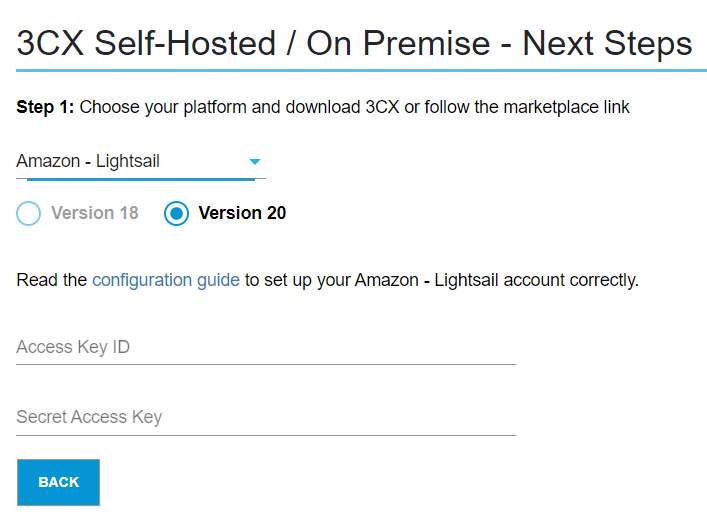
To deploy a new V20 install to Amazon Lightsail:
- Create an Amazon Lightsail account if you don’t have one already.
- Login to your 3CX Portal.
- Click on “Add System” and choose ““3CX Self hosted / On Premise - PRO/ENT”.
- Follow the deployment steps and 3CX will do the rest for you!
Read the complete guide on how to create a Lightsail account and deploy 3CX.









 Copyright © 2026