Implemented 3CX Central Monitoring for Resellers

BrenttG

Platinum Partner
Joined
Nov 17, 2017
Messages
912
Reaction score
586
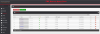
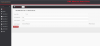
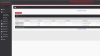
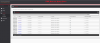
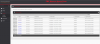
I have developed a system for internal uses that might be usefull for 3CX Resellers to centrally monitor, and have quick access to their customers 3cx systems.

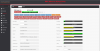
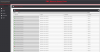
It can monitor the ping times/latency to their 3CX Servers, as well as check for responses from the services, such as the web console on 5001, the SIP service on 5060, and the 3CX tunnel on 5090 from a central dashboard, and highlights yellow on a system if there is high latency, and red if there is a service down, or latency is over 150ms.

It has a builtin credential manager, so the admin username and password can be stored in it for each system if so desired, but is not a requirement. It also tracks who was the last person to access the admin console from the central panel, and when.

If there is interest in this system by others, i was planning to also add support for it to monitor CPU Load, RAM Usage, and Disk Usage as well.

One click launches a new window directly to the web console of the system in question.

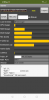
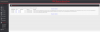
There is also a connection tester, which can test all of the TCP ports, and also verify the MTU size for the internet connection the 3CX server is on is correct, which is usefull for DSL, and some Fiber/FIOS connections that run non-standard MTU sizes which if not known and configured for, can cause audio issues, and call drops randomly.

Try out this Static Demo(NOTE: This is not fully updated to the Production Version)
https://www.pbxmonitor.net/demo/index.php?task=home

See Screenshots
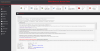
1603841976808.png1603842423265.png1603842041534.png1603842605972.png


2020-10-24 (2).png2020-10-24 (1).png2020-10-24.png
 
Last edited:
Upvote 60
I am very interested in this as well.

Stephen
 
Added a simple button to both main sections to instantly launch a new tab into the Management Console of each server you have connected.

Finished the edit page, and implemented some encoding on the connection details to safe them up from special characters and the like.

Other than the cleanup tasks now, all planned features are working. Some polishing and QA testing and it will be ready for some of you to be beta testers.
 
Edit PBX page for updating password, username, fqdn, or ports, in case they change, etc....
 

Attachments

  • edit-page.PNG
    edit-page.PNG
    172.4 KB · Views: 45
One of the security features, this tracks the failed logins to pbx monitor itself
 

Attachments

  • auth-monitor.PNG
    auth-monitor.PNG
    225.2 KB · Views: 37
Not only does my custom Web Application Firewall defend the system from penetration attempts, but it also logs and reports them, so you can take action and block hosts that continue to attempt to breach your monitoring system, how many platforms offer that feature built in, with no need to addon, and patch work something togeather....

My Custom WAF has 7 years worth of pattern recognition development as I use it in all of my projects, and it is also ever evolving as well. It does not simply report, it also blocks every attempt it detects by killing the actual thread before it can execute further.
 

Attachments

  • waf-in-action.PNG
    waf-in-action.PNG
    207.9 KB · Views: 30
Demo video now available:
 
  • Like
Reactions: outlaw
Ive decided to also add a central blocklist tool that will allow you to connect newer files to a text based ip list the PBX Monitor will generate, allowing you to pool all the blocked IPs from all your PBXs and centrally block them on all the firewalls you have connected to the text api via manual approval.
 
Can this be used if the 3cx instance's are being run on Windows Platform? We are running the 3cx server on Windows 10 on HP DL360 server.
Is it possible to use this for our instance?
 
i am very interrested myself. I'm available to test! I have both on premise and cloud installations!
 
I am interested as well and would be glad to spin it up in our lab.
 
Can this be used if the 3cx instance's are being run on Windows Platform? We are running the 3cx server on Windows 10 on HP DL360 server.
Is it possible to use this for our instance?

This works regardless of the Operating System on the 3CX Server, Windows or Linux
 
If I were a reseller, I'd be jumping all over this. Thanks for your support of 3cx... This is above and beyond - no matter how much you charge for it.
 
I have now added, Inbound Rules, Outbound Rules, Active Calls, Call Log features to PBX Monitor, and i have cleaned up the other pages, and in some places added auto-refresh.

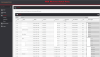
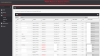
For book keeping purposes, there is now an Inventory section, which will inventory and display at a glance all the 3CX License details for all servers, on a single pane of glass, including expiration information.
 
Some new pics of the new pages added today.
 

Attachments

  • active-calls.PNG
    active-calls.PNG
    164.4 KB · Views: 40
  • call-log.PNG
    call-log.PNG
    234.9 KB · Views: 36
  • inbound-rules.PNG
    inbound-rules.PNG
    178.3 KB · Views: 36
  • ip-inventory.PNG
    ip-inventory.PNG
    200.6 KB · Views: 36
  • licensing.PNG
    licensing.PNG
    213.5 KB · Views: 35
  • outbound-rules.PNG
    outbound-rules.PNG
    149.9 KB · Views: 32
The new, refined, simplified and cleaned up version of the dashboard intended for wall display in your NOC.
 

Attachments

  • new-dashboard.PNG
    new-dashboard.PNG
    59.3 KB · Views: 38
If I were a reseller, I'd be jumping all over this. Thanks for your support of 3cx... This is above and beyond - no matter how much you charge for it.

Thank you for the compliment, I am working hard to get this to a point in which it has pretty much everything on a single pane of glass, made a lot of progress on it today.
 
Added an audible alarm to the dashboard if anything goes into critical state.
 
This works regardless of the Operating System on the 3CX Server, Windows or Linux
Great! We are definitely interested then!
Something like this is what I've been searching for quite long and thank god someone is making it happen!
Amazing work!
 
added another inventory page, this one will show all phones attached to all your PBXs, so you can keep track of the mac addresses for warantee, inventory, billing, and other purposes, and also allows you to search all PBXs at once, for a given model, firmware version, IP, or mac address, it also allows you to at a glance see if any phones on any PBX need firmware updates globally.
 

Attachments

  • inventory-phones1.PNG
    inventory-phones1.PNG
    258.7 KB · Views: 24
  • inventory-phones2.PNG
    inventory-phones2.PNG
    260.8 KB · Views: 22
  • Like
Reactions: outlaw
This looks excellent. Thank you for the work you're putting into this project.