Implemented 3CX Central Monitoring for Resellers

BrenttG

Platinum Partner
Joined
Nov 17, 2017
Messages
912
Reaction score
586
I have developed a system for internal uses that might be usefull for 3CX Resellers to centrally monitor, and have quick access to their customers 3cx systems.

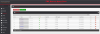
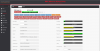
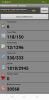
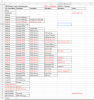
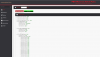
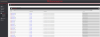
It can monitor the ping times/latency to their 3CX Servers, as well as check for responses from the services, such as the web console on 5001, the SIP service on 5060, and the 3CX tunnel on 5090 from a central dashboard, and highlights yellow on a system if there is high latency, and red if there is a service down, or latency is over 150ms.

It has a builtin credential manager, so the admin username and password can be stored in it for each system if so desired, but is not a requirement. It also tracks who was the last person to access the admin console from the central panel, and when.

If there is interest in this system by others, i was planning to also add support for it to monitor CPU Load, RAM Usage, and Disk Usage as well.

One click launches a new window directly to the web console of the system in question.

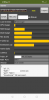
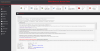
There is also a connection tester, which can test all of the TCP ports, and also verify the MTU size for the internet connection the 3CX server is on is correct, which is usefull for DSL, and some Fiber/FIOS connections that run non-standard MTU sizes which if not known and configured for, can cause audio issues, and call drops randomly.

Try out this Static Demo(NOTE: This is not fully updated to the Production Version)
https://www.pbxmonitor.net/demo/index.php?task=home

See Screenshots
1603841976808.png1603842423265.png1603842041534.png1603842605972.png


2020-10-24 (2).png2020-10-24 (1).png2020-10-24.png
 
Last edited:
Upvote 60
quick suggestion - THEMES. I have trouble reading red letters on black backgrounds.
 
The theme is CSS based, you can change the text colors to those of your desire by editting a single file on the system. Make it neon green for all care ;)
 
  • Like
Reactions: craigreilly
Is this avaliable for download yet? I would be super keen to test this out.
 
This looks absolutely fantastic! I'm in, just let me know the cost.

One request that I'd love to see is SBC status, but as it sits it is already the most useful app I've seen for resellers and hosts.
 
This looks absolutely fantastic! I'm in, just let me know the cost.

One request that I'd love to see is SBC status, but as it sits it is already the most useful app I've seen for resellers and hosts.

I have been looking for a way to do this, however the 3CX server itself does not really expose any status elements about the SBCs that i can hook into, it seems to solely track them on the low level only. However if they add SBC monitoring to the Management Console i would be able to easily hook those and add them to my dashboards.

Thank you for the vote of confidence on the system!
 
When do you think the trial / release version will be avaliable?
 
When do you think the trial / release version will be avaliable?
Im hoping to be able to setup at least a beta testing group by end of next week, hence this form i just posted in my previous post is collecting info for people who are interested in beta testing.
 
I have just succeeded in testing control functions to 3cx servers from pbx monitor, what does this mean?

The ability to restart services, un-block ips, run firewall checker, and numerous other tasks, from inside PBX Monitor.
 
Great work. This project basically dismisses the argument some people bring up about 3CX being a closed sourced PBX and that its "take it or leave it". If you know what you are doing, its much more powerful that what many might think is!

A friendly advice: I like the fact that you have taken into consideration security and included various mechanisms when building this system however be careful because the 3CX Management Console itself might be secure but with your implementation you are basically opening another door to access the PBX which is outside of 3CX's control. You are essentially 100% responsible for this door's security. Especially when adding more and more functionality, something somewhere might be overlooked. Also keep in mind that the people who will be using this might not be as security-oriented as you and might end up exposing their systems.
 
A friendly advice: I like the fact that you have taken into consideration security and included various mechanisms when building this system however be careful because the 3CX Management Console itself might be secure but with your implementation you are basically opening another door to access the PBX which is outside of 3CX's control. You are essentially 100% responsible for this door's security. Especially when adding more and more functionality, something somewhere might be overlooked. Also keep in mind that the people who will be using this might not be as security-oriented as you and might end up exposing their systems.

I think i need to explain a few things here...
1. It is actually my job to do penetration testing and vulnerability analysis, not only of network and internet based systems but also of programming. I am the SOLE programmer of this system, and I go over every line of my own work to ensure its using correct input sterilization, data segmentation, and security. Check out my signature line, and also my linked in, I have quite the security oriented background. https://www.linkedin.com/in/brentt-graeb-cisso/

2. This system does not require ANY, and i literally mean ANY changes or modifications to the security, code, or function of a 3CX Server, OR its underlying operating system whether it is windows or Debian. I do not open any ports, apis, or tunnels, that do not already exist, nor do i make any alteration to their functionality, period! That is part of my security oriented approach, if you have to even slightly compromise the security of a system to make something work right, it is not working right. That is a rule in my book. So there will be no changing settings, uploading files, opening ports, etc, for my system to work. It connects using 3CX's own native api that runs on port 5001 with the management console.

3. I am also aware people make mistakes when setting things up and installing software, that is why my intent, is that if and when i distribute installable copies, they will be virtual appliances that can run on VMware or HyperV(eww), with the OS, PBX Monitor, DBs, etc all pre-configured properly, so there is nothing to be messed up.

Please if you still have concerns, go to my linked in, and read some of the attached letters from those i have worked with, many are from actual government agencies and law enforcement officials whom i have assisted in cyber investigations, as well as other projects i cannot discuss. I assure you, im not jim bob stringing code together from google and stack-exchange in my basement and throwing it into the world with no testing.

Additionally! If someone has the interest to do some pentesting against a demo copy of the system, that can be arranged, If there is a bug somewhere, i would like to know and fix it, rather than pretend its perfect and cover it up, and ill stand behind my development work.
 
Added feature to delete ips from the blacklist from inside pbx monitor
 
Little update, shows a little of the planned features, and what is done, and what is holding up going into Beta Testing. Still hoping to begin the beta stage late next week, and i think its all on track.
 

Attachments

  • feature-dev-10-7-2018.PNG
    feature-dev-10-7-2018.PNG
    81.8 KB · Views: 38
  • Like
Reactions: Nederland6e

Attachments

  • firewall-checker.PNG
    firewall-checker.PNG
    250.5 KB · Views: 24
central persistent log of blacklisted ips from all servers
 

Attachments

  • ip-blacklist-history.PNG
    ip-blacklist-history.PNG
    287.4 KB · Views: 25
finishing the central blacklist section and then it will be beta time.
 
I have posted before and love the direction you are going. We would have interest in this Dashboard and would also help with testing if required.

Feature Consideration:
The bulk of our installs are are hosted in a Data Center. Regarding Latency - We would need to know the Latency of the customer (From them to the Data Center) A page where they could go and run a Ping/Latency and Jitter Test would be really helpful.
 
I have posted before and love the direction you are going. We would have interest in this Dashboard and would also help with testing if required.

Feature Consideration:
The bulk of our installs are are hosted in a Data Center. Regarding Latency - We would need to know the Latency of the customer (From them to the Data Center) A page where they could go and run a Ping/Latency and Jitter Test would be really helpful.

This system is not for customers to use for access, nor would you want it to be for security reasons, and there are easier ways to do this, such as with a ping from a command prompt with the delay set to its lowest value and to run continuous so you can get a snapshot of the latency over a minute or so.

Also, testing latency and jitter from a browser should not be relied on as most browsers will indicate either skewed or completely inaccurate results due to load, plugins, too many tabs open, laggy scripts pulling on the CPU, etc. Far to many variables to consider it gospel or even close to in my opinion.

We also host predominantly in the datacenter, we have ~1TB of RAM, 112 CPUs, and ~200 TB in our vCenter Cluster at the moment.
 
The latency that my system here measures is between itself and the 3CX servers, but it tests in the background on the command line not from the browser, the result is stored in the database every 60 seconds and then shown in the browser.
 
  • Like
Reactions: jofer