3cx live chat not working in Wordpress site

Status
Not open for further replies.

thanosgen

SOHO User
Joined
May 13, 2022
Messages
27
Reaction score
0
Hello

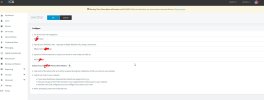
I install the wordpress 3cx live chat plug in but when I check these instructions
https://www.3cx.com/docs/manual/live-chat/

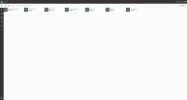
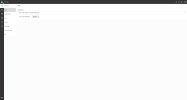
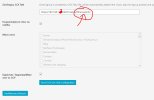
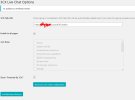
I cannot see Admin > Voice & chat icon or settings like the photo in tutorial.

also if you look at screenshots i cannot set something else.

Can anyone help me about this???
Is this a bug from version 18 ???

Please let me know...


Attachments

  • Screenshot_1.jpg
    Screenshot_1.jpg
    269.4 KB · Views: 18
  • Screenshot_2.jpg
    Screenshot_2.jpg
    121 KB · Views: 17
  • Screenshot_3.jpg
    Screenshot_3.jpg
    115 KB · Views: 16
  • Screenshot_4.jpg
    Screenshot_4.jpg
    118.6 KB · Views: 17
  • Screenshot_5.jpg
    Screenshot_5.jpg
    111 KB · Views: 17
Hello, Thanosgen,
First of all, you are using old version, and there is no Admin section in Webclient. I am not sure it will work proreply.
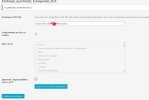
Second thing, your are using local network address of PBX. From web-site it can't be accessible. You should use your FQDN.
For example, 3CX talk link should be like this:
https://your-fqdn:5001/LiveChatIdentifier

Example: https://some-pbx.3cx.eu:5001/LiveChat441578
I done it with my 3cx domain but the problem not solved. Wordpress site doesn't show the popup window so I you can chat with me. I must update my plugin version or 3cx version?
 

Attachments

  • Screenshot_7.jpg
    Screenshot_7.jpg
    105.2 KB · Views: 7
Hello, Thanosgen,
First of all, you are using old version, and there is no Admin section in Webclient. I am not sure it will work proreply.
Second thing, your are using local network address of PBX. From web-site it can't be accessible. You should use your FQDN.
For example, 3CX talk link should be like this:
https://your-fqdn:5001/LiveChatIdentifier

Example: https://some-pbx.3cx.eu:5001/LiveChat441578
please tell me. How can upgrade my version? I already have version 18.
 
and this is the code of your html generator. *I put xxxxxxx in my account weblink
Code:
<call-us
     style="position: fixed; right: 20px; bottom: 20px;
         font-family: Arial;
         z-index: 99999;
         --call-us-form-header-background:#373737;
         --call-us-main-button-background:#0596d4;
         --call-us-client-text-color:#d4d4d4;
         --call-us-agent-text-color:#eeeeee;
         --call-us-form-height:330px;"
     id="wp-live-chat-by-3CX"
     channel-url="https://xxxxxxxxxxx.3cx.eu:4001"
     files-url="https://xxxxxxxxxxx.3cx.eu:4001"
     minimized="true"
     animation-style="none"
     party="kinita"
     minimized-style="BubbleRight"
     allow-call="false"
     allow-video="false"
     allow-soundnotifications="true"
     enable-mute="true"
     enable-onmobile="true"
     offline-enabled="true"
     enable="true"
     ignore-queueownership="false"
     authentication="name"
     operator-name="Support"
     show-operator-actual-name="true"
     channel="phone"
     aknowledge-received="true"
     gdpr-enabled="false"
     gdpr-message="I agree that my personal data to be processed and for the use of cookies in order to engage in a chat processed by COMPANY, for the purpose of Chat/Support for the time of  30 day(s) as per the GDPR."
     message-userinfo-format="both"
     message-dateformat="both"
     start-chat-button-text="Chat"
     window-title="Live Chat & Talk"
     button-icon-type="Default"
     invite-message="Hello! How can we help you today?"
     authentication-message="Could we have your name and email?"
     unavailable-message="We are away, leave us a message!"
     offline-finish-message="We received your message and we'll contact you soon."
     ending-message="Your session is over. Please feel free to contact us again!"
     greeting-visibility="none"
     greeting-offline-visibility="none"
     chat-delay="2000"
     offline-name-message="Could we have your name?"
     offline-email-message="Could we have your email?"
     offline-form-invalid-name="I'm sorry, the provided name is not valid."
     offline-form-maximum-characters-reached="Maximum characters reached"
     offline-form-invalid-email="I'm sorry, that doesn't look like an email address. Can you try again?"
     enable-direct-call="false"
     enable-ga="false"
     >
</call-us>


<script defer src="https://cdn.3cx.com/livechat/v1/callus.js" id="tcx-callus-js"></script>
 
What version of 3CX server are you running currently?
 
yes. It is in raspberry. I must install in windows pc?
 
You will need to take a backup of the 3CX system and then re-deploy, either on a Windows machine or Linux, then restore the backup taken from the current installation.

We do though recommend you re-deploy on 3CX hosted, for a smoother experience, and using your Raspberry Pi to install the 3CX SBC to provision any IP phones.

All the information on all the above points mentioned can be found here: https://www.3cx.com/docs/manual/
 
Status
Not open for further replies.

Latest Posts

Forum statistics

Threads
111,973
Messages
590,075
Members
164,895
Latest member
jasonkkrause