3CX Roadmap & V18 alpha - Connecting Customers!

Status
Not open for further replies.
That's actually a really good idea.Maybe you could consider providing PWA for easy installment from users.
What is PWA ?
 
Hi all, any update on being able to load this up via alpha/beta channel from the pbx? I've tried but really cannot figure out how to upload custom ISOs to GCP. So excited U8 Beta looks SOOO GOOD

edit: also Nick do not listen to the complaints about ticket system. Honestly I didn't think much of it but now I realize how critical it can be, especially with small call centers to log reports/calls. So simple and competitors charge so much for it.
 
@luckystrikes thanks for the heads up ! :)
RE webclient, as per @noord suggestion we are looking at electron to have a windows based version of the web app and its looking promising. (whatsapp uses same) Wont make it into the first version of 18 but maybe for an update. Also we are working on tidying up the web client and making it better first.
 
Last edited:
@luckystrikes thanks for the heads up ! :)
RE webclient, as per @noord suggestion we are looking at electron to have a windows based version of the web app and its looking promising. (whatsapp uses same) Wont make it into the first version of 18 but maybe for an update. Also we are working on tidying up the web client and making it better first.
That's really cool, could be so more user friendly to have a app. The V18 will be insane !
 
PWA is something between a desktop app and a website.
The shortcut function can be provided by an PWA installation routine (see https://web.dev/promote-install/#browser-promotion).
Just like that! I've been using this variant for a long time and it works perfectly. It is a full-fledged PWA function for the web client. The PWA link is on the desktop and the system remembers the window size.

That's how I did it

Open webclient as WebAPP (Chrome only !!!)
→ open the webclient normally in Chrome
→ Chrome 3 dots (top right) → more tools → create shortcut
→ assign a name (e.g. webclient) → click on Create
→ now there is a new link with the webclient on the desktop
→ after click on this link, the webclient opens in Chrome in app mode
→ adjust window size as desired - is saved for a new start
 
Just like that! I've been using this variant for a long time and it works perfectly. It is a full-fledged PWA function for the web client. The PWA link is on the desktop and the system remembers the window size.

That's how I did it

Open webclient as WebAPP (Chrome only !!!)
→ open the webclient normally in Chrome
→ Chrome 3 dots (top right) → more tools → create shortcut
→ assign a name (e.g. webclient) → click on Create
→ now there is a new link with the webclient on the desktop
→ after click on this link, the webclient opens in Chrome in app mode
→ adjust window size as desired - is saved for a new start

I told him exactly the same thing but didn't go for full tutorial :p (https://www.3cx.com/community/threads/3cx-roadmap-v18-alpha-connecting-customers.78349/post-364480) on the previous page, works really well but if the customer change its PC for example, you need to redo all the process.

Having a full app to launch with the same result, will save times and that will be more user friendly so hoping that will come soon.
 
I told him exactly the same thing but didn't go for full tutorial :p (https://www.3cx.com/community/threads/3cx-roadmap-v18-alpha-connecting-customers.78349/post-364480) on the previous page, works really well but if the customer change its PC for example, you need to redo all the process.

Having a full app to launch with the same result, will save times and that will be more user friendly so hoping that will come soon.
Right, but between us. Which is faster, 3 clicks in Chrome or installing the Windows app on a new PC?

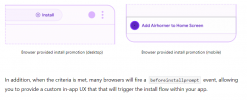
So the best way will be for 3CX to simply meet the criteria https://web.dev/install-criteria/
and then everything goes (almost) by itself.
 
Right, but between us. Which is faster, 3 clicks in Chrome or installing the Windows app on a new PC?

So the best way will be for 3CX to simply meet the criteria https://web.dev/install-criteria/
and then everything goes (almost) by itself.
Yes of course, I agree with you, both of the options are great.
The "add to home" (PWA) thing will result to the 3 click in Chrome if I understand well ?
 
Yeah right. Criteria are met? The PWA install routine is then automatically offered in the browser.

2021-02-11 14_22_04-What does it take to be installable_.png
 
I did some digging, there are a few ways you can do this:

You can push a shortcut via GPO with the below path (using chrome in this example) you will need to also push the icon file by GPO if you want it to be custom

"c:\program files (x86)\google\chrome\application\chrome.exe" --app=https://(your3cxlinkhere)

the "google" supported way would be to use their admx templates, this is likely the quick and easy way see the link below for information, essentially,
https://support.google.com/chrome/a/answer/9367354?hl=en#zippy=,windows

In our environment I used the following JSON

[{"create_desktop_shortcut":true,"default_launch_container":"window","url":"your3CXurlhere"}]

the end result is a link on the desktop that opens 3cx in a "web app" like mode.

For those using firefox, unfortunately firefox is dropping support for PWA apps:
https://www.xda-developers.com/mozilla-drops-support-for-desktop-web-apps-in-firefox/
 
Last edited:
  • Like
Reactions: MidiTélécom
@Greg Steinig I passed your information on to my Carrier account manager regarding SMS integration.
 
Any updates on us getting a new 3CX mobile client that integrates the separate webmeeting in with the extension app? I thought this was mentioned awhile back as something to expect soon.
 
PWA is good but its still a webapp which has no access to the underlying OS. In particular for example for pop up dialogs or bringing an app to the front this is very limiting. The good thing about electron is that it will allow us access to the OS to integrate some basic things such as hotkeys, pop to the front on a call and so on. Even old and much hated TAPI!

@SyncWave - they are separate platforms with separate release cycles.... But if you just want to make video calls we have that in 3CX and also we will increase the number 3CX can handle on adhoc video calls....
 
@Nick Galea Agreed, this is just a "stop gap" measure until your team finds out the exact path they want to take (which is sounding like electron) :). Plus you get more "control" of the underlying software so you don't have to worry about what firefox, google and Microsoft choose to do on their end.
 
PWA is good but its still a webapp which has no access to the underlying OS. In particular for example for pop up dialogs or bringing an app to the front this is very limiting. The good thing about electron is that it will allow us access to the OS to integrate some basic things such as hotkeys, pop to the front on a call and so on. Even old and much hated TAPI!

@SyncWave - they are separate platforms with separate release cycles.... But if you just want to make video calls we have that in 3CX and also we will increase the number 3CX can handle on adhoc video calls....
Isn't that changing in ver 18 though? We will be able to host our own webmeetings off our PBXs or will we have two servers per client?
 
Does this mean that a Mac app via the same is possible? That would be really really amazing..... we have a lot of Mac users and webclient does not like unstable internet. A client might be able to “reconnect” better
 
@SyncWave No they are still two separate platforms. One for web conferencing, one for calls including video calls. They are not really suited to be merged. However the integration will be much better as it will feel more integrated into 3CX. Just that attendees on smartphones will still have the video start up in a separate app window... i dont think it makes a big difference in my view....... If you just want to make video calls, then i agree its better to have it in the 3CX phone app. We have it now for 1 on 1 and we will add more capability there.

@luckystrikes No Mac app on the table yet. I dont have any issues with the webclient to be honest, and i have pretty unstable internet as well. Do you mean with toasters? Maybe open a support case....It should work fine so maybe some network setting or something. I assume you are using Google Chrome....
 
Last edited:
  • Like
Reactions: luckystrikes
Status
Not open for further replies.

Forum statistics

Threads
111,992
Messages
590,171
Members
164,931
Latest member
admintest