

- Joined
- Sep 12, 2019
- Messages
- 279
- Reaction score
- 232
What is PWA ?That's actually a really good idea.Maybe you could consider providing PWA for easy installment from users.


What is PWA ?That's actually a really good idea.Maybe you could consider providing PWA for easy installment from users.

Progressive Web App. Think Outlook and Word Online.What is PWA ?
PWA is something between a desktop app and a website.What is PWA ?


That's really cool, could be so more user friendly to have a app. The V18 will be insane !@luckystrikes thanks for the heads up !
RE webclient, as per @noord suggestion we are looking at electron to have a windows based version of the web app and its looking promising. (whatsapp uses same) Wont make it into the first version of 18 but maybe for an update. Also we are working on tidying up the web client and making it better first.

Just like that! I've been using this variant for a long time and it works perfectly. It is a full-fledged PWA function for the web client. The PWA link is on the desktop and the system remembers the window size.PWA is something between a desktop app and a website.
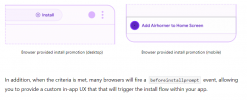
The shortcut function can be provided by an PWA installation routine (see https://web.dev/promote-install/#browser-promotion).
Just like that! I've been using this variant for a long time and it works perfectly. It is a full-fledged PWA function for the web client. The PWA link is on the desktop and the system remembers the window size.
That's how I did it
Open webclient as WebAPP (Chrome only !!!)
→ open the webclient normally in Chrome
→ Chrome 3 dots (top right) → more tools → create shortcut
→ assign a name (e.g. webclient) → click on Create
→ now there is a new link with the webclient on the desktop
→ after click on this link, the webclient opens in Chrome in app mode
→ adjust window size as desired - is saved for a new start
 (https://www.3cx.com/community/threads/3cx-roadmap-v18-alpha-connecting-customers.78349/post-364480) on the previous page, works really well but if the customer change its PC for example, you need to redo all the process.
Right, but between us. Which is faster, 3 clicks in Chrome or installing the Windows app on a new PC?I told him exactly the same thing but didn't go for full tutorial
Having a full app to launch with the same result, will save times and that will be more user friendly so hoping that will come soon.
Yes of course, I agree with you, both of the options are great.Right, but between us. Which is faster, 3 clicks in Chrome or installing the Windows app on a new PC?
So the best way will be for 3CX to simply meet the criteria https://web.dev/install-criteria/
and then everything goes (almost) by itself.
Hmm, it looks like this may be possible to script with a GPO as an interim solution. If anyone is interested I can try poking and let you know what I dig up.I told him exactly the same thing but didn't go for full tutorial
. Plus you get more "control" of the underlying software so you don't have to worry about what firefox, google and Microsoft choose to do on their end.Isn't that changing in ver 18 though? We will be able to host our own webmeetings off our PBXs or will we have two servers per client?PWA is good but its still a webapp which has no access to the underlying OS. In particular for example for pop up dialogs or bringing an app to the front this is very limiting. The good thing about electron is that it will allow us access to the OS to integrate some basic things such as hotkeys, pop to the front on a call and so on. Even old and much hated TAPI!
@SyncWave - they are separate platforms with separate release cycles.... But if you just want to make video calls we have that in 3CX and also we will increase the number 3CX can handle on adhoc video calls....


Founded in 2005, when VoIP was an emerging technology, 3CX has gone on to establish itself as a global leader in business communications.


