3CX SMS Version 18.0 U6

Status
Not open for further replies.

KonnectCraft

Silver Partner
Basic Certified
Joined
Apr 29, 2021
Messages
19
Reaction score
7
Putting together a quick note for everyone having issues with 3CX SMS Update with V18 update 6 since notes are all over the place and you missed the 3CX updates on blog and emails. Hope this helps someone.

  1. Messaging Section no longer available on the Management Console. Rebooting Server, restarting services isn't going to restore this. Its by design and not a glitch.
  2. SMS for Telnyx, Twilio, Flowroute & Bandwidth SMS is broken and reconfiguration is definitely required to restore SMS functionality.
  3. SMS Configuration (For Supported Providers) is now inside the SMS tab (Next to Outbound Parameters inside SIP Trunk Config). Configuration is going to be different as per different Service Providers. For any service providers not supported by 3CX, the SMS tab is simply missing.
  4. SMS is now enabled by default for all users. You no longer have to enable it per user in the General Tab.
  5. SMS Routing to an individual user/extension Interface is no longer available. SMS routing is handled directly by Inbound Rules.
I hope this helps someone as documentation is not yet updated with most of the SMS providers and can create a lot of confusion trying to follow different support documentations.
 
  • Like
Reactions: Phoenixfw
Thanks I was not aware
 
Hello,

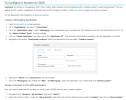
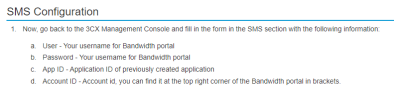
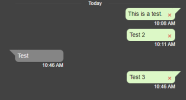
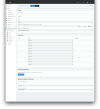
We're unable to send outbound texts using Bandwidth. I've already followed this guide https://www.3cx.com/docs/sip-trunk/bandwidth-usa/. The Sub-Account and Location in Bandwidth are set up properly because we've already been using them for voice and texting previously. The DIDs in the Bandwidth trunk are in +E164 format. I followed the SMS Configuration steps below in the SMS tab in the Bandwidth trunk. In Bandwidth I've updated the webhook under Applications for the application set up for messaging. I even created a new application in Bandwidth and set the Location to use the new one. The Inbound Rules for the numbers are set to go directly to extensions. Voice calls are working and it appears that inbound texts are coming through for the numbers. No outbound texts are working. We're sending them using +1-phone number. Even tried replying to the inbound texts that we did receive but they don't go through. We just get a red X on the message. It's happening on Android, iOS, desktop app, and web client.

Is there anything else that we need to do to get outbound texts working?

1676306922786.png

1676306982037.png

1676307690972.png
 
I have telynx working. We only use SMS not voice from Telnyx. On the telnyx website I had to create a voice trunk for each line.
Here are the text instructions. I also attached a pdf link with screenshotsTelnyx SMS with 3cx
From the Telnyx website
1. Select Voice, Sip Trunking.
2. Select Add a SIP Connection
3. Enter a name for the connection (I used the 3cx extension I want to route it to)
4. Select Create SIP Connection
5. Under Sip Connection Type, Select Credentials. This will give you a random userid and password. (I changed my by selecting edit).
6. Select Save & Finish editing. Now you must edit three parameters.
7. Select the pencil icon.
8. Select the inbound tab
9. Use the dropdown menu and change both the DNIS and ANI to +E.164.
10. Select the outbound tab
Scroll to the bottom of the page to Outbound Voice Profile
11. Verify the Outbound Voice Profile is set to Default. If it is not use the dropdown box to select default
12. Then select Save all changes.
From your 3cx admin console....
13. Select Sip Trunks
14. Select Add a Sip Trunk
Setup your provider
15. Select US
16. Select Telnyx LLC
From your Telnyx site
17. Select Numbers, My Numbers
18. Find your SMS number and copy it to the clipboard
Return to your 3cx admin site (add a Sip Trunk dialog)
19. Paste your number in the Main Trunk Box
20. Select Ok
21. Enter a Name for your new SIP Trunk - I added the 3cx extension to the end.
Scroll down the to the Authentication section...
22. Enter the credentials you created in Step 5
Scroll down the to the Routing Section... This is where you assign the SMS number to a 3cx extension.
23. Enter the destination your want SMS calls routed to during office hours, and outside office hours.
Scroll to the top of the page...
24. Select the SMS tab... This is how you connect your Telnyx profile.
25. Select the radio box beside the word SMS.
On the Telnyx Website...
26. Select Account Settings, Keys & Credentials
27. If you do not have an API Key, Select Create API key (if you have an API go to step 29)
28. Select Create
29. Copy the Key to the clipboard.
Return to the 3cx admin portal
30. Paste your key into the API field.
31. Copy the webhook url to the clipboard
32. Select Ok to save the SIP Trunk you just created
Return to the Telnyx website... Now you need to setup your messaging profile.
33. Select Messaging, Programmable Messaging (add a new profile or update your existing profile)
34. If you do not have a profile, Select Add new profile (if you have an existing profile open it and move to step 36)
35. Enter a name for your profile
Scroll down the to the Send a webhook to this URL
36. Paste the webhook from your clipboard in to this field.
Scroll down the to the bottom of the page
37. Select Save
You will get a dialog box asking if you want to exit without saving changes
38. Select Ok
You should see your messaging profile has been created...
39. Select Numbers, My Numbers
Scroll until you find the number you want to assign
40. Select the Messaging profile dialog box
Scroll down to SMS Messaging
41. Use the drop down box to select your new messaging profile
42. Select Save Changes
If you see an error loading, click to retry dialog box
43. Select it and you should see the newly assigned profile is attached. (It may take 30 seconds to update)
Now test it

Congrats you finally finished setting up one SMS number, you have to repeat this process for each number.
They really do not want us to use a "supported provider" for SMS.

Hope this helps someone. I lost two days setting this up.
 
  • Like
Reactions: UCPATH and N_G
Hi @2101

When setting up Bandwidth in 3CX try using your Bandwidth portal password as the password. The recently switched from the username for both fields to username and password.
Our guide should also be updated by now
 
Hello,

We've been using SMS with Twilio and this recent update really messed things up.

We're using Twilio and I've gone through the steps of reconfiguring our SIP trunk to access the SMS tab. I've setup our SID/auth token, and our inbound rule is configured. I'm aware that the SMS tab is no longer on the user tab and users will automatically have access provided they're listed under the DID rule, however that doesn't work with our current flow so I'm wondering if I should configure our setup differently.

Our inbound routing goes to a digital receptionist/IVR, then depending on the caller's selection will forward them to a specific extension/voicemail box. How am I supposed to give SMS access to all of our users without completely redoing our IVR/menu flow? I can't send calls to a group because we have a digital receptionist and menu system to get calls to the right extension, but I want all users to have the ability to send/receive SMS
 
Hi @chandler_aim

How many DIDs do you have? Would all users in the past use the same DID for inbound and outbound?

If yes then use the "Forward SMS" option in your Digital receptionist to route calls to a dummy Queue where all of your users are members.
Just create a queue and add all users and only route SMS to that Queue. That way all your users will see inbound SMS and be able to send SMS using the same number.
 
  • Like
Reactions: N_G
We use a single DID. I don't see a "Forward SMS" option anywhere under Digital Receptionists or Inbound Rules?

With our previous setup any new SMS was sent to the extension of our actual receptionist who would then transfer the conversation to the correct user. Also, any user could create a new SMS conversation which would automatically cause replies to go to their extension. I'm hoping to achieve exactly that again.
 
We use a single DID. I don't see a "Forward SMS" option anywhere under Digital Receptionists or Inbound Rules?

With our previous setup any new SMS was sent to the extension of our actual receptionist who would then transfer the conversation to the correct user. Also, any user could create a new SMS conversation which would automatically cause replies to go to their extension. I'm hoping to achieve exactly that again.
You'll have to use the webclient admin to see the forward SMS option under Digital Receptionist.
 
  • Like
Reactions: YiannisH_3CX
I'm in the webclient admin, and I've looked under editing my current Digital Receptionist as well as a new Digital Receptionist?
 

Attachments

  • Screenshot 2023-02-15 at 10.06.58 AM.png
    Screenshot 2023-02-15 at 10.06.58 AM.png
    605.1 KB · Views: 14
That's the management console, you need to go to the webclient admin tab

The URL will look like: :5001/webclient/#/office/call-handling/digital-receptionist/

1676484960276.png
 
  • Like
Reactions: N_G
Ah sorry about the confusion! Just found that and it addresses half of the problem.

The issue with this dummy queue setup as described is that while it does give everyone in the queue the ability to compose a new SMS (which is great), any new SMS sent to our number that is not already associated with a user goes to everyone in the queue rather than a specific user. Because of the nature of our business we really need messages to be filtered through a specific person (our actual receptionist), then transferred to that user.
 
https://www.3cx.com/blog/docs/sms-configuration/

Ah sorry about the confusion! Just found that and it addresses half of the problem.
OK so let's make some magic happen.

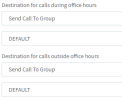
Assuming you only have a Default group and all your users are in the Default group, navigate to your trunk settings through the Management console and set the destination to be the Default Group. If you have an Inbound rule for your number do the same.
1676535990555.png

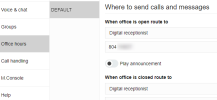
Then through your WebClient navigate to the Admin View / Office Hours (make sure you are looking at the Default view) and set the destination of your calls to be your Digital receptionist.


1676536016495.png

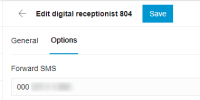
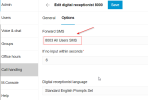
From there navigate to "Call Handling" and find your Digital Receptionist. Go to the "Options" tab and Forward SMS to the user you want.

1676536239878.png

This way all users in the Default Group gain the ability to send SMS and Inbound SMS only go to user specified in your Digital Receptionist.

Hope this helps.
 
This has caused a major headache for us with Telnyx.
We have about 7-8 DIDs. We have one DID with its own messaging profile. The other 6 DIDs shared another. Things were working just fine until the update.
We updated our 1 DID with the instructions and SMS messaging seems to work fine for it.
The other DIDs that were sharing a messaging profile with Telnyx don't work though. On the iOS 3CX application, the SMS messaging icon doesn't even show up.

Any ideas what the cause could be?
 
Are all your DIDs under the same trunk? If so then you need to move them under the same messaging profile through Telnyx to have them working.
 
https://www.3cx.com/blog/docs/sms-configuration/


OK so let's make some magic happen.

Assuming you only have a Default group and all your users are in the Default group, navigate to your trunk settings through the Management console and set the destination to be the Default Group. If you have an Inbound rule for your number do the same.
View attachment 34287

Then through your WebClient navigate to the Admin View / Office Hours (make sure you are looking at the Default view) and set the destination of your calls to be your Digital receptionist.


View attachment 34288

From there navigate to "Call Handling" and find your Digital Receptionist. Go to the "Options" tab and Forward SMS to the user you want.

View attachment 34289

This way all users in the Default Group gain the ability to send SMS and Inbound SMS only go to user specified in your Digital Receptionist.

Hope this helps.
Wow that did the trick! I didn't know how many of these settings existed, they feel quite buried. Hopefully this fix is stable and doesn't change with any updates. Thank you so much
 
  • Like
Reactions: YiannisH_3CX
Are all your DIDs under the same trunk? If so then you need to move them under the same messaging profile through Telnyx to have them working.
We had different SIP trunks set up. One for the main number and another for the 5-6 other DIDs.
 
What's curious is that the main DID now seems to receive SMS from the other 6. When creating an SMS, it gives the option for SMS providers (which it didn't before). The two trunks with SMS enabled are listed there. Is there a way to separate these out into different accounts or is it only one account now which has access to SMS messages in the iOS app?
 
If you are doing group SMS, I think the trick is to not put +1 in front then its not an SMS 'ready' option.

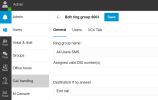
What I ended up doing was make a new "CALL HANDING" group - All Users SMS - I then have my main number point to the IVR and under the Digital Receptionist / Options I added All Users SMS - now when I send an SMS I dont have multiple options I just hit New SMS and select the number. If you have multiple DID's on that you probably will get an option to pick .. might be better to copy the current IVR and assign the other numbers to it.

1676672459832.png

1676672543366.png
 
What's curious is that the main DID now seems to receive SMS from the other 6. When creating an SMS, it gives the option for SMS providers (which it didn't before). The two trunks with SMS enabled are listed there. Is there a way to separate these out into different accounts or is it only one account now which has access to SMS messages in the iOS app?
Users that can receive SMS can also send SMS using those numbers. It all depends on where you are routing your calls to and who can receive calls from each trunk.
 
Status
Not open for further replies.

Latest Posts

Forum statistics

Threads
111,973
Messages
590,075
Members
164,895
Latest member
jasonkkrause