3CX upgrade from Debian 9 to 10 failed

Status
Not open for further replies.

SMC2022

New User
Joined
Oct 3, 2022
Messages
5
Reaction score
1
Hey guys,

We tried to upgrade our on-prem 3CX from debian 9 to 10 and it failed.

Attached log file where the update failed, can you please help parsing this information and what steps I could take next?

Thank you
 
Backup, copy backup off the box, wipe and reinstall from the ISO, restore, and stay current going forward.
 
Thanks, I'm trying fresh Debian 10 buster ISO install and looking to restore backup.
Will you keep posted on the progress
 
Hey Guys

I have Debian 10 buster installed and backup restored from Debian 9

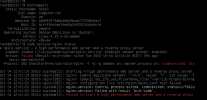
But unable to access MC and NGINX shows attached error

Any suggestions?

Thank you.
 

Attachments

  • Debian10_buster_Nginx_error.png
    Debian10_buster_Nginx_error.png
    244.6 KB · Views: 14
Hey Guys

I have Debian 10 buster installed and backup restored from Debian 9

But unable to access MC and NGINX shows attached error

Any suggestions?

Thank you.
Are you using a custom SSL? It seems the rights to the files (key and cert) may need changing.
 
Are you using a custom SSL? It seems the rights to the files (key and cert) may need changing.
HI @ConceptsWeb

Yes we are using a custom SSL

Can you please guide on how we go about changing permission on files?

Thanks
 
You may check the permissions are correct from an SSH terminal to the machine, check Linux guides on how this is to be done. The user and group is phonesystem phoensystem with 0755 rights. But if using your own certificate, the more likely reason is that you will need to ensure that the private key matches the certificate, you will need to check with your certificate provider.
 
  • Like
Reactions: Evolute IT
I managed to fix the NGIX & SSL errors and everything is working now on V18.

Thanks everyone.
 
  • Like
Reactions: Charles_3CX
Status
Not open for further replies.

Forum statistics

Threads
111,974
Messages
590,081
Members
164,899
Latest member
mazet