3CX V18: Connecting Teams & Customers - Faster, Better, More Efficiently

I was wondering if it is possible to remove the mailboxes for forwarding. Who wants to forward a call to a mailbox? The very special thing is, that in our company all mailboxes are disabled. If somebody wants something from somebody else, he should call again. But we can still forward calls to mailboxes of extensions where the mailbox is disabled. Then the mailbox tells the caller, that the mailbox for this one is disabled and hangs up. Was hoping this will be fixed with v18. Can you check it out here or should I create an own blog post for it?
 
I was wondering if it is possible to remove the mailboxes for forwarding. Who wants to forward a call to a mailbox? The very special thing is, that in our company all mailboxes are disabled. If somebody wants something from somebody else, he should call again. But we can still forward calls to mailboxes of extensions where the mailbox is disabled. Then the mailbox tells the caller, that the mailbox for this one is disabled and hangs up. Was hoping this will be fixed with v18. Can you check it out here or should I create an own blog post for it?
This is actually not considered an issue to be fixed, why not set the forwarding rule to something like "End Call" instead?

You can bulk edit extensions by selecting more than one extension in the "Users" section and then change the forwarding rules for everyone at the same time.
 
  • Like
Reactions: Evolute IT
This is actually not considered an issue to be fixed, why not set the forwarding rule to something like "End Call" instead?

You can bulk edit extensions by selecting more than one extension in the "Users" section and then change the forwarding rules for everyone at the same time.
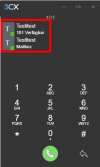
It is not about forwarding RULES what I'm talking about. When someone receives a call and forwards it manually to someone else and looks for the ext, the ext. mailbox is shown, too. On both is the name of the person on the head and below is one with the ext and the other one with "mailbox". And this is not needed for a forwarding I think. Why should I forward a call to a mailbox. And if 3CX thinks it is needed, maybe there could be a feature for disabled mailboxes not to be shown here.
Looks like this in the new Desktop App and for Testitest 101 the mailbox is disabled:
1628762276570.png
 
  • Like
Reactions: Pedro Torre
dear 3CX team, you must understand us. We are the interface between the 3CX team and the end users.

Design changes are OK, but you have to give us the arguments.

Many users call me and expect answers.

View attachment 23525
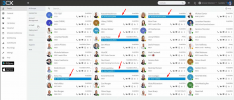
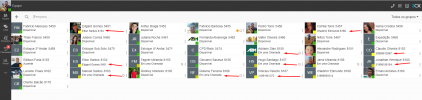
In the past, there was the Q (Blue or gray). That was perfect. Many users change the queue status several times per hour.
Now you have to make an additional click on the user icon or configure BLF buttons. With BLF buttons it works great, but there is just no visual feedback.

Also the much talked about topic "Contacts and Voicemail Icons"
If there is a deeper meaning behind it, please give answers.

What should I tell the users?
Same thing here! The users will kill me after the upgrade because it is getting more complicated...
 
  • Like
Reactions: Reformed-JB
Absolutely, we're going to get hung as partners by our end clients for implementing this upgrade.

Feels like it's gone backwards. I sing the praises of 3CX to everyone for how good it is but my confidence in the product has been shaken by this release and the apparent inability to listen to partners requests.
Just train the users for god sake. Or at least warn them.

We warned our users 1 months in advanced, sent screenshots to show how it is different, and only got praises for the new look and the new app.

Now we are upgrading them this weekend for the most part. Some are already on V18 and loving it.
 
When someone receives a call and forwards it manually to someone else and looks for the ext, the ext. mailbox is shown, too.
This same behavior existed on 3CX v16 as well and there's no way to disable it. As you can see, the options are labeled so it should be clear enough for users to make the desired selection.
 
There are definitely some positives for V18 and it was a release I was very much anticipating but I feel disappointed by the design elements which could have been much better.
That's it exactly! I love to have the new Windows App and all the improvements, but the design of webclient and desktop app has of course some improvements like smaller icons in the side menu bar, but the hidden menus and the hidden Q login. We had 400.000 calls in half a year on just one 3CX and 90% of them is on queues. The users have to log out when they go to the toilet, eat something, leaving their office for a couple of minutes for whatever they do and they will always need to click one more time to log in or out and you can't see your login state wherever you are with the blue or grey Q...
 
This same behavior existed on 3CX v16 as well and there's no way to disable it. As you can see, the options are labeled so it should be clear enough for users to make the desired selection.
I know, but I was hoping this was already addressed and be fixed with v18. I wanted to let you know that it should be fixed. disabled mailboxes should not be shown as a forwarding target...
 
Need help for a GPO to set the needed firewall rules for the 3CX desktop app. Did anybody get this? I tried it with the "normal" rules with %localappdata%, %username%, %logonuser% and with the administrative templates with some variables, but everytime I restart the app it want its own firewall rules back. Any idea how to implement the rules, so that the users don't need to interact with it when they install it?
 
Will this V18 release be automatically pushed to V16 customers that have Automatic Updates enabled?
 
Will this V18 release be automatically pushed to V16 customers that have Automatic Updates enabled?
No you need to trigger the upgrade manual from the MC
 
  • Like
Reactions: 604
Just a couple of quirks i've found since updating:

- Existing webmeeting links which have been sent out to customers take you to v16 webmeeting, yet if you join the meeting from within the v18 desktop app or webclient, you end up in a v18 meeting without any other participants
- Webmeeting links open a browser window even if the desktop app is installed
- The windows flag link doesn't go once the Desktop app is installed (like the browser extension link used to)
- You cannot update your 'available' status anymore unless you have access to the forwarding rules (which we hide to ensure the call route where we set)
 
  • Like
Reactions: Charli
Olá,

Atualizamos recentemente para a V18, deparamos que na pagina de contatos mostra a chamada em andamento, mas não marca ela na cor azul igual tinha na V16.
Queria fazer uma sugestão de melhoria para a V18, ter essa característica que facilita bastante em nossa equipe.

V16:
1628856828695.png

V18:1628856855854.png


Aguardo retomo.
 
Hi All,

Is anyone else seeing this in the teams integration. Inbound call gets declined from the teams side and the call drops with the remote party hearing a call can not be completed or another error message (depending on carrier)?

Thanks!
Yes, we have noticed this as well. We've been using other PBXs with direct routing to get the integration to Teams and do not have this issue. We certainly prefer the 3CX backend over the other manufacturers which is why we've been anxiously waiting to test out the 3CX solution but this is a deal breaker for many Teams users. They are very accustomed to simply pressing the "big red button" to reject or send a call to voicemail. When they do that in Teams, it drops the call. It looks like Microsoft is sending a 603 DECLINE message back to the 3CX and the call just gets dropped. It would be good if the 3CX knew to send these calls to VM instead of dropping the call. That said, I could very well simply be missing a basic setting either in Teams or 3CX which would resolve the issue....;)
 
Will the old Windows app still work with the new v18 server?
It would be nice if users were still able to make calls after the upgrade without having to install the new version immediately.

And are Headset integrations/plugins that were written for the old Desktop app still compatible with the new app? We are working with Epos (formerly Sennheiser) headsets that have a convenient button to accept incoming calls and a "busy light" that makes it visible if the user is in a call. They're providing a custom 3CX plugin to make this work.

kind regards!
 
Last edited:
Will the old Windows app still work with the new v18 server?
It would be nice if users were still able to make calls after the upgrade without having to install the new version immediately.
Yes, it will work. And for some integrations (Outlook, DATEV, TAPI) this is the only client supporting them.
 
  • Like
Reactions: Charli
Where am i going to generate the CSR to buy a certificate im a little confused how i create a CSR can some one point me in the right direction ?
 
As @SweetAction posted, the only license needed for Teams Direct Routing is the Phone System SKU for $8. You can add this to 365 Business Basic ($5), Business Standard ($12.50) or Business Premium ($20).

If an enterprise is already on E5, then there is no additional cost.

Using Teams Direct Routing with 3CX should be significantly less than having Microsoft do it all, and you get a full featured communications system to power it.

We're a Microsoft Silver Partner. We have a lot of clients that want to fully utilize Teams, but do not want to lose what they get from 3CX. This is a fantastic solution, and many other PBX vendors are doing the same thing. It just makes sense.
Plus when teams dies... which is not very often ;) phones typically go with it. There has a been a few times this past year where I would of been in pain not having another communication option from teams going down.
 
I was wondering if it is possible to remove the mailboxes for forwarding. Who wants to forward a call to a mailbox? The very special thing is, that in our company all mailboxes are disabled. If somebody wants something from somebody else, he should call again. But we can still forward calls to mailboxes of extensions where the mailbox is disabled. Then the mailbox tells the caller, that the mailbox for this one is disabled and hangs up. Was hoping this will be fixed with v18. Can you check it out here or should I create an own blog post for it?
I see your use case, for my company it's a godsend to send to voicemail. We force all calls into different teams for every member on the team. Business cards etc have that queue number instead. When a caller calls, if the person they are looking for is busy the caller gets offered to be sent to the team members voicemailbox or take a message. Many people who call will happily say, send me to there voicemail box. But I see your point on adding a system parameter or a flag to disable that option.
 
  • Like
Reactions: Evolute IT
Plus when teams dies... which is not very often ;) phones typically go with it. There has a been a few times this past year where I would of been in pain not having another communication option from teams going down.
Let's just be honest: Teams is NOT a phone system, whatever they try to tell us. It's a nice addon to Teams to be able to make calls, but their queues and attendants features are very very limited. We are far from 3CX lol but the integration is a must these days so I'm very happy they decided to do it even though Nick was extremely against it (for obvious reasons.) I guess they convinced him :) lol

No offense @Nick Galea ;)
 

Forum statistics

Threads
111,978
Messages
590,100
Members
164,907
Latest member
d.obermeier