Attended Transfer Greyed out

Rich Hopkins

Customer
Joined
Oct 22, 2026
Messages
5
Reaction score
0
I'm having an issue with attended transfers on our T42s handsets and 3CX PWA or Chrome webclient software.
Users pick up the T42s to answer the call, speak and try to do an attended transfer via the 3CX PWA or Chrome webclient but the option is greyed out.

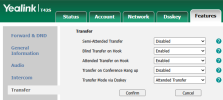
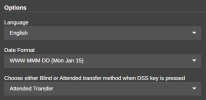
I've been through the Admin side of 3CX and Yealink WebUI but changing the option for transfer does not make a difference:
1792681603725.png

1792681543489.png

I'm out of ideas and this is becoming a real issue for my users when transferrring calls. Any ideas?
 
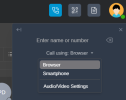
Hi @Rich Hopkins in the pwa --- if you click the dialer ---- are you selecting the Yealink T42s ?

1792681860769.png

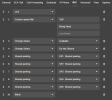
The user extension under the blf tab can you check that at least the blf are set as line key.

is this phone in the same pbx LAN or remotely connected via 3cx sbc?
 
Yealink is selected in the dialer.

BLF's have 9 selected
1792682494302.png

Same LAN for PBX and all phones.
 
Could you please check the following:
  • Firmware on Yealink T42S must be 66.86.0.180
  • Phone must be using default template and not a custom one.
  • If the phone and the pwa are in the same pbx LAN, make sure the split DNS is configured, more info here
  • Make sure you are logged in the web client or PWA using the FQDN via HTTPS.
 
Thanks for your reply, it is very much appreciated.
  • Firmware on Yealink T42S is 66.86.0.180
  • Using a default template
  • Using FQDN via HTTPS
  • Will check split brain DNS
It's odd, as this is only affecting new users where the T42s has been factory reset by holding the 'OK' button down.
Previous users that have been working here a while can do attended transfers ok.
 
You can try to remove the phone from the user extension, apply the changes and perform a factory reset on the phone. Once done, proceed and add it back in the user extension and provisioning it. Let me know the result.
 
  • Like
Reactions: Evolute IT
I tried this with three users, it gives me the same result. I cannot perform an attended transfer on any of these users now.
 
Just out of curiosity.

The phones are created as T42S inside 3CX?

I think I might have seen problems like this in the past when someone created a phone as T42 instead of T42S.

So CTI mode only works if the phone Type matches the real phone.
 
I might have an idea what your issue is. Please confirm the following first though exactly as I describe:
  1. Select the T42S from the drop down of your client
  2. Call another internal user directly using the client dial pad (your T42 will start calling them) and have them answer your call normally by lifting their handset.
  3. Does the attended transfer button become active in this very specific case?
 
  • Like
Reactions: Evolute IT
I might have an idea what your issue is. Please confirm the following first though exactly as I describe:
  1. Select the T42S from the drop down of your client
  2. Call another internal user directly using the client dial pad (your T42 will start calling them) and have them answer your call normally by lifting their handset.
  3. Does the attended transfer button become active in this very specific case?
  1. Tried that exactly as described. Attended transfer still greyed out.
 
Ok in this case compare the config file of a existing user that works vs one that does not and see if there is a difference (other than the login credentials, name, and blf list of course).

Particularly, you have to make sure the generated config file contains this line:
Code:
features.csta_control.enable = 1
 

Forum statistics

Threads
112,322
Messages
591,882
Members
165,467
Latest member
EMMEPICASA